

AI-Assisted Coding Enters a New Era: Why Claude for Coding is Different
Over the past decade, software development has undergone a profound transformation. Traditional coding environments, IDEs, linters, and manual testing processes are no longer sufficient to keep pace with increasingly complex projects and accelerated release cycles. Enter Claude Code: an AI-powered coding assistant capable of reasoning across modules, analyzing code for potential issues, and generating comprehensive test cases. Unlike simple autocomplete tools, Claude is designed to augment human reasoning, providing context-aware insights that support developers in building reliable and scalable software. Learning how to use Claude Code effectively is key to maximizing productivity and code quality.
At Ariel Software Solutions, we have integrated Claude into multiple enterprise projects and observed firsthand the efficiency gains, improved code quality, and robust testing outcomes that AI-assisted workflows can deliver. However, as our teams quickly discovered, the full value of Claude is only realized when paired with structured human oversight. Human judgment remains central; AI alone cannot replace expertise. Our philosophy of human-in-the-loop AI ensures that Claude is a reasoning partner rather than a crutch, reinforcing accountability, maintainability, and developer growth. Understanding Claude for coding is critical before applying it in large-scale projects.
Understanding Claude Code: More Than Just Autocomplete
Claude Code stands apart from other AI tools for several reasons. Most AI coding assistants focus on line-by-line suggestions, relying heavily on syntax patterns and statistical correlations from training data. Claude, however, employs context-aware reasoning, analyzing how modules interact, identifying potential conflicts, and considering execution flows. This capability allows developers to uncover subtle errors that might elude conventional testing or manual review.
In real-world projects, our development teams observed that Claude could:
- Detect potential issues at the line or module level before they manifest in runtime errors.
- Suggest targeted test scenarios to validate edge cases.
- Offer recommendations for maintainability and code robustness, emphasizing long-term project health.
For example, when a team completes a module, they prompt Claude to analyze the completed code for potential issues. Claude highlights lines where logic conflicts may arise, suggests test cases covering boundary conditions, and explains its reasoning. Developers then validate these recommendations, refining the code based on AI insights while retaining full responsibility for decisions. This approach saves hours of manual code review, reduces human error, and cultivates a deeper understanding of code behavior. Using ai coding tools like Claude allows teams to improve efficiency while learning how to use Claude Code effectively.
Step-by-Step Guide: How to Use Claude Code for Your First Project
Before developers can fully harness Claude’s reasoning capabilities, it’s essential to ensure the AI is properly configured in the coding environment. Simply connecting to an API is insufficient; without proper setup, Claude might generate generic suggestions, miss cross-module conflicts, or provide irrelevant test scenarios. Thoughtful configuration ensures the AI understands project context, has access to all dependencies, and can provide meaningful insights without overwhelming the team. Proper setup lays the foundation for reliable, actionable AI-assisted development, maximizing the synergy of human-AI collaboration.
1. Choosing the Right Integration Approach
Claude offers multiple integration options, and the choice depends on your team’s workflow, size, and priorities:
- IDE Plugins: Direct plugins in popular IDEs allow developers to invoke AI suggestions inline as they code. This approach is ideal for individual developers or small teams seeking immediate feedback without switching tools. Plugins often support context-aware suggestions, refactor proposals, and inline code explanations, which can dramatically reduce the time spent on mundane code reviews.
- Command-Line Interface (CLI): CLI-based integrations are lightweight and flexible, supporting batch code analysis, automated scripts, and integration with developer pipelines. This method is suited for teams that want control over when AI analysis runs, and allows embedding AI checks into custom scripts or pre-existing automation frameworks.
- API Access: Enterprises often prefer API integration, embedding Claude into CI/CD pipelines, automated testing suites, or internal developer platforms. API access provides the most flexibility; teams can programmatically submit code, retrieve reasoning insights, and integrate AI into complex workflows. However, it requires careful setup of authentication, project context, and scope definitions to ensure meaningful, actionable feedback.
Many organizations combine these approaches depending on context: for example, real-time plugin feedback during development and API-based batch analysis for nightly builds or pull request checks. Selecting the right approach ensures balance between immediacy, scalability, and precision.
2. Authentication and Access Control
Securing access to Claude ensures that AI analysis remains controlled and compliant:
- API Key or Token: Authentication ensures only authorized users can access AI services.
- Permission Levels: Developers should grant access only to relevant files and modules, limiting exposure of sensitive code while allowing the AI to analyze necessary components.
- Workspace Configuration: Configuring a workspace lets Claude reference project-wide conventions, libraries, and coding standards. This improves context-aware suggestions, ensuring the AI’s recommendations are aligned with team expectations.
By carefully configuring access, teams maintain security while providing sufficient context for precise AI analysis.
3. Providing Project Context for Accurate Analysis
Claude’s outputs are highly dependent on context. Without proper metadata and environmental awareness, AI suggestions may be generic or miss critical issues. Essential elements of context include:
- Directory Structure: Ensures Claude can analyze cross-file dependencies and detect conflicts in interconnected modules.
- Dependencies and Libraries: Explicitly provide package versions, frameworks, and libraries so AI can reason about compatibility, edge cases, and integration risks.
- Coding Standards and Architectural Guidelines: Sharing style guides, linting rules, and architectural constraints aligns AI suggestions with organizational best practices, maintaining consistency across the codebase.
Providing rich context transforms Claude from a generic code generator into a reasoning partner capable of actionable insights.
4. Running the First Analysis
Once setup is complete, it’s time to validate integration and understand how Claude reasons about code:
- Start Small: Begin with a single module, function, or component. Observing AI suggestions on smaller scopes reduces complexity and allows the team to fine-tune prompts effectively.
- Prompt Effectively: Use prompts such as, “Analyze this function for potential errors, conflicts, and edge cases.” Carefully observe what the AI flags and what test scenarios it proposes.
- Evaluate Outputs: Assess the quality, clarity, and relevance of suggestions. Are edge cases correctly identified? Are the recommendations developer-friendly?
- Refine Configuration: Adjust workspace access, directory inclusion, or prompt phrasing based on initial results. Iterative tuning ensures precision and usefulness in subsequent analyses.
This initial run validates both the technical setup and the developer’s familiarity with Claude’s reasoning, laying the foundation for structured, AI-assisted workflows.
5. Embedding Claude into Daily Workflows
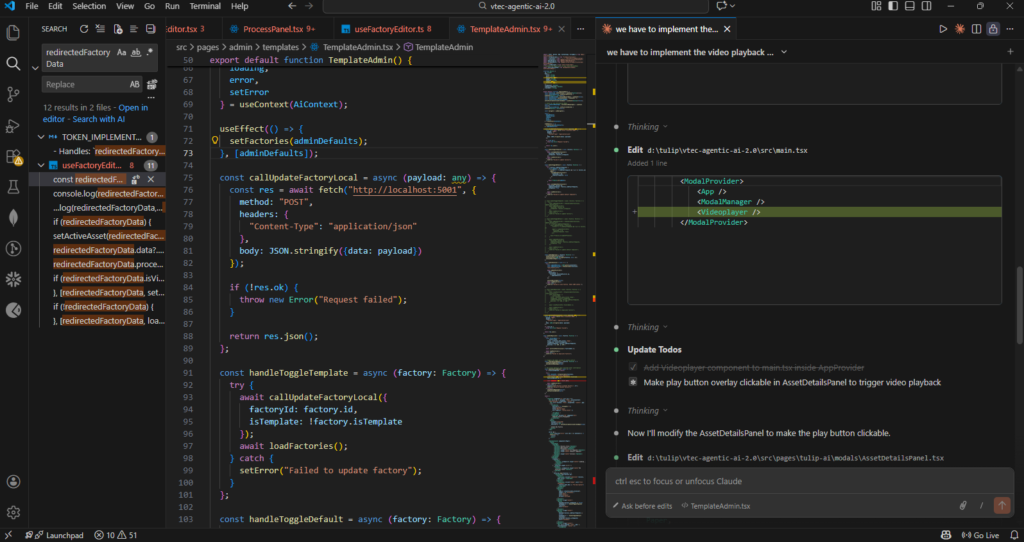
With successful integration, Claude can be incorporated into daily development practices, enhancing efficiency without replacing human judgment:
- Code Reviews: Submit completed tasks for AI-assisted review before human review. Claude can flag potential issues early, catching subtle mistakes that might otherwise slip through.
- Testing Support: Generate test scenarios for edge cases, functional validation, and regression testing. Developers can focus on complex logic and architecture while AI handles repetitive test case generation.
- CI/CD Pipelines: Automate analysis during commits, pull requests, or build processes. Early detection of issues reduces debugging time and improves overall code quality.
Even when embedded deeply, human oversight remains critical. Developers validate AI suggestions, maintain accountability, and approve changes, ensuring reliability while leveraging AI speed and insight.
By carefully configuring Claude for coding, from installation to first analysis, teams set the stage for reliable, actionable AI assistance, transforming software development from reactive error correction into proactive quality assurance. For complete guidance, see the official Claude API Documentation.
Progression Path: Learning How to Use Claude from Beginner to Advanced
For developers just starting with Claude, setup and integration are critical first steps. Claude can be integrated into IDEs, code editors, or CI/CD pipelines. Proper configuration ensures access to project dependencies, module hierarchies, and coding standards. At this stage, beginner prompts should be exploratory, allowing developers to observe how Claude interprets instructions.
Example beginner prompts:
- “Review this function for potential issues.”
- “Suggest improvements for readability and maintainability.”
- “Provide insights into possible edge cases for this module.”
By analyzing Claude’s responses, beginners learn how AI interprets code logic and reasoning patterns. Instead of blindly following suggestions, developers can refine prompts and gradually understand how to use Claude Code to generate actionable feedback. This foundation establishes reliable workflows for AI-assisted coding and demonstrates the value of Claude for coding for new developers.
Step-by-Step Guide: From Beginner to Advanced
1. Initial Setup and Integration
Integrating Claude into development environments requires careful configuration. This includes granting access to all relevant files, dependencies, and project context. Prompts should provide context-rich instructions, including architectural guidelines, coding standards, and module relationships. Clear context ensures that Claude’s output is relevant and actionable. Using ai coding tools correctly depends heavily on setup and prompt quality.
2. Beginner-Level Code Assistance
Once integrated, Claude assists in generating or refining functions. Developers can prompt the AI to identify potential issues, suggest alternative implementations, and provide explanations for each recommendation. For example, Claude might flag a potential null-pointer issue in a function and explain why it could occur. Beginners benefit from reviewing these explanations, which reinforce understanding of coding principles. Learning how to use Claude Code from the start enables beginners to gradually transition to intermediate and advanced workflows.
3. Intermediate Usage: Test Cases and Debugging
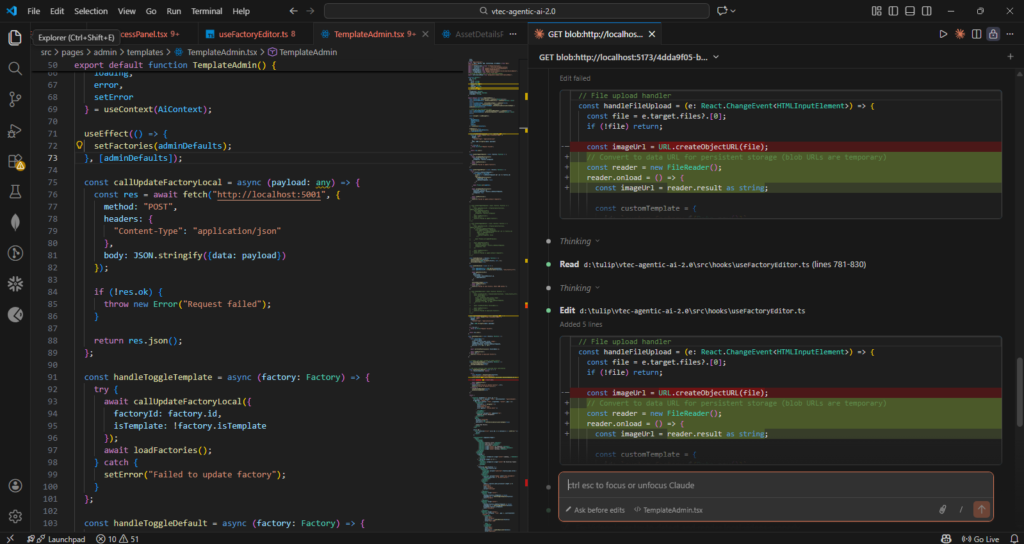
Claude excels at creating test scenarios, including edge cases often overlooked in manual testing. Developers can prompt the AI to generate test cases for all input possibilities, ensuring comprehensive coverage. Claude also pinpoints specific lines where issues may arise, streamlining debugging efforts. Human oversight is critical at this stage, as developers validate AI suggestions and maintain final authority over code quality. Integrating Claude for coding at this stage helps developers gain deeper insights into test coverage and error prevention.
Advanced Workflows: Multi-File Reasoning and Pull Requests
In enterprise-scale projects, Claude can analyze interactions across multiple files or modules. It identifies inconsistencies, suggests refactors, and assesses architectural impacts. Integrated into pull request workflows, Claude provides early feedback on complex changes, reducing repetitive review work. Clear, context-rich prompts are essential to ensure reliable and actionable recommendations. Using AI coding tools at this level ensures teams maintain high code quality while leveraging AI reasoning.
For a deeper enterprise perspective, explore our detailed breakdown of how Claude has evolved in professional engineering environments in “Claude in Code Review: From Experimental Assistance to an Enterprise Engineering System.”
Continuous Integration and Monitoring
Embedding Claude in CI/CD pipelines allows automated analysis before merging code. AI-generated test cases and error detection provide early signals of potential failures. Teams monitor AI performance, adjust prompts, and ensure consistent application of coding standards. Human oversight ensures that AI outputs are interpreted correctly, maintaining accountability and trust in the workflow. Understanding how to use Claude Code in CI/CD pipelines maximizes efficiency and minimizes errors.
Real-World Impact: Why Ariel Software Solutions Prefers Claude for Coding
Developers using Claude in production consistently report time savings, more robust testing, and easier debugging. By automating repetitive review tasks, Claude allows developers to focus on architecture, system design, and mentorship. Observing AI reasoning encourages developers to reflect on their own logic and design decisions, fostering better engineering practices. Studies and surveys show that developers highly value Claude for coding in accelerating workflows while maintaining quality.
Research supports these insights. A McKinsey study on AI in technology workflows highlights that structured AI guidance can accelerate coding cycles while improving developer productivity, but it emphasizes the necessity of human oversight to avoid introducing errors. The GitHub Developer Survey underscores that while developers value AI for speed and idea generation, they rely on manual validation for security and reliability. Additionally, studies on [AI Code Quality Risks] reveal that unchecked AI suggestions can introduce subtle vulnerabilities, reinforcing the importance of a human-in-the-loop approach. Proper use of AI coding tools mitigates these risks.
The Human-in-the-Loop Philosophy: Mastering How to Use Claude Code Safely
At Ariel, our philosophy is that AI should amplify, not replace, human reasoning. Claude acts as a reasoning layer, generating insights, test cases, and potential issue flags, while developers retain full authority over code implementation. This approach preserves trust, accountability, and decision-making clarity.
Human-in-the-loop workflows at Ariel include:
- Interpretation of AI Outputs: Developers validate and contextualize suggestions to ensure relevance.
- Decision Authority: Humans approve changes, apply recommendations, and maintain responsibility for architectural decisions.
- Continuous Learning: Developers gain insights from AI reasoning, refining prompts, and improving code quality iteratively.
This methodology addresses a common misconception: that AI alone can replace developers. In reality, over-reliance on AI introduces risks, while structured oversight ensures efficiency without compromising code quality, security, or maintainability. Emphasizing how to use Claude Code within these workflows ensures maximum value.
Advanced Considerations and the Future of AI-Assisted Development
Scaling AI adoption in development workflows introduces additional challenges. Multi-module reasoning, architectural alignment, and governance frameworks are critical for enterprise adoption. Claude’s outputs must be structured and interpretable, as unfiltered suggestions can overwhelm developers. Proper context engineering, providing only relevant files, constraints, and assumptions, ensures accurate and actionable reasoning. Teams using Claude for coding benefit from these safeguards.
Observability, accountability, and traceability are essential. Teams must monitor AI usage, track the rationale behind recommendations, and maintain records for compliance and audit purposes. These practices mitigate risk and enable long-term, enterprise-grade integration of AI coding tools into software engineering workflows.
Looking Ahead: The Future of Claude in Coding
The next evolution of AI-assisted coding involves hybrid reasoning, multi-module awareness, and adaptive learning. Hybrid reasoning allows AI to adjust analysis intensity based on problem complexity, optimizing computational resources without compromising output quality. Multi-module awareness enables Claude to reason across repositories and large-scale systems, highlighting dependencies and architectural risks. Adaptive learning ensures that AI continually refines its reasoning from developer feedback, improving suggestions over time.
When integrated responsibly, Claude enables organizations to accelerate development, improve software quality, and maintain robust governance, while humans retain ultimate authority. This human-AI collaboration model ensures trust, security, and efficiency, positioning Claude for coding as a permanent augmentation layer in modern software engineering workflows.
Final Thoughts: How to Use Claude to Lead the Future of Engineering
Claude Code represents a paradigm shift in AI-assisted software development, moving beyond autocomplete to reasoning-driven analysis, testing, and debugging. At Ariel Software Solutions, we leverage Claude to accelerate development, improve robustness, and enhance developer productivity. Crucially, our human-in-the-loop approach ensures that AI outputs are interpreted, validated, and applied responsibly, safeguarding trust, accountability, and software quality.
By combining Claude’s advanced reasoning with human expertise, developers can focus on high-value tasks, including architectural decisions, long-term maintainability, and strategic system design. This collaborative approach ensures that AI acts as an empowering assistant rather than a replacement, paving the way for safer, more efficient, and higher-quality software development. Understanding how to use Claude Code ensures developers maximize its potential, making AI coding tools like Claude an integral part of modern software engineering.
If you’re looking to implement Claude Code or AI-assisted development workflows in a secure, scalable, and enterprise-ready way, Ariel Software Solutions can help you design, integrate, and optimize intelligent coding systems tailored to your business needs.
Book a free consultation to get started.
Frequently Asked Questions (FAQs)
1. What is Claude Code used for in software development?
Claude Code is an AI-powered coding assistant used for code reviews, bug detection, test case generation, and multi-file reasoning. It helps developers identify logic issues, improve maintainability, and speed up development workflows.
2. How do developers integrate Claude Code into their workflow?
Developers integrate Claude Code using IDE plugins, command-line tools (CLI), or API connections. It can be embedded into daily coding, pull request reviews, and CI/CD pipelines for automated analysis and testing.
3. Can Claude Code analyze multiple files and large codebases?
Yes. Claude Code can reason across multiple modules and files, identify dependencies, detect conflicts, and suggest architectural improvements, making it suitable for enterprise-scale projects.
4. Does Claude Code replace manual code reviews?
No. Claude Code supports developers by automating repetitive analysis and testing, but human review remains essential for security, business logic, and final decision-making.
5. Is Claude Code safe to use in production environments?
Claude Code is safe when used with proper access control, context configuration, and human validation. Following a human-in-the-loop approach ensures code quality, security, and reliability.