Most companies don’t fail at cloud adoption because of technology. They fail because they rebuild legacy systems on modern infrastructure and expect different results. Many organizations are moving cloud-first; the question is no longer whether to adopt the cloud. It’s how to do it without creating long-term complexity.
Organizations that build for the cloud from the start report a 30% reduction in operational downtime compared to lift-and-shift migrations. The difference is structural. Cloud application development means designing every layer, from compute to security, around the platform it runs on. Not porting old code to new servers.
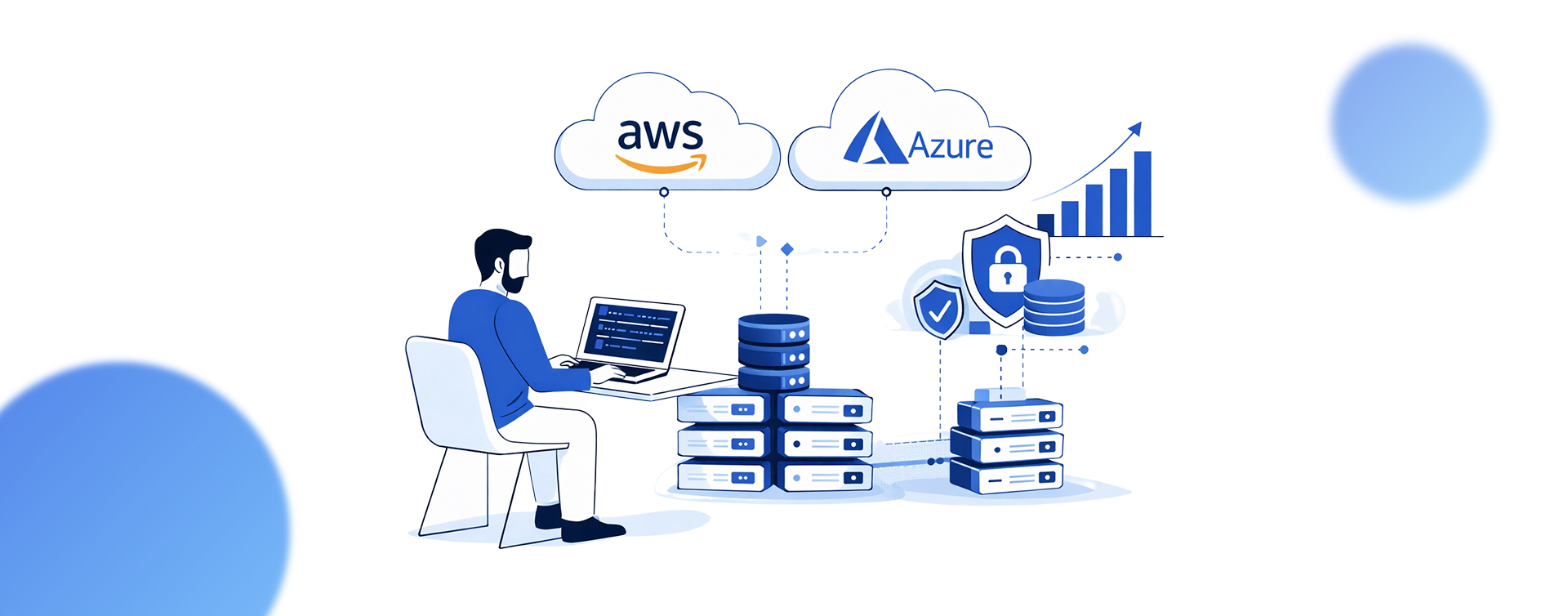
This guide will break down how to use AWS serverless architecture and Azure cloud security to build distributed applications that perform, scale, and stay protected in production.
What Are the Core Principles of Cloud Application Development
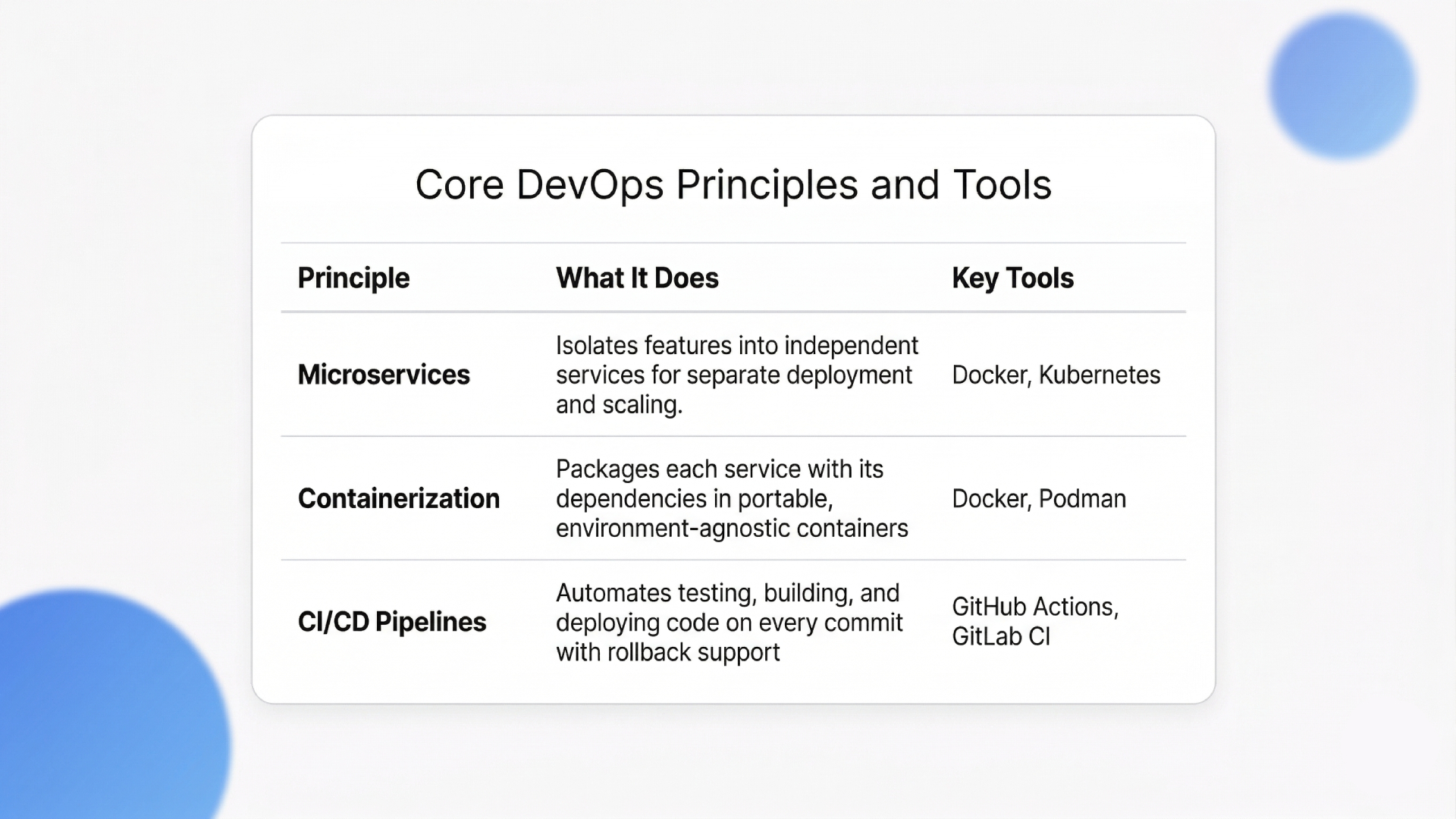
Cloud application development is built on three structural pillars: microservices architecture, containerization with Docker and Kubernetes, and automated CI/CD pipelines. These allow teams to deploy, scale, and roll back individual features without touching the rest of the system.
Monolithic applications force every update through a single deployment. One broken function takes down the whole product. Microservice architectures increase deployment frequency by 50% compared to monolithic designs. That gain comes directly from isolating services, so teams push code independently.
Core Principles at a Glance:
1. Embracing Microservices and Containers
Each microservice runs inside its own container, packaged with dependencies and isolated from other services. Docker handles the packaging. Kubernetes handles orchestration across clusters, managing scaling rules, health checks, and failover automatically.
Here’s the trade-off most cloud application development teams learn late: Kubernetes adds operational overhead. For teams under 10 engineers shipping a single product, a managed PaaS like AWS App Runner or Azure Container Apps is often the better starting point.
“Cloud security controls only hold up when the underlying infrastructure evolves with them, a shift we break down in Innovations in Cloud Computing: Paving the Path to the Future.”
Kubernetes earns its complexity when you’re running 15+ services across multiple environments. For anything smaller, it creates more problems than it solves.
2. Implementing Automated Deployment Pipelines
DevOps pipelines with tools like GitHub Actions or GitLab CI/CD automate testing, building, and deploying code on every commit. This eliminates one of the most common bottlenecks: manual deployment errors. The strongest cloud application development teams integrate automated rollback triggers that revert failed deployments within seconds, not hours.
With the architecture principles set, the next question is how specific cloud platforms handle automatic scaling.
How Does AWS Serverless Architecture Improve Scalability
AWS serverless architecture improves scalability by auto-provisioning compute resources based on real-time traffic. Developers write functions, deploy them, and AWS handles every layer underneath, from memory allocation to instance management. No servers to patch, no capacity to guess.
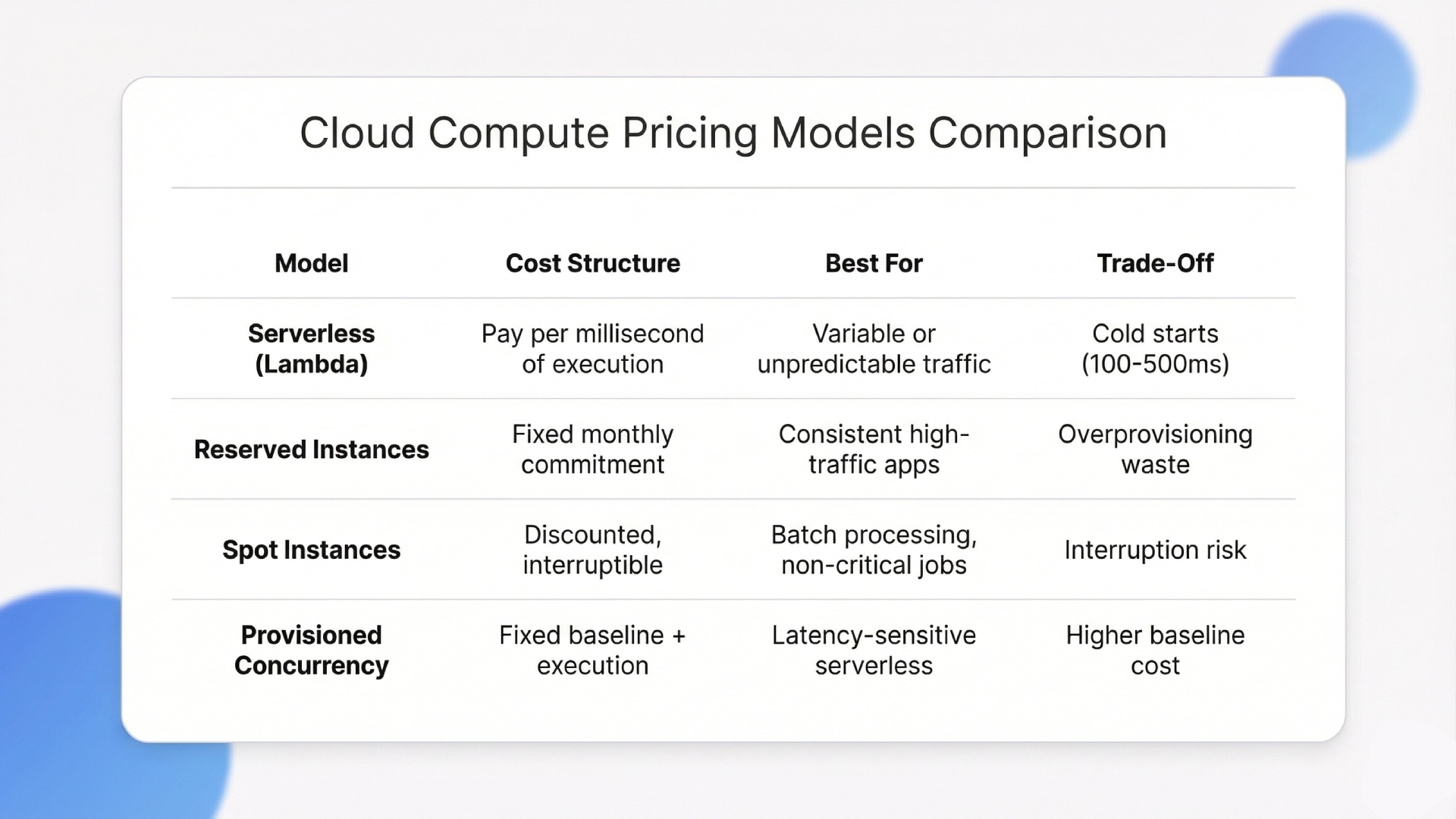
The financial upside is significant. Organizations migrating to serverless platforms reduce compute costs by an average of 25% annually. The pay-per-execution model means idle time costs nothing. That directly benefits applications with unpredictable traffic spikes.
1. Understanding AWS Lambda Triggers
AWS Lambda executes code in response to events: API calls through Amazon API Gateway, file uploads to S3, database changes in DynamoDB, or scheduled CloudWatch rules. Each trigger invokes an isolated function instance.
A typical event-driven architecture looks like this: API Gateway receives the request, Lambda processes the logic, DynamoDB stores the data, and SQS queues handle async tasks. No always-on servers. No wasted compute. For cloud application development teams handling event-driven workflows, this setup replaces the need for maintained server fleets.
2. Optimizing Costs with Event-Driven Computing
Event-driven computing aligns infrastructure spend with actual usage. Instead of paying for reserved capacity that sits idle most of the time, AWS’s serverless architecture charges per millisecond of execution. Startups and mid-size companies running variable workloads see the biggest ROI here.
“Maintaining consistent security policies across providers is one of the hardest operational challenges in multi-cloud, a problem we address in our Multi-Cloud Strategy Guide 2025.“
The honest downside for any cloud application development team using Lambda: cold starts. Lambda functions that haven’t been invoked recently take 100-500ms longer on the first request. For latency-sensitive APIs, this matters. Provisioned concurrency fixes it, but adds cost. The right call depends on whether your users notice a half-second delay.
Cloud Cost Models at a Glance:
Scalability solves one half of the production equation. The other half is making sure that the scaled infrastructure stays protected.
Why Is Azure Cloud Security Critical for Enterprise Apps
Azure cloud security provides layered protection through integrated threat intelligence, identity management via Azure Active Directory, and real-time monitoring with Microsoft Defender for Cloud. These tools enforce access controls that prevent unauthorized data exposure across enterprise applications.
68% of cloud vulnerabilities come from misconfigured access controls. That makes identity and permission management the single most impactful security investment for any team building cloud-native systems.
The breach doesn’t come from a sophisticated attack. It comes from an S3 bucket left public or an IAM role with wildcard permissions.
1. Managing Identity and Access Controls
Azure Active Directory enforces conditional access policies based on user identity, device compliance, location, and risk signals. Multi-factor authentication should be mandatory, not optional.
“For teams planning a migration where security needs to be embedded from day one, our guide to Cloud Migration Services for Businesses covers the full process.”
For cloud application development projects with regulatory requirements (HIPAA, SOC 2, GDPR), Azure’s identity layer provides audit trails and role-based access that map directly to compliance frameworks.
A production lesson most cloud application development teams learn the hard way: IAM misconfigurations cause more outages than code bugs. Review permissions quarterly. Remove unused service accounts. The principle of least privilege is not a suggestion.
2. Protecting Data at Rest and in Transit
Azure encrypts data at rest using AES-256 and data in transit using TLS 1.2+. Azure Key Vault centralizes the management of encryption keys, certificates, and API secrets. Most breaches involve credential exposure, not algorithm weakness.
Storing secrets in Key Vault instead of hardcoding them in application config files eliminates one of the most common attack vectors in cloud application development.
Security and scalability define the foundation of any production-ready system. The challenge gets harder when you add GenAI workloads on top.
Building Scalable GenAI Support on AWS and Azure with Ariel
Scaling GenAI applications on AWS and Azure creates problems standard cloud application development doesn’t face: unpredictable inference costs, GPU resource contention, and complex data pipelines connecting vector databases, embedding models, and retrieval layers.
A RAG system requires synchronized orchestration across embedding generation, vector search, LLM inference, and caching. On AWS, that means coordinating Lambda, SageMaker, and OpenSearch. On Azure, it involves Azure OpenAI Service and Cognitive Search. Get the architecture wrong here, and you’re facing months of rework.
This is where Ariel Software Solutions’ approach differs. Across 1,100+ completed projects, two things consistently prevent GenAI deployments from going off track:
- AI-First Architecture Assessment: Before writing any code, Ariel maps exactly where AI/ML reduces overhead or accelerates workflows for each client’s stack. This catches the over-engineering that inflates GenAI budgets before a single resource is provisioned.
- 6-Stage GenAI Delivery Process: From infrastructure design through post-launch AI model tuning, each phase has client checkpoints built in. This is what keeps RAG pipelines and inference layers coordinated across AWS and Azure without the rework cycle most teams hit.
If the infrastructure complexity around your GenAI stack is creating delays, let’s sit and map out the right architecture for your use case.
Conclusion
Cloud application development with AWS and Azure is the operating model for building software that scales under real traffic, stays secure under real threats, and costs less to maintain over time. Serverless compute, container orchestration, and identity-first security give engineering teams the foundation to ship faster without accumulating technical debt.
The gap between companies that get cloud application development right and those that don’t will only widen as AI workloads, edge computing, and FinOps practices become standard. Teams that design for the cloud from the start will compound their speed advantage.
If your team is ready to move from legacy infrastructure to a cloud-native stack, book a quick walkthrough with Ariel Software Solutions to see how it fits your product roadmap.
Frequently Asked Questions
1. What is the main advantage of AWS serverless computing?
AWS serverless computing eliminates server provisioning and manual capacity management. Developers write and deploy functions while AWS scales automatically. The system bills only for active compute time, which makes it cost-effective for applications with variable or unpredictable traffic.
2. How do you ensure data security in Azure?
Azure uses Azure Active Directory for identity management with conditional access policies. Data is encrypted at rest with AES-256 and in transit with TLS 1.2+. Azure Key Vault stores encryption keys and API secrets, keeping credentials out of application code entirely.
3. What tools are best for cloud application development?
Tool selection depends on your architecture. Docker handles containerization. Kubernetes manages orchestration. GitHub Actions or GitLab CI/CD automate deployment pipelines. AWS Lambda and Azure Functions handle serverless compute. The right stack depends on your traffic patterns and compliance needs.
4. Can I deploy a FastAPI application on AWS?
Yes. Containerize the FastAPI app with Docker and deploy through AWS Elastic Container Service (ECS) or AWS App Runner. Both handle auto-scaling and load balancing. This setup provides strong performance for high-throughput API endpoints with minimal configuration.
5. How much does it cost to build a cloud app?
Costs vary based on traffic volume, architecture, and cloud provider. Serverless models charge per execution, which benefits startups with lower or variable traffic. Enterprise applications with consistently high traffic often save more with reserved instances. A detailed cost estimate requires mapping expected usage to specific services.
6. What is the difference between PaaS and serverless?
PaaS (Platform as a Service) provides a managed runtime environment for deploying full applications. Serverless breaks the application into individual functions triggered by events. PaaS works better for long-running processes. Serverless works better for event-driven, short-execution workloads with variable demand.