Most CMS decisions don’t fail at the platform choice. They fail at the assumption underneath it.
A team picks headless CMS because their stack feels outdated, then spends nine months rebuilding a frontend layer their editors quietly hate. Another team stays on traditional CMS because migration looks expensive, then absorbs that cost anyway through plugin sprawl, security patches, and engineering workarounds that compound year after year. Both teams “made the right call.” Both ended up paying.
After 16 years of delivering CMS platforms across Umbraco, WordPress, Sitefinity, DNN, and headless builds on .NET Core and Node, the pattern at Ariel is consistent. The headless CMS vs traditional CMS debate is rarely about technology. It’s about whether the team has honestly mapped the editorial, governance, and integration cost of each model before committing. This piece is built around that operational reality.
Key Takeaways
- Traditional CMS still wins for single-channel sites, lean teams, and editor-led publishing
- Headless CMS earns its complexity only when content genuinely lives across multiple surfaces
- The largest hidden cost of headless is the editorial workflow you have to redesign around it
- Localization, preview, and metadata control move from configuration into engineering tickets
- Migration risk is almost always 2 to 3 times the initial estimate
- Umbraco lets you start coupled and decouple later, which is often the most defensible path
- The right CMS is the one your editors, developers, and roadmap can sustain together
The Decision Most Teams Get Wrong
The standard framing of this debate is technical. APIs, decoupling, frameworks, scalability. That framing skips the questions that actually decide whether the platform survives in production: who publishes content and how often, what a “small” change costs in engineering hours, and how many channels content has to reach over the next 24 months.
Headless adoption sits at 73% across surveyed businesses, yet 61% of teams still run more than one CMS to handle content across regions, brands, or departments. That gap is the entire problem. Companies are buying into headless without retiring the systems it was supposed to replace, because the editorial workflow and governance never made the transition. That’s a design failure at the decision stage, and it’s the most common pattern we get called in to fix.
Traditional CMS: Where It Still Earns Its Place
A traditional CMS couples the content backend and rendering layer in one system. WordPress, Joomla, DNN, Sitefinity, and Umbraco in default mode all sit here. Editors work in a familiar interface, see live previews, scheduling works out of the box, and content goes live without involving developers.
That model is still right for content-heavy sites with one primary channel, editorial teams that publish daily and depend on WYSIWYG, and organizations where the content team outnumbers engineering. WordPress still holds over 43.6 % of global CMS market share, and a meaningful share of those installs run perfectly well.
What teams underestimate is the slow accumulation of cost. A clean four-year-old site is now running 32 plugins, three custom themes, and a queue of patch updates that nobody owns. Editors work around quirks instead of through them. The platform isn’t broken. It’s just no longer being maintained as a system. That’s the point teams start asking whether they should switch to headless CMS, when the real answer is often: maintain what you have, properly.
Headless CMS: What You’re Actually Buying
A headless CMS removes the rendering layer entirely. Content lives in a structured repository exposed through REST or GraphQL APIs. Frontend teams build in whatever stack fits, React, Next.js, Vue, Nuxt, or native mobile.
The architecture is genuinely powerful when content has to reach multiple surfaces from one source of truth. Over 74% of digital teams now publish to six or more endpoints, spanning web, mobile, AR/VR, IoT, and connected screens. For those teams, headless CMS isn’t a preference, it’s the only architecture that scales without parallel content systems running in the background.
But what gets sold as “developer freedom” lands differently in delivery. Editors lose live preview unless you build it. Open Graph tags, structured data, and search snippets become engineering tickets. Localization workflows that were one toggle in Umbraco now require frontend deployments and per-locale routing logic. The editorial side of the platform doesn’t disappear when you go headless. It moves from CMS configuration into custom code, and that code becomes a long-term maintenance line. Headless CMS benefits are real, but they’re earned by absorbing engineering responsibility the traditional CMS previously handled for you.
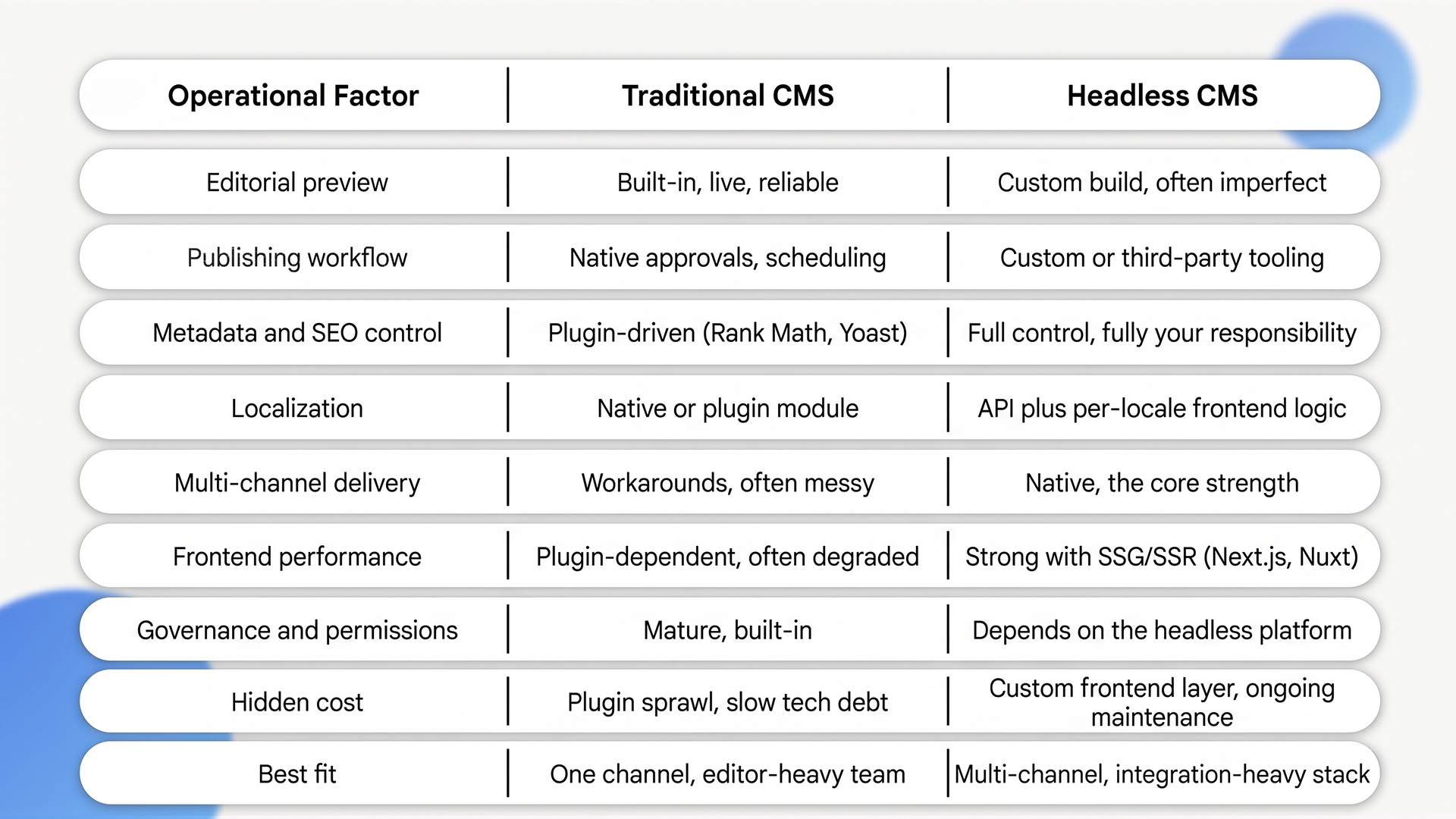
Headless CMS vs Traditional CMS: Operational Comparison
Most comparison tables focus on architecture. The ones that matter focus on what your team actually has to operate.
The Trade-offs Most Comparison Posts Skip
Here’s where decisions actually get made or broken. We’ve watched these specific issues derail otherwise well-architected platforms.
Editorial workflow rebuild
In a traditional CMS, an editor writes a draft, hits preview, sees the live page, schedules it, and moves on. In headless, that flow has to be re-engineered. Preview environments need a parallel deployment of the frontend reading draft content. Scheduling becomes a coordination problem between the CMS, build pipeline, and CDN cache. Multi-step approvals need either a workflow tool bolted on or custom code. We’ve seen content velocity drop by half in the first six months of a headless migration when this work isn’t planned upfront.
Content modeling and governance
Headless rewards strong content modeling and punishes weak modeling. A content type designed for a website doesn’t reuse cleanly across a mobile app and an in-store screen. Teams that skip the modeling phase end up with parallel structures inside one repository, which is the same fragmentation they were trying to escape. Governance is the same issue. Role-based permissions, content ownership across regions, and versioning are mature out of the box in Sitefinity and Umbraco. In headless, they vary wildly by platform and frequently need supplementing with custom roles in the frontend layer.
Localization complexity
In a coupled Umbraco or WordPress build, a multilingual site is a few module choices and an editor workflow. In headless, every locale is a content branch, a routing decision, an SEO consideration (hreflang tags, locale-specific structured data), and a frontend rendering path. Add right-to-left languages and the engineering surface widens further. Headless is consistently the more expensive path to localization, which is why hybrid often wins for clients with five or fewer locales.
Integration overhead with CRMs, DAMs, commerce, and search
API-first architecture removes a class of integration friction. Pulling product data from a commerce engine, syncing assets from a DAM, indexing content into Algolia or Elastic, and pushing form data into a CRM all become standard API work rather than plugin gymnastics. The trade-off: each integration is now your code to maintain. Plugin ecosystems on traditional CMS handle a lot of edge cases for free. Headless makes you pay for them once, with the upside of much cleaner long-term integration architecture.
Migration risk and hidden rebuild cost
A site with five years of content, deep template logic, custom plugin behavior, and accumulated SEO equity is not “lifted and shifted.” Content models have to be rebuilt. URL structures have to be preserved or redirected. Internal linking, schema markup, and image references all need re-mapping. In our delivery experience, migration cost runs 2 to 3 times the initial estimate, and the longest tail item is editorial retraining, which rarely makes it into the original scope.
Frontend dependency risk
In a traditional CMS, the rendering layer is the platform’s responsibility. In headless, it’s yours, indefinitely. That means framework upgrades, browser compatibility, accessibility audits, performance budgets, and Core Web Vitals are all engineering work you have to staff for. Teams that go headless without sustained frontend capacity see their builds decay faster than well-maintained traditional CMS sites.
When Headless Genuinely Pays Off
In our delivery experience, headless CMS earns its overhead in three situations.
You’re publishing the same content to three or more surfaces. A retail brand with a website, a native mobile app, in-store digital signage, and a partner portal cannot maintain four parallel content systems. Headless eliminates the duplication and the inevitable drift between channels.
Your integration surface is wide and deepening. When the CMS has to talk to a CRM, a DAM, a commerce engine, a search platform, and a personalization layer, API-first architecture removes friction that traditional CMS adds. 58% of enterprises are already replacing monolithic CMS deployments with microservices-based architectures, and integration density is the largest driver, more than performance or developer experience.
Frontend performance is a revenue lever. For e-commerce, media, and SaaS marketing sites where conversion correlates directly with Core Web Vitals, headless paired with Next.js or Nuxt removes the plugin drag that holds back traditional builds. In the Netherlands, 86% of headless CMS users reported increased ROI. The ROI shows up because the frontend is finally optimizable end-to-end, not because the CMS itself moved the needle.
When Headless Is the Wrong Call
We’ve walked clients away from headless migrations more often than we’ve walked them into one.
Your editorial team publishes daily and depends on preview. Building and maintaining a preview environment for a headless setup is not a one-time engineering task. It’s a system. If your editors lose confidence in what they see versus what ships, content velocity drops within months, and senior editors quietly route around the platform.
You don’t have, or can’t sustain, in-house frontend engineering. Headless moves rendering, SEO, performance, and accessibility into your codebase. Without sustained engineering coverage, the platform decays faster than a coupled CMS would, because there’s nobody patching the parts that the platform used to handle automatically.
Your migration risk is higher than your scalability ceiling. If your traditional CMS is still meeting demand, the right move may be optimization rather than replacement. Plugin audit, performance tuning, and a content model cleanup will often deliver 70% of the ROI a migration would, at a fraction of the cost and risk.
For teams in this position, hybrid is often the smarter route. Umbraco supports this directly. You can run Umbraco in coupled mode today and adopt headless delivery on a per-channel basis later, without a forklift migration.
How Ariel Approaches the Decision
We don’t lead with platform recommendations. We start with editorial workflow, integration map, content model, and delivery roadmap. The platform falls out of that analysis.
For multi-region clients with high integration density, that has typically meant a headless setup, often Umbraco Heartcore or a custom .NET Core API layer feeding a Next.js frontend, with editorial workflow and preview built as first-class features rather than afterthoughts. For mid-market clients with focused content operations and lean engineering, it has been a hardened Umbraco or WordPress build, properly governed, with a content model designed to scale without rebuilding later.
Over-engineering creates fragility. Under-engineering creates future costs. The right call is the one your team can sustain three years from now, not the one that looks impressive in a proposal today.
Considering a CMS rebuild, migration, or platform decision?
Talk to a team that has delivered both architectures across enterprise and mid-market clients for 16 years. We’ll give you a straight read on what actually fits, not a pitch.
Frequently Asked Questions
1. Is headless CMS better than WordPress?
Not for most businesses currently on WordPress. WordPress wins for single-channel marketing sites with editor-led workflows. Headless wins when content has to reach multiple channels and you have the engineering capacity to maintain a custom frontend layer indefinitely.
2. What are the real headless CMS benefits beyond marketing?
One content source for many channels, cleaner third-party integrations, better Core Web Vitals when paired with modern frameworks, and a content model that doesn’t have to be retrofitted every time a new surface is added.
3. What’s the most underestimated cost of going headless?
Editorial workflow rebuild. Preview, scheduling, localization, and metadata control all become custom engineering rather than CMS configuration. That’s a long-term maintenance line, and the most common reason headless projects underperform their business case.
4. Can Ariel migrate us from a traditional CMS to headless?
Yes. We handle phased migrations from WordPress, Sitefinity, DNN, and legacy Umbraco builds, with content modeling, SEO equity preservation, integration mapping, and editorial training in scope. Get in touch to scope yours.
5. Which industries see the strongest ROI from headless?
E-commerce, media, financial services, healthcare, and SaaS, but only where operational complexity justifies it. The deciding factor isn’t industry. Channel count, integration density, and content velocity are.
The Decision That Actually Matters
The strongest CMS decision isn’t about headless or traditional. It’s about whether your team has honestly mapped the editorial, technical, and integration cost of the model they’re choosing, and whether that cost matches what they can sustain.
Headless CMS rewards teams that already operate at multi-channel scale. Traditional CMS rewards teams that publish well in one place. Hybrid rewards teams that want optionality without paying for it upfront. Pick the one your editors, developers, and roadmap can carry together. The architecture follows from there.
Ready to make a CMS decision built on delivery reality, not vendor pitches?
Book a free consultation with Ariel’s CMS team. We’ll review your current setup, your roadmap, and your operational constraints, then give you a clear recommendation, not a sales pitch.