

Many cloud cost-optimization efforts start with rightsizing resources, removing waste, and optimizing pricing. But when those measures deliver limited savings, the next question is: why does the architecture consume those resources in the first place?
Microservices that generate excessive network calls, over-provisioned scaling, synchronous workloads, unnecessary data replication, and inefficient storage can all drive cloud spend.
The bill shows what you’re paying for. Architecture optimization helps explain why you’re paying for it. Some of the most meaningful cloud savings may come from changing what the architecture needs to consume, rather than only changing how those resources are priced.
Already Covered the Basics? Go Deeper on Cost.
If you haven’t worked through rightsizing, Savings Plans, and waste elimination yet, start there; it’s the fastest win before any architecture change.
Before You Optimize the Bill, Map Cost Back to the Architecture
Before jumping into fixes, it’s worth establishing a different starting point for the conversation. This is the diagnostic foundation of a useful cloud architecture review.
1. Start with the workload, not the AWS service
Most cost investigations start with a question like “Why is EC2 costing $40,000 a month?” That question rarely leads anywhere useful, because EC2 spend isn’t really the thing you’re trying to understand; it’s a symptom. Most AWS cloud cost reduction efforts stop right here, at the resource level, without ever asking why the resource needed that capacity.
The more useful question is: Which workload is consuming this compute, why does it need this capacity, and how does that workload actually behave? That reframing pulls the investigation up a level, from infrastructure line items to the chain that produced them:
Business capability → workload → application component → infrastructure → cost
Most workload-related spend can be traced through that chain, although shared infrastructure and platform services may require allocation across multiple workloads. Skipping straight to the infrastructure layer means treating the symptom instead of the cause.
2. Measure architecture in units that matter
Total spend is a lagging, low-resolution number. It tells you the bill went up, not why, and not whether that increase was proportionate to the value it created.
Unit economics fix that. Depending on the system, useful units might include:
- Cost per transaction
- Cost per API request
- Cost per active user
- Cost per customer
- Cost per job processed
- Cost per GB processed
The goal is to establish a principle: architecture decisions need measurable economic consequences. That’s the kind of measurement FinOps consulting engagements typically formalize, but the principle applies well before you bring in outside help. If you can’t say what a transaction costs, you can’t tell whether an architecture change actually helped.
3. Identify the expensive architectural boundaries
Some of the less obvious architectural costs occur at boundaries, the points where data or requests cross between parts of the system. Look specifically at:
- Compute boundaries
- Network boundaries
- Availability-zone boundaries
- Region boundaries
- Database boundaries
- Storage boundaries
- Managed-service boundaries
These boundaries are where the five fixes below are aimed.
5 Architecture Changes That Can Reduce AWS Costs
Once you’ve mapped cost back to workloads and identified where the expensive boundaries sit, the next step is knowing where to actually intervene. The five fixes below aren’t a checklist to run through in order.
Rather, they are more like five places where architecture decisions, not resource pricing, are usually the real driver of spend, like how components scale, how compute is matched to workload behavior, how data moves through the system, how much the database is asked to do, and how long data sticks around after it’s no longer useful:
Fix 1: Stop Scaling the Whole Application When Only One Workload Needs More Capacity
In a tightly coupled application, scaling one workload can force the entire application tier to scale with it. For example:
User traffic → monolithic application → database
When demand increases, the entire application tier scales, including every component, uniformly, regardless of which part of the system is actually under load.
In practice, it’s rarely the whole application that needs more capacity. It’s usually one workload: search, image processing, recommendations, reporting, checkout, or background jobs. The rest of the application scales along with it anyway, because the architecture doesn’t allow it to do otherwise. The result is paying to scale components that aren’t experiencing the demand at all. This is one of the most common patterns cloud architecture optimization services engagements uncover in the first review.
The fix is to give workloads with different demand curves the ability to scale independently. That can mean:
- Independently scalable services
- Background workers
- Asynchronous queues
- Event-driven processing
- Horizontal scaling applied selectively
- Deliberate workload isolation
However, this doesn’t mean that you need to move to microservices. Decomposition is not a universal cost solution, and it can just as easily increase cost if it introduces:
- Excessive network traffic between services
- Duplication of shared logic or data across services
- More observability overhead
- Additional infrastructure to run and secure
- Operational complexity that slows delivery
The objective isn’t more services. It’s this: scale each workload according to its actual demand. Sometimes that means splitting a monolith. Sometimes it means keeping the monolith and just isolating one bursty component.
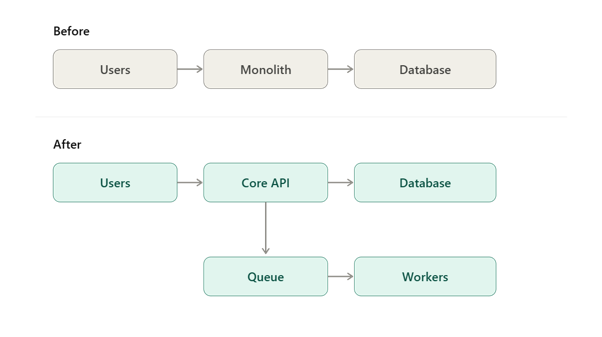
Now bursty background processing can scale independently from the core application, instead of dragging the whole system’s compute footprint up with it.
Fix 2: Redesign Compute Around Workload Behavior, Not Server Uptime
This is a different conversation from generic rightsizing. It’s about matching the compute model itself to how a workload actually behaves. Here’s how you can match compute models to workload characteristics:
| Workload | Potential Compute Approach |
|---|---|
| Predictable, continuously running | EC2/containers |
| Variable traffic | Auto scaling/containers |
| Short-lived, event-driven tasks | Serverless |
| Batch processing | Scheduled/batch compute |
| Interruption-tolerant workloads | Spot capacity |
| Bursty, asynchronous workloads | Queue + workers |
The point isn’t “serverless is cheaper” or “containers are always right.” It’s that every compute model has a workload shape it’s efficient for, and a lot of cloud spend comes from running a workload on a compute model it doesn’t fit.
Always-on compute is one area worth reviewing because some infrastructure is required to run 24/7 by default. Worth asking, honestly, for every major component:
- Does this service need to run 24/7? If demand is flat and predictable, always-on compute is correct. If it isn’t, that’s the signal to move to the next question rather than assume the current setup is fine by default.
- Does meaningful traffic actually exist overnight? If not, this is a scheduling fix: scale the fleet down (or to zero) during known quiet hours instead of paying for standby capacity nobody’s using.
- Are background jobs running continuously when they could run on a schedule? If a job checks for work every few seconds but new work only arrives a few times a day, move it to a cron-triggered or event-triggered run instead of a persistent process.
- Can non-production environments shut down outside working hours? Some development, test, and QA environments do not need full capacity outside active working or testing windows. Where workloads permit it, automated schedules can reduce unnecessary runtime.
- Can batch, asynchronous, or other intermittently used processing capacity scale down or even to zero when idle? For bursty or unpredictable workloads, this points toward serverless or scale-to-zero compute rather than a fleet sized for peak and idling the rest of the time.
However, remember, every compute decision involves trade-offs. More elastic or ephemeral architectures can reduce idle capacity, but may introduce cold starts, latency, concurrency limits, execution-duration constraints, state-management requirements, or additional operational complexity.
That’s why compute architecture should be evaluated by engineering teams against performance, reliability, and workload requirements, not by cost alone.
Fix 3: Remove Expensive Data Paths From the Architecture
This can be the highest-leverage fix, because the problem isn’t always the amount of data; it’s where that data travels. Data-transfer costs are easy to overlook because they are often consequences of how components communicate rather than standalone architectural decisions.
Architecture can quietly create cost through:
- Cross-AZ communication
- Cross-region traffic
- Repeated, redundant database requests
- Chatty service-to-service communication
- Large API payloads
- Unnecessary external API calls
- Data movement duplicated across systems
So, identify high-chatter data paths. Distributed architectures are especially prone to this. A single user action can trigger a chain like:
Service A → Service B → Service C → Service D → Database
Each hop can add latency, compute overhead, and, depending on where the traffic crosses, additional network charges. And it spreads across network transfer, compute time, and downstream database load.
The fix is a more deliberate data path, using:
- Batching
- Caching
- Asynchronous events instead of synchronous chains
- Payload reduction
- Aggregation at the source
- Data locality, keeping data close to the compute that uses it
Exact transfer charges vary by AWS service and traffic path, so teams should verify the pricing model before changing an availability design solely to reduce network cost.
The right question isn’t “can we remove this?” It’s “does the resilience or latency benefit justify the recurring infrastructure and data-transfer cost it creates?”
That distinction between an architectural decision made deliberately and one that’s just accumulated over time is the difference between an architectural trade-off and pure waste.
Fix 4: Stop Treating the Database as the Answer to Every Request
The problem is that applications routinely send every request straight to the database, even when the underlying data changes infrequently, can be cached, can be precomputed, or can be generated asynchronously ahead of time. The database ends up doing work it was never necessary for it to do.
So, we need to reduce unnecessary database work. There’s a well-established toolkit here:
- Application-level caching
- Distributed caching
- CDN caching for cacheable content and responses
- Read replicas, where read scaling or availability requirements justify their additional cost
- Query optimization
- Connection pooling
- Batching writes and reads
- Precomputation of expensive results
- Asynchronous processing instead of synchronous reads
Choose the database architecture according to workload. This isn’t a SQL-versus-NoSQL debate. It’s about matching the database architecture to how the workload actually behaves:
- Relational vs. NoSQL
- Read-heavy vs. write-heavy access patterns
- Transactional vs. analytical workloads
- Hot vs. cold data
- Managed database sizing relative to actual demand
The underlying point: Database cost is influenced heavily by workload design as well as service choice, capacity, storage, I/O, availability configuration, and pricing model.
Instead of:
1,000 requests → 1,000 database reads
Consider:
1,000 requests → cache → database only on cache miss
Conceptually, 1,000 cacheable requests could otherwise result in 1,000 database reads. With a suitable cache, many of those requests can be served without reaching the database.
That shift introduces its own trade-offs, like cache invalidation strategy, consistency guarantees, TTL tuning, and the memory cost of the cache itself. None of those trade-offs disqualifies the approach; they just need to be designed for deliberately, rather than discovered in production.
Fix 5: Design Data Storage and Retention Into the Architecture From Day One
Data doesn’t all follow the same lifecycle, but every retained data class should have an intentional policy for how it’s stored, accessed, retained, archived, or deleted. Logs, backups, application uploads, analytics data, event streams, database records, and snapshots can all have very different requirements. The architectural goal is to match each data class to its actual access pattern and retention requirement rather than keeping everything in the same storage tier indefinitely.
So, don’t replicate everything everywhere. Replication, backups, disaster recovery copies, multi-region data, and long retention periods all have legitimate use cases, and all have a real, recurring cost. The question worth asking for each one is simple: what business requirement justifies keeping another copy of this data?
If there isn’t a clear business or technical reason, it’s worth questioning whether the additional copy is still justified.
Also, storage cost isn’t just storage cost. The sticker price of a storage tier is only part of the bill. The total cost of a storage strategy can include:
- Storage charges
- Retrieval
- Transfer
- API requests
- Replication
- Backup
- Operational overhead
This is why “just move everything to the cheapest tier” is often bad advice on its own because it ignores the retrieval and operational costs that can outweigh the storage savings. Overlooking these details is a common reason AWS cloud cost reduction projects stall after the first few months.
The Architecture Trade-Off: Cheap Isn’t Always Efficient
Cloud architecture optimization isn’t about chasing the lowest possible infrastructure bill. Every architectural change shifts the balance between cost, performance, resilience, and operational complexity. A cheaper design can introduce latency, reduce availability, or create new engineering overhead if the trade-off isn’t understood upfront. The goal is to reduce unnecessary spend without compromising what the application actually needs to deliver.
Cost optimization can increase other costs
Every fix above comes with a counterweight. It’s worth being explicit about that, because a cost-cutting exercise that ignores these trade-offs tends to create new problems it didn’t account for:
- More aggressive scale-down → potentially higher latency
- Serverless adoption → potential cold-start considerations
- Caching → consistency complexity
- Spot capacity → interruption handling
- Fewer replicas → potentially lower resilience
- Single-region deployment → potentially weaker disaster recovery
Optimize the architecture’s cost-to-value ratio
A useful way to think about cloud efficiency is the amount of business value delivered for each unit of infrastructure spend.
The cheapest architecture isn’t necessarily the best one. The objective is the lowest sustainable cost that still meets the application’s performance, availability, security, and scalability requirements. Anything cheaper than that isn’t optimization; it’s just risk that hasn’t been priced in yet. Getting this balance right consistently is exactly what cloud architecture review provides help with.
Not Sure Where Your Trade-Offs Actually Sit?
Every architecture balances cost against latency, resilience, and complexity differently. Talk it through with an architect before you commit to a change.
Where FinOps Fits Into Architecture Decisions
FinOps as a discipline is well documented elsewhere, so this isn’t a reintroduction to it. If you’re evaluating FinOps consulting specifically, that ground is covered in depth elsewhere. The more useful question here is narrower: how does FinOps actually influence architecture?
1. Move cost conversations upstream
The traditional sequence is: Build → deploy → receive the bill → optimize
By the time cost shows up, the architecture is already fixed, and every optimization from that point on is a retrofit. A better sequence moves cost earlier:
Architecture decision → estimate consumption → evaluate unit economics → build → measure → optimize
2. Make architecture costs visible to engineering
That shift only works if engineers can actually see the cost consequences of their decisions. That means:
- Cost allocation down to the workload level
- Clear workload ownership
- Unit economics engineers can reference
- Cost-aware architecture reviews
- Budgets tied to workloads, not just accounts
- Forecasting before, not after, a build
- Genuine collaboration between engineering and FinOps, rather than a report handed over after the fact
3. Cost becomes another architecture constraint
Architecture reviews already weigh security, performance, availability, and scalability. Cost efficiency belongs in that same conversation and not as the overriding priority that trumps everything else, but as a first-class design consideration alongside them.
How to Know When AWS Costs Require an Architecture Review
Rather than another generic checklist, treat this as a diagnostic. Your architecture is worth a cost-focused review if:
- Cloud spend is rising faster than traffic or revenue
- Infrastructure scales linearly even when demand doesn’t
- Database costs are growing disproportionately to everything else
- Network costs appear unexpectedly high
- Multiple services are duplicating the same data
- Non-production environments run continuously, all day, every day
- Workloads with very different traffic patterns are sharing the same scaling model
- Engineers can’t clearly explain why a major infrastructure component exists
- Cost is only ever reviewed after deployment
- Nobody can calculate what a single transaction or customer actually costs
If several of these sound familiar, an architecture-level review is justified rather than limiting the investigation to individual AWS resources.
Not sure whether the problem is your AWS resources or the architecture behind them?
An architecture assessment can trace major cloud costs back to the workloads and design decisions that are actually creating them.
Ariel’s Recommended Approach to Cloud Architecture Optimization
This is a different lens from a spend-analysis engagement. Rather than starting from categories of waste, it starts from architecture decisions. Ariel’s cloud workload optimization services are built around this lens specifically.
1. Understand the workload. Map traffic patterns, application behavior, data flows, dependencies, and scaling characteristics before touching anything.
2. Trace infrastructure costs to architectural decisions. Not “your EC2 is expensive,” but “this component requires this capacity because of this specific architectural pattern”, and here’s what changes if that pattern changes.
3. Model alternative architectures. Compare realistic alternatives against cost, performance, reliability, scalability, security, and complexity, side by side.
4. Implement incrementally. Avoid unnecessary full rewrites. Prioritize the architectural changes that offer the greatest cost-to-value improvement for the least engineering risk, and sequence from there.
5. Establish continuous measurement. Track infrastructure cost, workload utilisation, cost per unit, performance, and reliability on an ongoing basis. So, the next architecture decision is informed by real data, not another audit.
Architecture optimization and FinOps reinforce each other. Architecture determines how resources are consumed, while FinOps provides the visibility, ownership, measurement, and operating discipline needed to evaluate those decisions continuously.
The Goal Isn’t a Smaller Cloud Bill. It’s a Better Architecture.
A lower AWS bill achieved by deleting resources isn’t necessarily architectural optimization. It might just be housekeeping.
A genuinely better architecture:
- Scales according to actual demand, not blanket rules
- Processes data efficiently, without redundant hops
- Minimises unnecessary network movement
- Uses compute appropriate to the shape of the workload
- Gives every retained data class an intentional lifecycle
- Makes cost visible to the engineers making the decisions
- Balances cost deliberately against performance and resilience, rather than sacrificing one for the other by accident
If your cloud costs keep growing despite repeated cost-cutting exercises, the problem may no longer be the bill. It may be the architecture producing it. No amount of resource cleanup fixes that, but the right cloud cost architecture optimization from a trusted service provider can.
Frequently Asked Questions
1. What is cloud architecture optimization?
It’s the practice of redesigning how a system is built, its compute model, data paths, storage lifecycle, and scaling behavior, so that infrastructure consumption matches actual workload demand, rather than optimising only what you pay for a fixed set of resources.
2. How does cloud architecture affect AWS costs?
Architecture determines how much a system needs to consume in the first place: how often it calls the database, how far data travels between services, how much compute runs 24/7 regardless of demand, and how many copies of data exist across regions. Two systems doing the same job can have very different AWS bills purely because of these design choices.
3. Can microservices increase cloud costs?
Yes. Decomposing a system into more services can increase network traffic, duplicate data and logic, add observability and operational overhead, and introduce more infrastructure to run and secure. Microservices reduce cost only when they’re applied to workloads that genuinely need independent scaling, not as a default architectural style.
4. How can application architecture reduce AWS data-transfer costs?
By deliberately shortening data paths: reducing chatty service-to-service calls, batching requests, caching aggressively, favouring asynchronous events over synchronous chains, and keeping data close to the compute that processes it. Cross-AZ and cross-region transfer in particular should be a deliberate trade-off, not a byproduct of how services happen to be laid out.
5. Should we use serverless to reduce cloud costs?
Serverless is often attractive for event-driven and variable workloads because it can reduce idle capacity. For sustained, high-volume, or latency-sensitive workloads, teams should compare serverless with containers or provisioned compute based on utilization, latency, operational requirements, and total cost rather than assuming one model is cheaper.
6. When should cloud cost become an architecture consideration?
As early as possible, ideally at the point an architecture decision is made, not after the first bill arrives. Cost should sit alongside security, performance, availability, and scalability as a standard input to architecture reviews, rather than being addressed retroactively through a separate optimization project.