
Talk to the Patient, Not the Screen | AI Medical Scribe
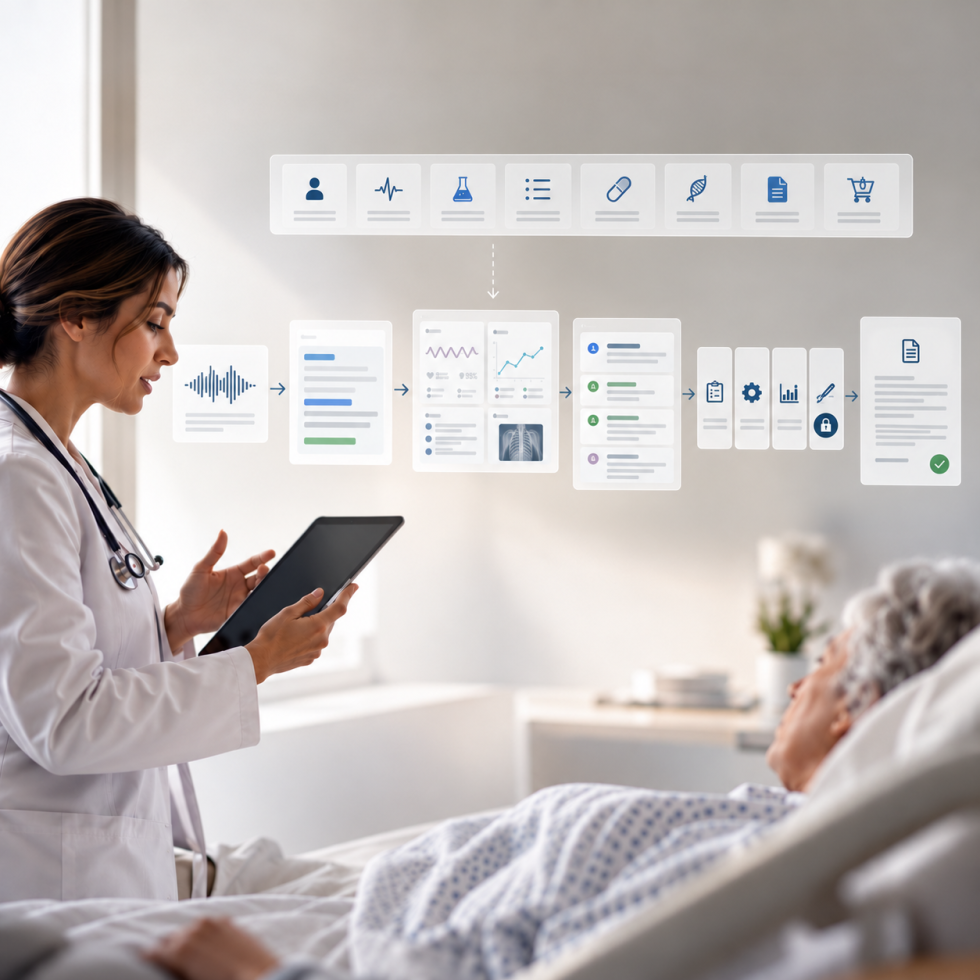
A custom AI medical scribe built into a tablet-first EHR companion app for allergy, asthma and immunology practices: the provider speaks naturally with the patient, medical speech recognition transcribes in real time, and a generative model merges the dictation with vitals and clinical categories into a structured SOAP note that the provider reviews, edits and signs.
Doctors were spending hours after clinic typing notes. We built the documentation layer that writes the first draft while they are still in the room, and kept the signature where it belongs.
- Healthcare IT
- AI Clinical Documentation
- 7 min read
Stat Strip
The Note Writes Itself. The Doctor Still Signs It.
What Does a Custom AI Medical Scribe Do That a Bolt-On Product Does Not?
A custom AI medical scribe lives inside the clinical workflow instead of beside it. The dictation, the vitals the nurse just recorded, the intake answers, the chart and the signature all sit in the same app, so the note is assembled from what the practice already knows about the visit rather than from audio alone.
The pain it was built for is well documented. Office-based US physicians spend a mean 1.77 hours a day on documentation outside office hours, and scribes or staff support made no measurable difference to that figure (JAMA Internal Medicine, 2022). Family physicians were found to spend about 86 minutes of “pajama time” in the EHR each night (AMA, reporting Annals of Family Medicine). Desktop software adds a second cost: it keeps the doctor behind a monitor during the visit itself.
The app’s clinical content is built for allergy, asthma and immunology practices, where a visit carries structured data a generic scribe does not understand: injection history, allergy-extract vials, asthma action plans, biologic medications and anaphylaxis plans. The scribe had to be built around that content, not retrofitted to it.
Four Things the Scribe Had to Get Right
- Capture speech at the bedside, not at a desk afterwards: The provider speaks naturally while with the patient and the app transcribes in real time using medical speech recognition.
- Merge, not just transcribe: A transcript is not a note. The dictation had to be combined with the vitals and clinical categories already recorded in the app into a clean, structured SOAP note.
- Keep the provider in charge of the record: The finished text goes into the note for review. Nothing is signed by software.
- Surface what matters during the visit, not after it: Important information was hard to find in the moment. The scribe needed a companion that brings the relevant patient context to the provider’s side of the screen.
How the Scribe Works
- The provider talks. During the visit, the provider dictates naturally. Microsoft Azure Speech converts the speech to text in real time.
- The app merges. A note-merge step combines the dictation with the vitals and clinical categories captured earlier in the visit. Google Generative AI produces the structured note and the suggestions that go with it.
- The note flows through four steps. Assessment, then Plan and Execution, then Review, then Sign and Complete with the provider’s e-signature. The provider can preview the note while writing and copy history from earlier visits.
- The signed note lands in the record. Signed notes go to a read-only notes repository, organized by date and visit. An Unfinalized Notes tab on the main navigation keeps anything not yet signed in view.
A Copilot Beside the Note, Not a Chatbot Beside the App
A side panel acts as the provider’s AI assistant during the visit. It surfaces a patient snapshot, vitals and lab trends, the problem list, drug interactions, biologic eligibility, patient education and suggested orders and codes. The daily dashboard adds AI suggestion cards next to today’s patients and their status indicators, and the patient chart carries AI-generated insights alongside demographics, clinical summary, insurance and immunotherapy records.
Suggested orders and codes are suggestions. Prescriptions, lab orders and charges are still created, signed and submitted by people in their own modules, inside the same app. Those modules, and the platform underneath them, are described in the companion case study on the React Native EHR companion app.
Built for a Specialty, Not for a Demo
Generic scribes know what a visit sounds like. This one also knows what an allergy visit contains. The chart carries immunotherapy records next to the clinical summary. The copilot checks biologic eligibility and drug interactions. The clinical content includes allergy-shot vial tracking, injection history, asthma action plans, biologic medications and anaphylaxis plans, so the note the model drafts has the right categories to land in. An integrated dermatology image-analysis module supports skin assessments; the assessment itself stays with the clinician.
Documentation Before and After
| Moment in the visit | Desktop EHR and after-hours typing | Scribe inside the companion app |
|---|---|---|
| During the visit | Provider types while facing a monitor | Provider dictates while facing the patient; transcription runs in real time |
| Building the note | Vitals, intake and narrative assembled by hand | Dictation merged with recorded vitals and clinical categories into a structured SOAP note |
| Finding context | Important information hard to find mid-visit | Copilot panel surfaces snapshot, trends, problem list, interactions, eligibility and education |
| Review and sign | Often deferred to the evening | Four-step flow ending in e-signature; unfinalized notes stay on the main navigation |
| Orders and codes | Remembered and entered later | Suggested during the visit; created and submitted by people in the eRx, lab and charge entry modules |
| History | Re-read and re-typed | Copied forward from earlier visits; signed notes kept in a read-only repository |
What the Provider Keeps
- The signature: No note enters the record without the provider reviewing, editing where needed and e-signing it.
- The clinical decision: The copilot suggests; the provider orders. The dermatology module supports an assessment; the clinician makes it.
- The codes: The copilot can suggest orders and codes, and charge entry captures the ICD and CPT codes right after the visit, linked to the encounter, entered by the provider or the billing team.
What a Custom AI Medical Scribe Is Actually Worth
- Less typing and fewer clicks: The first draft of the note exists before the provider leaves the room.
- More face-to-face time: The tablet lets the provider work at the bedside instead of behind a desktop screen.
- Context in the moment: Vitals trends, interactions and eligibility are on screen during the visit, not looked up afterwards.
- Codes captured at the point of care: Suggestions during the visit, charge entry immediately after it.
- One system, not several: Dictation, chart, orders, charges and messages share one app and one login, which is the broader healthcare software development story behind this build.
The value of an AI scribe is not that it writes. It is that the doctor stops writing during the visit and never stops being the one who signs.
Build the Scribe Into the Workflow, Not Beside It
Ariel builds AI clinical documentation into the software clinicians already use: dictation, note generation and copilot features that respect the provider’s signature and the practice’s specialty. If your EHR or practice-management product needs documentation that happens at the bedside rather than after hours, our team can show you how an embedded scribe differs from a bolt-on one.
FAQ
What is a custom AI medical scribe?
A custom AI medical scribe is documentation AI built into a practice’s own clinical software rather than bought as a separate product. It transcribes the provider’s dictation, merges it with data the app already holds, such as vitals and clinical categories, and drafts a structured note the provider reviews and signs inside the same workflow.
How does an AI medical scribe work?
The provider speaks naturally during the visit. Medical speech recognition converts the speech to text in real time, and a generative model merges that text with recorded vitals and clinical categories into a structured SOAP note. The draft then moves through assessment, plan, review and sign-and-complete steps, ending with the provider’s e-signature.
Do AI scribes actually save doctors time?
Large studies show modest, real gains. A 2026 JAMA study across 8,581 ambulatory clinicians found documentation time fell about 16 minutes per eight hours of patient care, while after-hours EHR time did not fall significantly. This build targets the typing and clicking that happen during and right after the visit, and keeps review before sign explicit rather than promising the evening away.
Should an EHR vendor build its own AI scribe or buy one?
Buy when a packaged scribe already fits your specialties and workflow. Build when the note needs data a bolt-on cannot see, such as vitals recorded minutes earlier, specialty records like immunotherapy history, or a copilot that reads the same chart. This scribe was built inside the companion app so the draft, the chart and the signature share one screen.
How do you keep AI-drafted notes safe to sign?
Treat the draft as a draft. The provider previews the note while it is written, edits it, and e-signs it in a defined final step; unsigned notes stay visible in an Unfinalized Notes tab until they are completed. Signed notes are kept in a read-only repository by date and visit, so the record reflects what the provider approved.
What does an AI scribe need to handle a specialty like allergy and immunology?
The right structure to write into. This build’s chart carries immunotherapy records, the copilot checks biologic eligibility and drug interactions, and the clinical content covers allergy-shot vial tracking, injection history, asthma action plans, biologic medications and anaphylaxis plans. A scribe that only hears the visit cannot place those details; one built into the specialty workflow can.