
Most teams adopting Claude Code right now are getting a fraction of the value the tool can actually deliver. From what we see across active engagements, the gap isn’t the model. It’s the way the tool is being used.
Across active engineering work at Ariel, how to use Claude Code stops being a question of installation and quickly becomes a question of context engineering, permission design, and team protocol. The teams that treat it like a smarter autocomplete plateau within a few weeks. The ones that treat it as an agentic system, with proper context loading, hooks, sub-agents, and codified review workflows, see compounding gains across the engineering org.
Key Takeaways
- Claude Code is not autocomplete. Treating it as such caps your gains at the same level as Copilot.
- Context engineering through CLAUDE.md, project memory, and explicit prompts is the dominant driver of output quality.
- Multi-agent orchestration and parallel sessions are where mature teams get their compounding gains.
- Hooks and custom slash commands turn one-off productivity into team-wide workflows.
- MCP servers extend Claude Code into real systems: Jira, Linear, GitHub, Slack, design files.
- AI-generated code still needs human review. Skipping that step creates a new category of technical debt.
- Adoption fails when teams skip shared standards. Each developer using it differently fragments code quality.
Why Most Teams Underuse Claude Code
The gap between organizations that get real value out of Claude Code and the ones that don’t is rarely about the technology. It’s about how the technology is operationalized.
The pattern looks like this. A senior engineer installs Claude Code, runs it on a few tasks, and gets impressive results. Adoption spreads across the team. Within a few weeks, every developer is using it in their own way:
- One team uses it for architectural reviews.
- Another uses it for syntax help.
- A third only invokes it for unfamiliar parts of the codebase.
The result isn’t a productivity gain, it’s fragmentation. The same coding pattern gets accepted in one repository and flagged in another, not because standards differ but because there are no shared standards for how to use Claude Code across the team.
The same principle applies here: Claude Code multiplies the discipline you bring to it. Without that discipline, it just multiplies the noise.
The second underuse pattern is treating Claude Code as a smarter autocomplete. That framing caps the gain at modest improvements on routine tasks. The teams getting genuine compounding leverage have crossed into agentic usage:
- Handing off entire features.
- Multi-file refactors.
- Full migration tasks.
- Autonomous debugging loops.
In each case, Claude Code plans the work, executes across files, runs tests, and iterates on failures. That’s a different operational model, and it requires different practices to be safe and effective.
The Foundation: Context Engineering Through CLAUDE.md
If there is one decision that determines how to use Claude Code effectively on your codebase, it’s how well you set up context. Without it, every prompt starts from zero. With it, every prompt starts from your codebase’s actual conventions, architecture, and constraints.
CLAUDE.md is a markdown file in your project root that Claude Code reads at the start of every session. Treat it as your team’s onboarding document for the agent. The teams getting the most value from Claude Code put real effort into this file. It typically includes:
- Coding standards: naming conventions, file structure, test patterns, and commit message format
- Architecture decisions: which patterns are used, which are deprecated, why certain trade-offs exist
- Preferred libraries and versions: so Claude doesn’t suggest replacements your team has already evaluated and rejected
- Review checklists: what “done” looks like for a feature, a bug fix, a migration
- Domain context: business logic that wouldn’t be obvious from reading the code
Skipping this step is the single most common reason Claude Code for developers produces inconsistent results across a team. The model isn’t guessing at your standards because you haven’t told it what they are. Implicit expectations are expectations that aren’t met. Explicit instructions are instructions that consistently get followed.
Beyond CLAUDE.md, project memory builds automatically as Claude Code works in your repository, capturing build commands, test patterns, and debugging insights it discovers across sessions. That memory compounds the longer you use the tool, which is why teams that switch tools mid-project lose more than they realize.
The Workflow Patterns That Actually Move the Needle
Once context is set up properly, the next layer of how to use Claude Code comes from how you structure interactions with the agent. Five patterns separate ad-hoc usage from production-grade workflows.
1. Plan, then execute
For anything beyond a simple change, ask Claude Code to write a plan first. Have it list the files it will modify, the tests it will run, and the rollback path if something fails. Review the plan. Then approve execution. This sounds like it adds friction. It doesn’t. It removes the larger friction of unwinding a 200-line change you didn’t fully understand. Plan-first execution is what separates an agent from autocomplete, and it’s the workflow that scales to multi-file refactors safely.
2. Custom slash commands for repeatable workflows
If your team runs the same review checklist on every pull request, package that as a custom slash command. Same for staging deployments, security audits, dependency upgrades, or test scaffolding. Custom commands turn a one-off prompt into a team-wide protocol. They also enforce consistency, because the prompt is now version-controlled rather than a Slack message someone copied last quarter.
3. Hooks for pre and post action automation
Hooks let you run shell commands before or after Claude Code actions. Auto-format on every file edit. Run lint before every commit. Trigger your test suite after a refactor. These are small investments that compound. The 80% of teams that skip hooks end up doing the same manual cleanup steps after every Claude Code session, which is exactly the work the tool was supposed to remove.
4. Multi-agent and parallel sessions
This is where the most experienced teams pull away. Ramp engineers run multiple Claude Code sessions in parallel, with one focused on a frontend refactor while another handles backend integration. Rakuten reduced average feature delivery time from 24 working days to 5, a 79% drop, by delegating tasks across parallel Claude Code sessions and treating engineers as orchestrators rather than implementers. The shift from “how do I write this code” to “how do I supervise four agents writing different parts of this code” is the inflection point where agentic workflows reshape engineering work.
5. MCP servers for cross-system context
Model Context Protocol (MCP) is the integration layer that lets Claude Code reach beyond your codebase. With MCP servers configured, Claude Code can read your design docs in Google Drive, pull tickets from Jira or Linear, query your data warehouse, or post to Slack as part of a workflow. This is what removes the context-switching tax. The agent doesn’t have to ask you to paste in the spec, the ticket, the design file. It pulls them itself, then reasons across all of them.
How We Think About Adoption Levels
This is the lens we use internally at Ariel to assess where a team currently is and what it would take to move them up. It’s not a validated industry benchmark, it’s a delivery framework drawn from the engagements we’ve run. Use it as a self-assessment, not a yardstick.
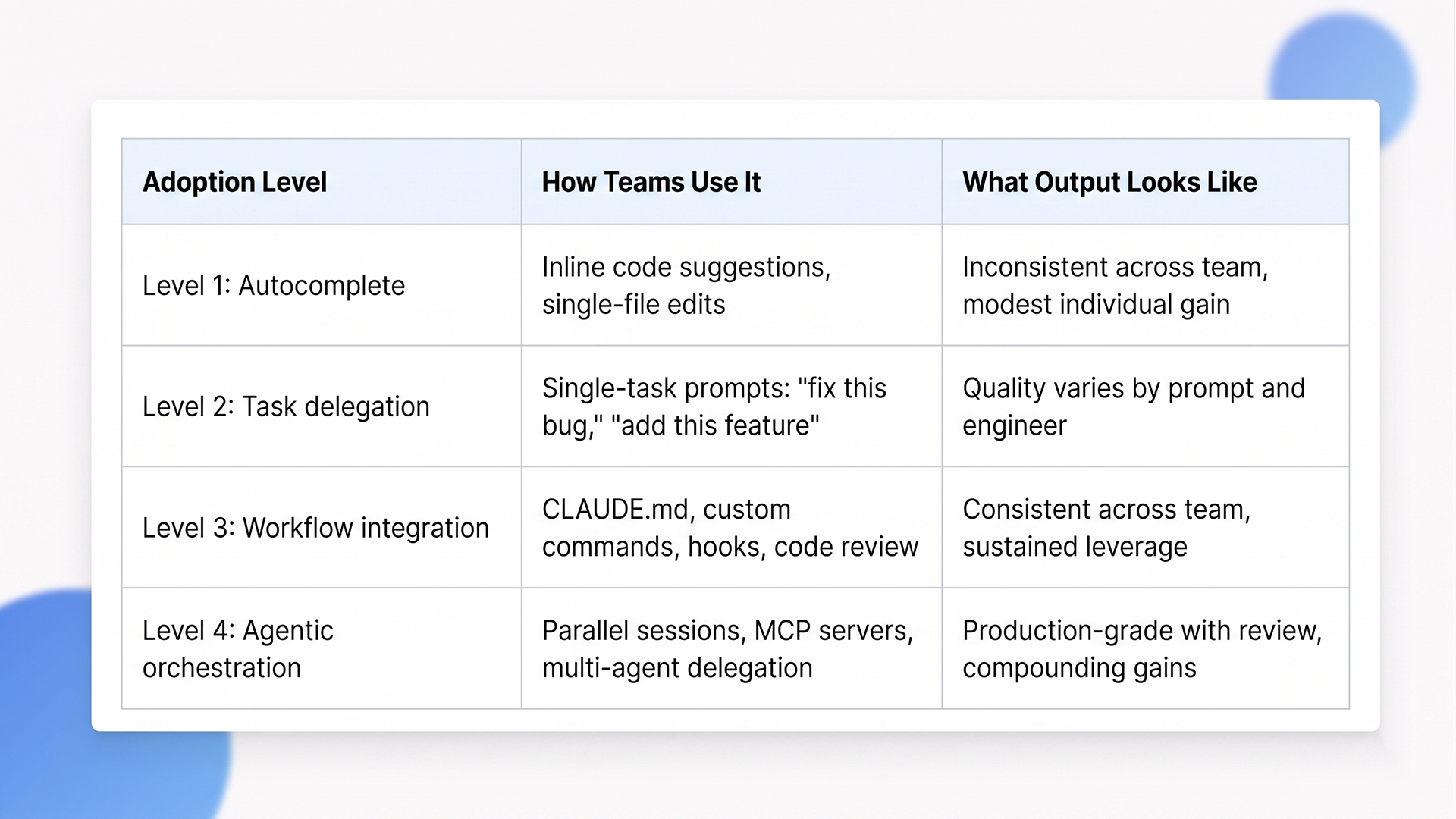
In our experience, most teams settle around Level 2 without deliberate process change. The jump to Level 3 isn’t a tooling problem, it’s a cultural and protocol shift. The jump to Level 4 typically requires senior engineers who think in terms of orchestration rather than implementation. Both are achievable, but neither happens by default.
The Trade-offs Most Adoption Stories Skip
Claude Code is genuinely powerful, but adopting it without understanding its failure modes creates a new class of problems.
AI-generated code still needs human review
This is the most common adoption mistake. Teams treat Claude Code output as ready to deploy because it compiles, the tests pass, and the diff looks reasonable. The result is technical debt that surfaces three sprints later, when an engineer who didn’t write the code has to debug a subtle architectural mismatch the model introduced. The right model is AI as a highly capable first-pass contributor whose work gets reviewed by an engineer who understands the business context. Skip the review and you’re shipping code nobody fully understands.
Context switching costs are real
Without strong CLAUDE.md and project memory, every new conversation costs 5 to 15 minutes of re-explaining the codebase. Multiplied across a team, across sprints, that adds up to a meaningful share of the productivity Claude Code was supposed to deliver. The teams that solve this invest upfront in context infrastructure. The ones that don’t burn the gain on context overhead.
Standards drift across the team
When adoption happens organically, with each engineer using Claude Code differently, code quality fragments. One developer’s code reflects one set of patterns, another’s reflects different ones. PRs become harder to review because the underlying assumptions vary. The fix is shared CLAUDE.md files, codified slash commands, and team-wide standards for what “reviewed” means. Without them, Claude Code makes inconsistency faster, which is the opposite of the goal.
Hidden security and compliance gaps
Claude Code can interact with your codebase, your infrastructure tools, and (with MCP) your business systems. That’s powerful. It also means permission boundaries matter more than they did with autocomplete tools. Decide upfront which actions require explicit approval, which directories the agent can modify, what credentials it can access, and how its actions are logged. We treat this as part of the engineering setup, not a phase-two concern.
Long-term capability erosion
There is research suggesting that developers in heavy AI-assisted conditions show measurable drops in code comprehension over time. The fix isn’t to use the tool less. It’s to be deliberate about where engineers still write code by hand, where they review carefully, and where they orchestrate agents. The teams keeping this balance get compounding leverage. The teams that delegate without thinking lose engineering judgement on the way.
When Claude Code Isn’t the Right Call (Yet)
Not every team should adopt Claude Code at full intensity. Here is when we tell clients to slow down.
Your codebase has minimal documentation and weak test coverage. Claude Code amplifies what’s already there. If your tests are sparse, the agent can’t validate its own work, and small mistakes propagate quickly. Invest in test coverage and documentation first. The tool will earn back the time when the foundation supports it.
Your team doesn’t have senior engineering capacity to review output. Without a strong reviewer in the loop, AI-assisted output ships unchecked. That’s how subtle architectural drift, security regressions, and silent edge case failures enter production. Claude Code is a force multiplier for senior engineers, not a substitute.
Your domain is highly regulated and your audit trail isn’t ready. Healthcare, finance, defense, anywhere code is subject to formal review and signed-off change processes. Claude Code can be used in these environments, but only with explicit logging, approval gates, and clear separation between agent-generated and human-written code. If those guardrails aren’t built yet, hold the rollout until they are.
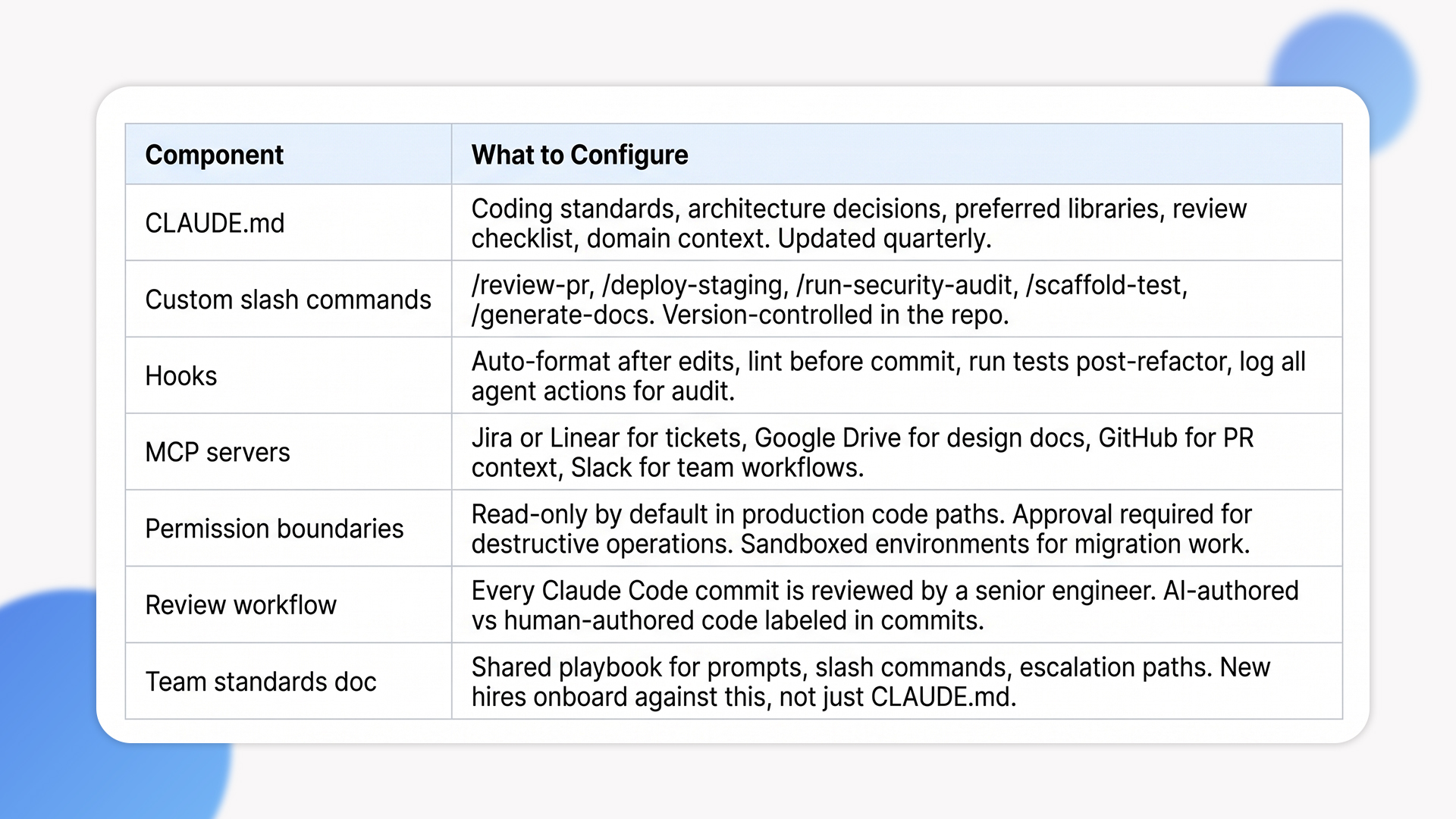
A Practical Claude Code Setup for a Real Team
This is the setup we recommend to clients building AI coding assistant workflows that survive past the beginner phase.
How Ariel Uses Claude Code on Client Work
Internally, Claude Code is part of how we deliver across .NET, Python, and Node engagements. We don’t use it as autocomplete, we use it as a delivery-grade agent embedded in our workflow.
On modernization projects, Claude Code accelerates legacy code analysis:
- Parses old .NET WebForms or classic ASP estates.
- Extracts business rules from legacy code.
- Proposes modern equivalents that get reviewed by senior engineers before they ship.
On greenfield builds, the work shifts toward structural acceleration:
- Shapes scaffolding for new modules.
- Runs first-pass test generation.
- Handles repetitive structural work so engineers can focus on architecture and integration.
Every project has its own CLAUDE.md, its own custom commands, and its own permission profile based on the client’s compliance posture.
The principle is consistent: AI augments engineering judgement, it doesn’t replace it. The teams getting genuine value out of Claude Code understand this distinction. The ones treating it as a shortcut are creating problems they’ll discover six months later.
Looking to operationalize Claude Code across your engineering team without losing review discipline?
Our delivery teams have integrated Claude Code into client engagements across .NET, Python, and Node. We’ll help you set up CLAUDE.md, custom commands, MCP integrations, and the review workflows that keep adoption sustainable.
Frequently Asked Questions
How is Claude Code different from GitHub Copilot or Cursor?
Copilot is autocomplete optimized: it suggests the next line as you type. Cursor is an IDE built on top of AI capabilities, including Claude. Claude Code is a direct interface to an agentic coding system that reads your codebase, plans multi-file work, runs tools, and iterates on failures. The differences matter most when you move beyond single-file edits into refactors, migrations, or feature work spanning multiple files.
Does Claude Code replace engineers?
No. It changes where engineers spend their time. Less on repetitive mechanical work, more on architecture, judgement, integration, and orchestration. Anthropic itself notes that the majority of code internally is now written by Claude Code, with engineers focused on architecture, product thinking, and managing multiple agents in parallel. The role shifts, it doesn’t disappear.
How long does it take to see real productivity gains?
From what we observe across engagements, teams typically see modest gains within the first couple of weeks just from task delegation. The bigger jump in productivity requires CLAUDE.md, custom commands, hooks, and shared team standards, which usually takes a month or two to operationalize properly. Compounding gains from agentic orchestration emerge over months, not weeks, as teams build their workflow infrastructure. These are observations from delivery, not benchmark figures.
What’s the biggest mistake teams make with Claude Code?
Treating it as autocomplete instead of an agent. The second biggest mistake is letting adoption fragment, with each engineer using it differently. Both are solved by deliberate workflow design: shared standards, codified commands, and explicit review protocols.
Can Ariel help us set up Claude Code workflows for our team?
Yes. We help engineering teams set up CLAUDE.md, custom slash commands, hooks, MCP servers, and review workflows tailored to their codebase and compliance requirements. Get in touch to scope your setup.
The Decision Behind the Decision
The question isn’t whether to use Claude Code. It’s how deliberately you operationalize it. Teams that approach how to use Claude Code as a smarter autocomplete plateau quickly. Teams that treat it as an agentic system, with proper context, codified workflows, and senior review, see the kind of compounding gains that change how engineering work gets done.
Build the foundation first: CLAUDE.md, shared commands, hooks, MCP integrations, review discipline. Then scale into parallel sessions and multi-agent orchestration once the foundation is sound. The architecture of AI coding assistant workflows is what determines whether Claude Code amplifies your team or fragments it.
Ready to move past Claude Code as autocomplete and into real agentic workflows?
Book a free consultation with Ariel’s engineering team. We’ll review your codebase, your team’s current adoption level, and design a Claude Code workflow setup that compounds across your engineering org.