The first OpenAI integration most teams ship is the one they end up rewriting six months later. Not because the code is bad. Because the architecture was scoped against a prototype, not a production system.
In a prototype, OpenAI API integration looks like a single endpoint, a system prompt, and a function call. In production, its cost architecture, rate limit management, error handling, prompt versioning, observability, security boundaries, and model selection logic. The same five lines of code that worked in the demo become the part of the system that costs the most to operate, fails most often, and has the least observability when something goes wrong.
Across GPT API integration projects we’ve delivered at Ariel, the gap between the demo and the production system is consistent. This guide is built around closing it: what to design upfront, where the real costs live, and the architectural decisions that determine whether your AI feature scales or stalls.
Key Takeaways
- Cached input pricing is 90% cheaper than standard. Most teams ignore it and overpay by 60 to 80%.
- Model selection should be driven by evals, not defaults. Start with nano, step up only when quality requires it.
- Rate limits, retries, and exponential backoff are not optional in production. Build them in from the first commit.
- The Responses API is now the recommended foundation. Chat Completions still works, but Responses is the superset.
- Streaming reduces perceived latency by 60%+ on long generations. Skip it and your UX suffers regardless of model speed.
- Observability for LLM calls is different from traditional APM. You need prompt versions, token counts, and outcome tracking, not just latency.
- Security boundaries (PII redaction, prompt injection defense, output validation) decide whether the integration ships compliant or creates liability.
Why Most OpenAI Integrations Underperform
The pattern looks like this. A team ships a working prototype in two weeks. Stakeholders are impressed. Production launch is approved. Three months in, the bill is 4x what was projected, latency complaints are starting, and the team is debugging hallucinations they can’t reproduce because nobody captured what prompt was used in production three weeks ago.
None of this is a model failure. It’s an integration architecture failure. The teams that ship OpenAI API integration projects that hold up at scale make six decisions before writing the first endpoint:
- Which model fits which workload
- How prompt caching is structured
- How rate limits will be respected
- How errors degrade gracefully
- How prompts get versioned
- How outcomes get measured.
Get those right and the rest is execution. Get them wrong and you’ll be rewriting after launch.
Choosing the Right Model: Evals Before Defaults
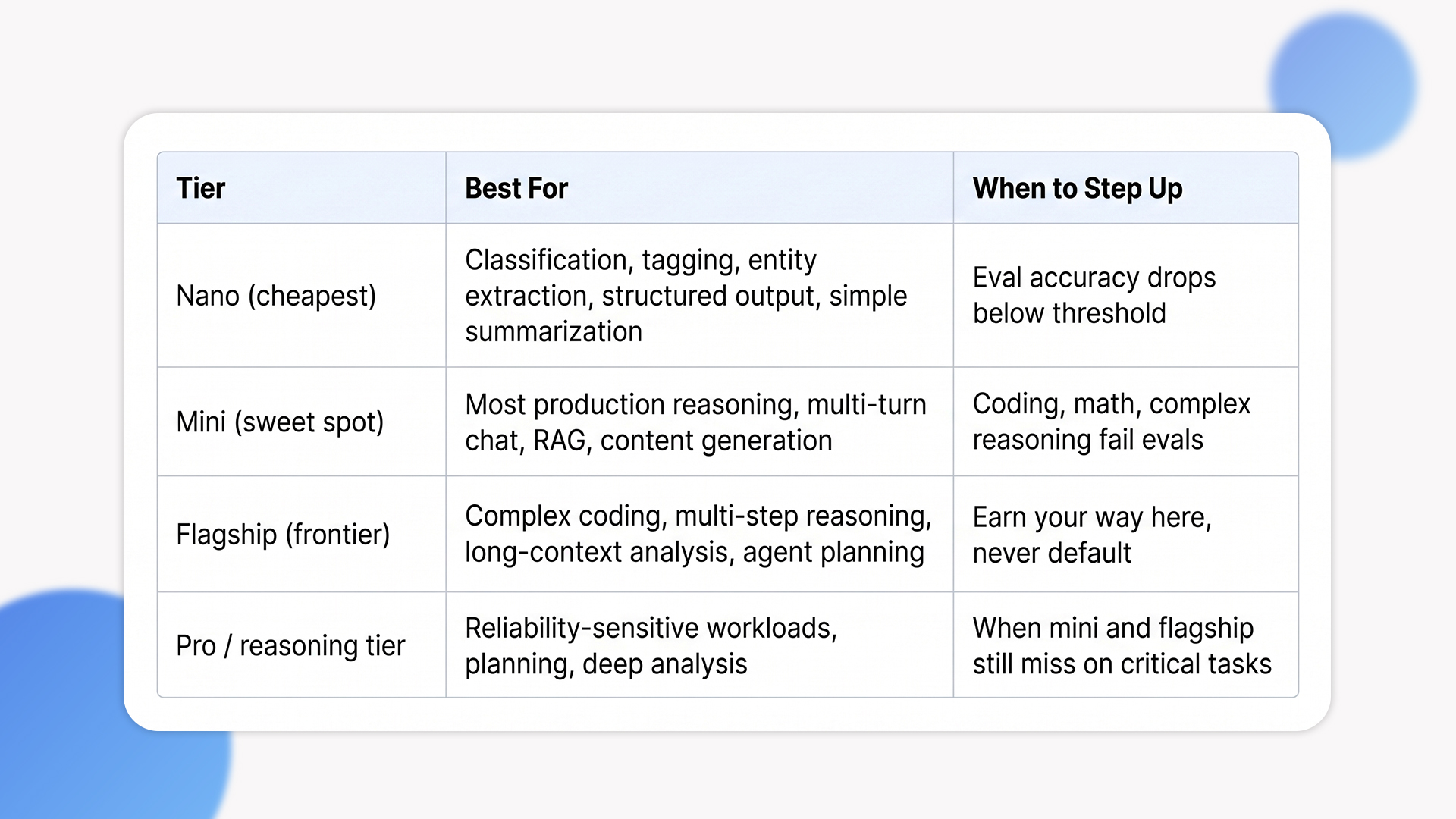
The single most expensive mistake we see is teams defaulting to the flagship model for every use case. The OpenAI lineup spans nano, mini, and frontier tiers, and the difference in price between nano and flagship is roughly 60x on input tokens. For tasks like classification, entity extraction, tagging, or simple summarization, nano often delivers production-grade quality at a fraction of the cost. Defaulting to the flagship for these tasks is paying a premium for capability you aren’t using.
The discipline that works is eval-driven model selection. Build a small evaluation set of representative inputs and known-good outputs (50 to 200 examples), run nano against it first, measure quality and cost. Step up to mini only when nano fails the evals. Step up to flagship only when mini fails. This produces a defensible model choice per workload, not a default that compounds cost across thousands of requests per day.
Model selection cheat sheet
Cost Architecture: Where the Real Savings Live
Token-based pricing is the surface layer. The deeper layer is how OpenAI charges based on what your request actually looks like, and that’s where cost architecture decisions land.
Cached input is the largest free win
Cached input tokens are charged at 10% of the standard rate, applied automatically when prefixes are reused. No code change required. The catch: cache hits depend on identical prefix bytes. System prompts that change per request break caching. Few-shot examples interleaved with user content break caching. Move static content (system prompts, examples, instructions) to the start of the request, keep variable content at the end, and most production apps see 40 to 70% cache hit rates without deliberate optimization. At 80% hits, the effective input cost on flagship can land below mini’s standard rate. Most teams that ignore this overpay by 60 to 80% on input tokens.
Batch API cuts non-urgent workloads in half
For workloads that don’t need real-time response (overnight processing, content generation pipelines, eval runs, document processing queues), the Batch API cuts pricing by 50% in exchange for results within 24 hours. This is a routing decision, not a code rewrite. Identify your async workflows during architecture, route them through Batch, keep your sync workflows on standard. Done well, this is the second-largest cost lever after caching.
Output tokens are the real budget pressure
Output is roughly 5x more expensive than input on most tiers, and output is what you actually pay for in long-form generation. The discipline that helps:
- Set max_completion_tokens deliberately
- Use stop sequences to truncate when the model has finished
- Structure prompts to ask for the shortest correct answer rather than the most thorough one.
A 30% reduction in output tokens compounds across millions of requests faster than any other optimization.
Production Patterns That Hold Up
Once cost architecture is sound, the next layer is what happens when things break. Five patterns separate prototypes from production-grade OpenAI API implementation guide work.
1. Rate limit and retry with exponential backoff
OpenAI enforces rate limits per model and tier, expressed in requests per minute, tokens per minute, and tokens per day. Production systems need exponential backoff on 429 responses, with jitter to prevent thundering herds. They also need request-level timeouts, because long-running calls that never time out can starve worker pools and look like an outage even when the underlying API is healthy. The OpenAI SDKs include retry logic, but the timeout and circuit breaker layers are your responsibility.
2. Streaming for perceived latency
Long generations feel slow even when total time is reasonable. Streaming responses (token-by-token or chunked) reduce perceived latency by 60% or more on long outputs because users see progress immediately. The implementation is straightforward at the SDK level. The non-trivial part is server architecture: streaming requires connection persistence, which interacts with load balancers, timeouts, and serverless platforms in ways that catch teams off guard if they only test with short responses.
3. Prompt versioning and outcome tracking
Prompts are code. Treat them that way. Version them in your repository, tag them with semantic versions, and log the prompt version with every API call. When a hallucination report comes in three weeks later, you need to reconstruct exactly what prompt produced what output, against what model snapshot, with what tool calls. Without prompt versioning and outcome tracking, debugging is guesswork. The teams that get this right also build evaluation harnesses that re-run their golden dataset on every prompt change, catching regressions before they ship.
4. Structured output and validation
If your downstream code parses the model output (JSON, function call arguments, classification labels), use structured outputs or function calling rather than parsing free text. The Responses API and function calling support strict JSON schema enforcement. Rely on free-text parsing and you’ll be writing fragile regex against model behavior that changes between snapshots. Even with structured outputs, validate the response against your schema before acting on it. Models occasionally produce schema-valid but semantically wrong outputs, and that’s where validation layers earn their keep.
5. Graceful degradation and fallback chains
API outages happen. Rate limit windows close. Models get deprecated. Production systems need fallback chains: try the primary model, fall back to a secondary on failure, fall back to a deterministic response on total outage. For latency-sensitive paths, set timeouts that allow the fallback to run within user expectations. Without this, your AI feature becomes a single point of failure for the entire user flow it’s embedded in.
Security and Compliance: The Non-Optional Layer
This is where the biggest production liabilities live.
PII redaction before the API call
OpenAI’s enterprise tiers offer zero data retention and SOC 2 compliance, but you still control what gets sent. For HIPAA, PCI, and GDPR-scoped data, redact PII at the application layer before the API call. Build a sanitization pipeline that detects and tokenizes sensitive fields (emails, phone numbers, SSNs, payment data, health identifiers), passes the sanitized content to OpenAI, and rehydrates the original values in the response only if needed. This is non-negotiable for regulated workloads.
Prompt injection defense
User-provided content embedded in prompts can override system instructions if not handled correctly. Defenses include :
- Strict input validation
- Separating user content from instructions through clear delimiters
- Instructing the model to ignore user attempts to change its behavior
- Using the new instruction hierarchy features in the Responses API.
- None of these are bulletproof on their own. Defense in depth, applied at multiple layers, is what works in production.
Output validation before action
If the model output triggers a side effect (sending email, executing code, modifying a database), validate the output against business rules before acting. Models occasionally produce confidently wrong outputs that pass schema validation but violate business logic. The validation layer is what prevents the AI feature from becoming the source of expensive incidents. Teams that defer this to phase two consistently regret it.
Key management and audit logging
API keys live in secret managers, not environment files. Rotate them on a schedule, scope them to projects (OpenAI’s project-level keys make this clean), and audit every API call with user, request, and outcome. This is the same security hygiene you apply to any external service, but the LLM-specific twist is that prompts and outputs may themselves contain regulated data, so audit logs need the same encryption and retention policies as the underlying records.
The Trade-offs Most Implementations Skip
These are the cost and complexity lines that don’t appear in the original architecture document but determine whether the integration lands.
Vendor lock-in is real but manageable
OpenAI-specific features (function calling syntax, response format, system message structure) couple your code to OpenAI. The Agents SDK is provider-agnostic by design, but the underlying API differences between OpenAI, Anthropic, and Google still require abstraction work to switch. Decide upfront whether single-provider integration is acceptable for the use case, or whether the application warrants a model-abstraction layer (LiteLLM, OpenRouter, custom). The cost of building this upfront is small. The cost of retrofitting it after a year is significant. We’ve covered the broader trade-off in our piece on custom AI agents versus ChatGPT integration, which goes deeper into when each approach fits.
Conversation state management
Stateful conversations, where the model remembers prior context across requests, are not free. Long context windows (1M+ tokens on flagship models) make this technically possible, but every turn replays the conversation history at full input cost, and prompts above 272K tokens are priced at 2x input and 1.5x output for the full session. The Responses API and Conversations API change this picture, and we’ve covered how persistent conversation APIs reshape multi-turn workflows in detail. The takeaway: choose state management deliberately. Stateless, summarized history, full replay, or conversation-API-managed are different cost and complexity profiles.
Fine-tuning vs prompting vs RAG
These three approaches solve different problems. Fine-tuning bakes patterns into the model and reduces prompt size, but costs upfront training and ongoing eval. RAG retrieves relevant context at request time and is the right answer for knowledge-grounded responses where the underlying data changes frequently. Prompting is the cheapest and fastest, but breaks down on complex, domain-specific tasks. Most production systems use all three for different parts of the workflow, and a credible OpenAI API implementation guide sets the boundaries between them per workload. Picking one and applying it everywhere is how teams either overpay or underdeliver.
The 24-month maintenance line
Models get deprecated. Pricing changes. New API surfaces (Responses, AgentKit, Conversations) emerge and old ones get superseded. An OpenAI integration shipped in early 2024 already needs review against the current API surface. Plan for ongoing maintenance, model migration testing, and prompt re-evaluation as part of your operating cost, not as a one-time launch task.
When OpenAI Isn’t the Right Call

Not every AI feature needs OpenAI. Here is when we tell clients to evaluate alternatives.
- Your use case requires data residency or on-prem deployment
OpenAI’s hosted API works for most regions and compliance frameworks, but strict data sovereignty requirements (some EU healthcare contexts, government workloads, defense) call for on-prem or self-hosted models. OpenAI’s open-weight gpt-oss release helps here, but Anthropic, Google’s open models, and self-hosted options like Llama may fit better depending on the constraint.
- Your task is narrow, repetitive, and high-volume
If you’re running classification on a million documents per day with stable patterns, fine-tuned smaller models (or even open-source alternatives) often beat OpenAI on unit economics. The decision rule: if your eval shows nano works and the volume is sustained, do the math against alternatives. The cost difference at scale can justify the engineering investment.
- You need predictable, deterministic outputs
LLMs are non-deterministic by design. For workflows that demand exact, reproducible outputs (regulated reporting, financial calculations, audit-bound document generation), the right answer may be deterministic automation with LLM assistance, not LLM-driven workflows. Picking the wrong tool here builds compliance debt that surfaces during audit.
How Ariel Approaches OpenAI Integration
We don’t lead with model selection or feature recommendations. We start with the workload: what’s the expected volume, what’s the latency budget, what’s the data sensitivity, what’s the failure cost, and what’s the eval criteria for “good enough.” The architecture decisions fall out of that analysis.
From there, the engineering work follows the patterns in this guide. Eval-driven model selection. Cache-aware prompt structure. Streaming where latency matters. Prompt versioning from day one. Structured outputs over free-text parsing. PII redaction and output validation as architectural layers, not afterthoughts. Observability that captures prompt versions, token counts, and outcome quality, not just latency. Fallback chains for graceful degradation under outage or rate limit pressure.
Across industries (logistics, healthcare, financial services, e-commerce) we’ve delivered OpenAI API integration projects that handle support automation, document processing, content generation, multi-turn assistants, and agent workflows. The integration code is the smallest part. The architectural decisions around it are what determine whether the feature ships, scales, and stays maintainable.
Planning an OpenAI integration and want a delivery-grade architecture review, not a vendor pitch?
Our team has shipped production OpenAI integrations across financial services, healthcare, e-commerce, and logistics. We’ll review your workload, your cost projections, and your security boundaries, then design an architecture that holds up beyond the demo.
Frequently Asked Questions
1. How do I estimate OpenAI API costs for a new integration?
Estimate per-request token volume (input + output), multiply by expected request rate, apply cache hit assumptions (40-70% is realistic for production), and apply tier-specific pricing. The biggest variables are model tier, cache architecture, and whether you can route async work through the Batch API. Most realistic projections come in 30 to 50% lower than initial estimates once caching and Batch are factored in.
2. Should I use the Chat Completions API or the Responses API?
OpenAI now considers the Responses API the superset and recommends it for new integrations. Responses support built-in tools (web search, file search, computer use), multi-step workflows, and are designed for agentic applications. Chat Completions still works and continues to receive updates, but new GPT API integration projects should default to Responses unless you have a specific reason to stay on Chat Completions.
3. How do I handle rate limits in production?
Build exponential backoff with jitter on 429 responses, set request-level timeouts (don’t let calls run forever), monitor your tier limits relative to actual usage, and request rate limit increases proactively before you need them. For high-volume workloads, distribute load across multiple projects with separate rate limit pools. The OpenAI SDKs include basic retry logic but production needs the timeout and circuit breaker layers on top.
4. What’s the most underestimated cost in OpenAI integration?
Output tokens. Input is what teams budget against, but output is roughly 5x more expensive on most tiers and is what you actually pay for in long-form generation. A 30% reduction in output tokens through better prompts, max_completion_tokens limits, and stop sequences usually delivers more savings than any other single optimization.
5. Can Ariel handle OpenAI integration end-to-end?
Yes. We cover model selection, cost architecture, prompt engineering, security and compliance layers, observability, and ongoing model migration. Get in touch to scope your project.
The Decision Behind the Decision
OpenAI API integration isn’t a feature you add to your stack. It’s an architectural commitment that touches cost, latency, security, observability, and ongoing maintenance. The integrations that scale are the ones designed against production reality from day one. The ones that get rewritten are the ones scoped against the demo.
Pick the right model for each workload. Structure prompts for cache hits. Route async work through Batch. Build retry, streaming, versioning, and validation in from the first commit. Treat security and compliance as architectural layers. The code is the easy part. The decisions around it are what determine whether the integration ships and stays.
Ready to ship an OpenAI integration built for production, not just for demo day?
Book a free consultation with Ariel’s AI engineering team. We’ll review your use case, project your real costs, and design an architecture that holds up at production scale.