One Portal Instead of a Spreadsheet Full of Timesheets
We built a Power Apps portal that replaced manual timesheets, attendance sheets, and utilization reports with one real-time system for a growing technology organization.
- Workforce Management
- Employee Portal
- 5 min read
Stat Strip
The Setup, Summarized
When Timesheets Live in Spreadsheets, Nothing Adds Up
A growing technology organization tracked timesheets, attendance, and project allocation through spreadsheets and manual processes. As the team grew, tracking hours, monitoring project utilization, and preparing reports took more and more time.
Employees submitted timesheets by hand. Attendance got tracked separately. Project hours had to be pulled together from multiple sources. Resource Managers spent their time chasing missing entries and validating allocations, instead of planning.
Eight Ways Manual Tracking Slows a Team Down
- Manual timesheets: Spreadsheets tracked hours, with no shared system behind them.
- Repetitive entry: Employees re-entered the same kind of data every single day.
- Split attendance tracking: Work from home, half-day, and leave status all lived apart from timesheets.
- Limited utilization visibility: No clear, project-wise view of who was working on what.
- Unclear billable hours: Billable and non-billable time was hard to separate out.
- Slow reporting: Reports took real time to prepare by hand.
- Delayed decisions: Scattered information meant slower calls on staffing.
- Rising admin load: Resource Managers spent more time on upkeep than on planning.
One Login, Every Timesheet
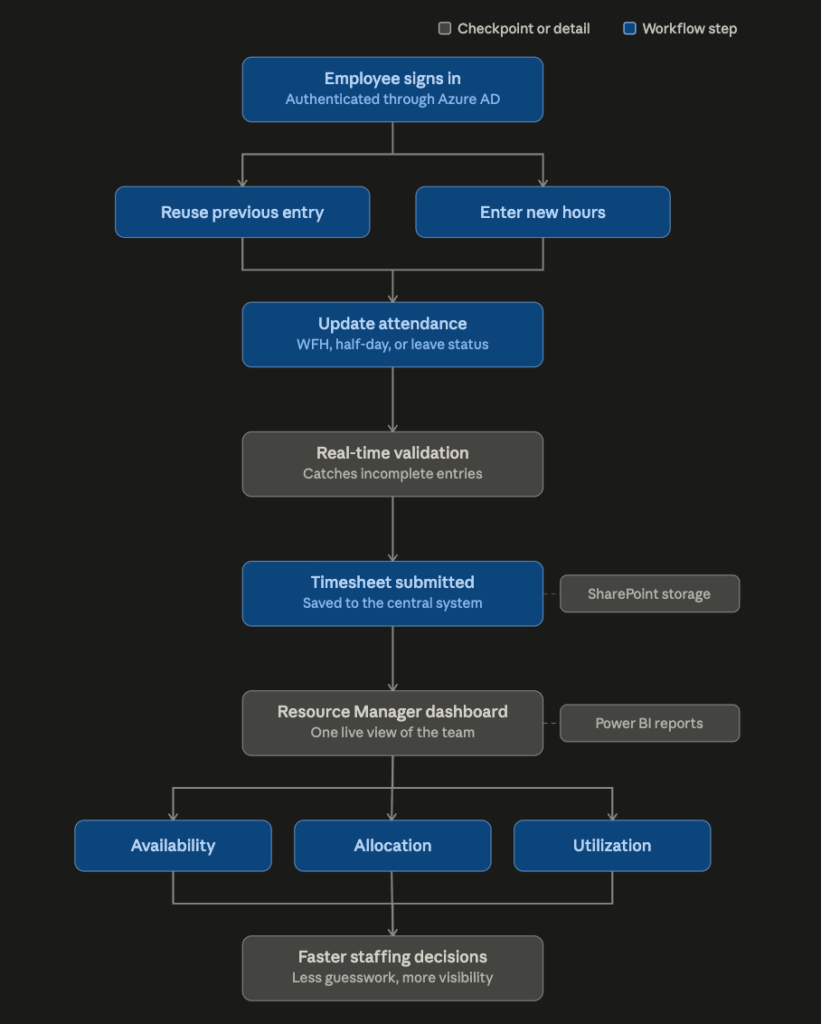
We built a Team Hour Tracking Portal on Microsoft Power Apps. Employees log hours, update attendance, and submit daily timesheets in one place. Resource Managers get one live view of availability, allocation, and utilization.
- Centralized timesheet management: Employees submit daily hours against assigned projects from a single interface.
- Smart attendance tracking: Work from home, half-day, and leave status get captured alongside timesheets, replacing separate attendance records.
- Billable and non-billable hours: Productive and non-productive time are tracked separately, so utilization and project profitability stay visible.
- Reuse previous entries: Employees repeat a prior day’s timesheet in one click, cutting repetitive entry down.
- Real-time validation: Built-in checks catch incomplete or incorrect submissions before they go through.
- Resource Manager dashboard: One view of availability, allocation, work hours, utilization, attendance, and capacity, for faster staffing calls.
Built on the Microsoft Stack the Team Already Trusted
The portal connects directly into Microsoft 365, SharePoint, and Power Automate. Nothing about it feels bolted on. It fits the ecosystem the organization already runs on.
Seventy Percent Less Admin, Measured
- Administrative effort dropped by about 70% once spreadsheets and repetitive entry went away.
- Employees submit daily hours in a few clicks, using reusable entries.
- Resource Managers get real-time visibility into allocation, availability, billable hours, and utilization.
- Reporting runs faster and more accurately, without manual consolidation.
- Managers spot available resources and balance workloads with less guesswork.
- Employees spend less time on admin and more time on project work.
Let's Get Your Team Off Spreadsheets
Ariel builds workforce and operations portals on the Microsoft stack teams already trust. It turned a manual, spreadsheet-driven process into a real-time system with about 70% less admin work. If your team is still tracking hours by hand, our team is ready to scope what this looks like for you. Book a Consultation →