

Most CMS decisions are made twice. Once at the start of the project, and once again 18 months later when the platform stops fitting the business it was chosen for.
With Umbraco CMS, that second decision usually comes down to one of two outcomes. Either the team built it right, treated content modeling and governance as first-class work, matched their .NET engineering capacity to the platform’s requirements, and now has a stable, scalable system that earns its keep. Or they picked it for the right reasons and operated it with the wrong assumptions, expecting WordPress economics and plugin-speed delivery, and spent the back half of year paying for that gap.
Across 16 years of Umbraco development at Ariel, the platform itself is rarely the problem. The decision framework behind it usually is. This guide is built around fixing that, not a feature list, but an honest read on who Umbraco fits, where it earns its total cost of ownership, and what teams consistently get wrong when evaluating it.
Key Takeaways
- Umbraco is a .NET-based CMS used by 700,000+ websites globally and trusted by enterprises like Microsoft, Cargill, and CVS Health.
- It earns its place where structured content, governance, and Microsoft-stack integration matter more than plugin volume.
- WordPress wins on ease of setup, ecosystem size, and editor self-service. Umbraco wins on long-term control, security, and content modeling.
- Total cost of ownership is dominated by development, not licensing. Plan for .NET specialist time, not plugin shopping.
- Umbraco 14 onward shifted to a fully rebuilt back-office, Tiptap editor, and extension-first architecture, which changes the upgrade path materially.
- Most Umbraco builds fail not because of the platform, but because content modeling and governance were skipped at the start.
- Pick Umbraco when content discipline, integration depth, and stability over five years matter more than time-to-launch.
Why Umbraco Exists, and Who It’s Actually Built For
Umbraco was built in 2000 by Niels Hartvig and open-sourced in 2004. Today, more than 700,000 websites worldwide run on Umbraco, and around 2,990 companies including Microsoft, Cargill, and CVS Health use it in production tech stacks. Those numbers tell you who the platform actually serves. It is not a long-tail web tool. It is the CMS that wins when an organization already lives inside the Microsoft ecosystem and needs a content platform that respects that estate.
That context shapes everything. Umbraco runs on .NET and typically on SQL Server. Its core assumptions look like this:
- Development model: assumes you have, or will hire, .NET engineers.
- Content modeling philosophy: assumes editors and developers will work as separate disciplines, with developers shaping data structures and editors filling them.
- Governance model: assumes audit trails, role-based permissions, and structured workflows matter to the business.
None of that is true for everyone. A small marketing site that needs to launch in three weeks doesn’t benefit from any of it. An enterprise B2B platform with 12 regional editors, a CRM integration, and an Active Directory dependency benefits from all of it. The mistake is treating those two situations as the same evaluation.
Umbraco vs WordPress: What the Comparison Actually Decides
Most Umbraco vs WordPress comparisons fixate on surface metrics: plugins, themes, learning curve, hosting cost. Those metrics matter for the launch. They don’t decide whether the platform survives in production three years in. The honest comparison runs across the dimensions that actually drive long-term TCO and operational risk.
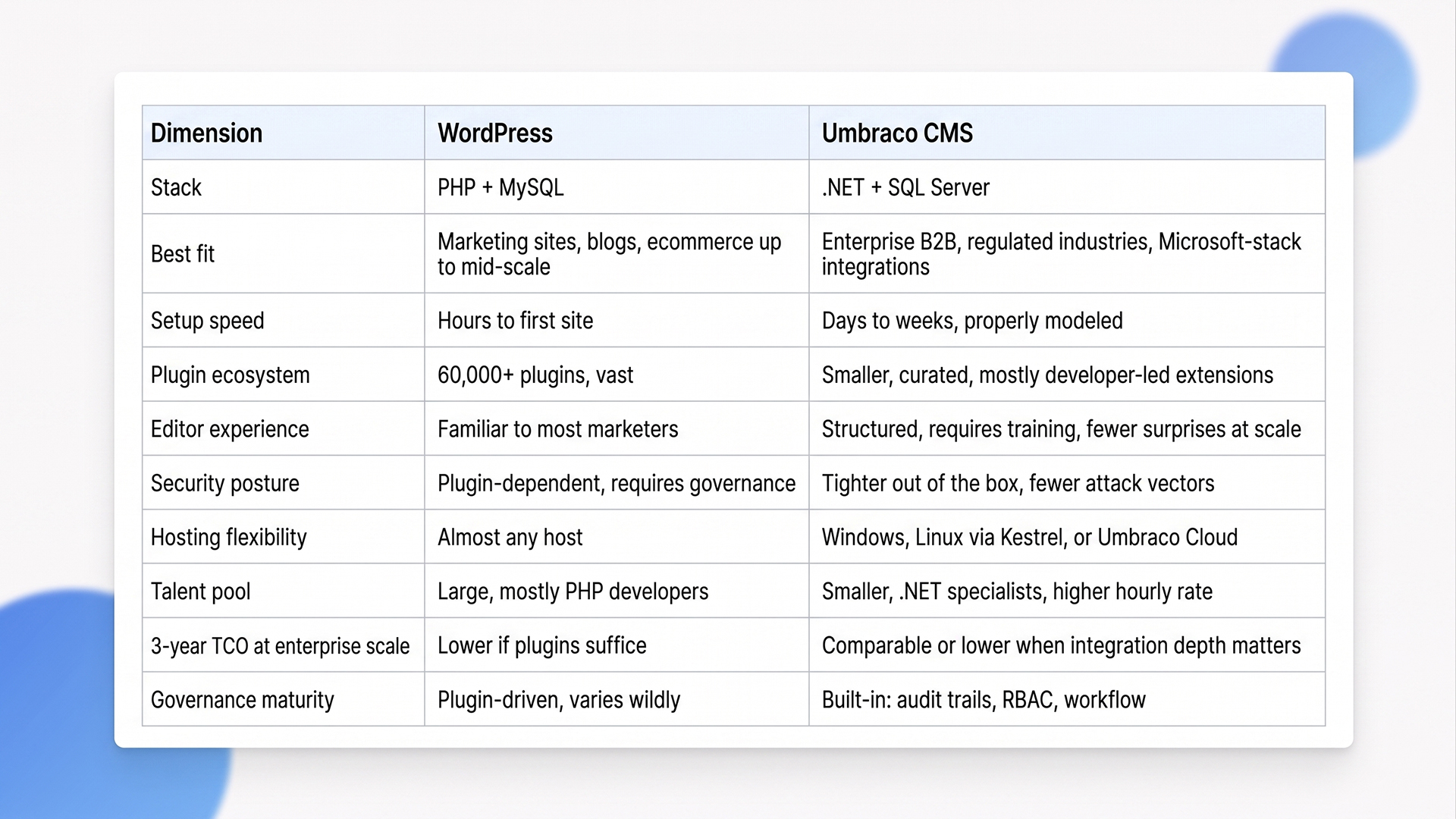
Read across that table and the pattern is clear. WordPress is faster, cheaper, and more accessible for the first 18 months. Umbraco is more disciplined, more secure, and more sustainable for the next five years. The right choice depends entirely on which window you’re optimizing for.
A useful rule we apply at Ariel: if the website is primarily a marketing surface and the team running it is marketing-led, WordPress almost always wins on economics. If the website is a digital experience platform supporting structured business processes, complex integrations, or compliance requirements, Umbraco’s discipline starts paying for itself by year two.
What Teams Get Wrong About Umbraco TCO
The most common misread of Umbraco economics is that the platform is free, therefore the project is cheap. The core CMS is genuinely free under the MIT license, and that’s where the simplicity ends. The total cost is dominated by what surrounds it, not what it costs to download.
Developer rate, not license
Umbraco runs on the .NET stack, which narrows the talent pool considerably. Skilled .NET developers with CMS experience are harder to find than equivalent WordPress developers and command higher hourly rates. That’s not a problem if you’re building something that justifies the rate. It is a problem if you scoped the project assuming WordPress economics and discovered the rate difference at sprint planning. Plan for it upfront, or work with a partner that already has the engineering depth in place.
Custom development is the default, not the exception
Umbraco’s plugin ecosystem is intentionally smaller than WordPress’s. Most enterprise features (advanced workflows, custom integrations, content blocks tailored to brand systems) are built rather than installed. That’s a strength when it produces clean, maintainable code that fits the business. It’s a cost when teams expect plugin-style economics and end up paying for everything custom. Budget for development time, not feature-store shopping.
Hosting and deployment add-ons aren’t free
Umbraco Cloud pricing reflects a tiered model with separate licensing for some add-ons:
- Umbraco Cloud Starter: around USD 40 per month.
- Umbraco Cloud Standard: around USD 250 per month, with Forms included in the plan.
- Umbraco Cloud Enterprise: flexible pricing.
- Self-hosted Forms: around USD 250 per domain.
- Umbraco Deploy: additional licensing on self-hosted setups.
None of these are blockers, but they do mean the “free open source” framing is incomplete by the time you have an enterprise stack assembled.
Upgrade discipline matters more on Umbraco
Umbraco follows Microsoft’s LTS release cadence. Umbraco 14 introduced a fully rebuilt backoffice, Umbraco 15 brought it to .NET 9 with HybridCache, and Umbraco 16 made Tiptap the default rich text editor. These aren’t cosmetic releases, they involve real upgrade work. Sites that defer upgrades for three years routinely pay more to catch up than they would have spent staying current. Treat upgrade cadence as part of operations, not a deferred line item.
Content modeling decisions outlive the platform
This is the cost most teams discover too late. Umbraco rewards strong content modeling and punishes weak modeling. Document types, compositions, blocks, and nesting rules set early in the project define how flexible the site will be five years later. We’ve taken over Umbraco builds where the original team treated content modeling as a phase-one task and discovered every new feature requires structural rework. The fix is expensive. The prevention is cheap.
When Umbraco Is the Wrong Call

Not every project needs Umbraco. Here is where we tell clients to walk the other way.
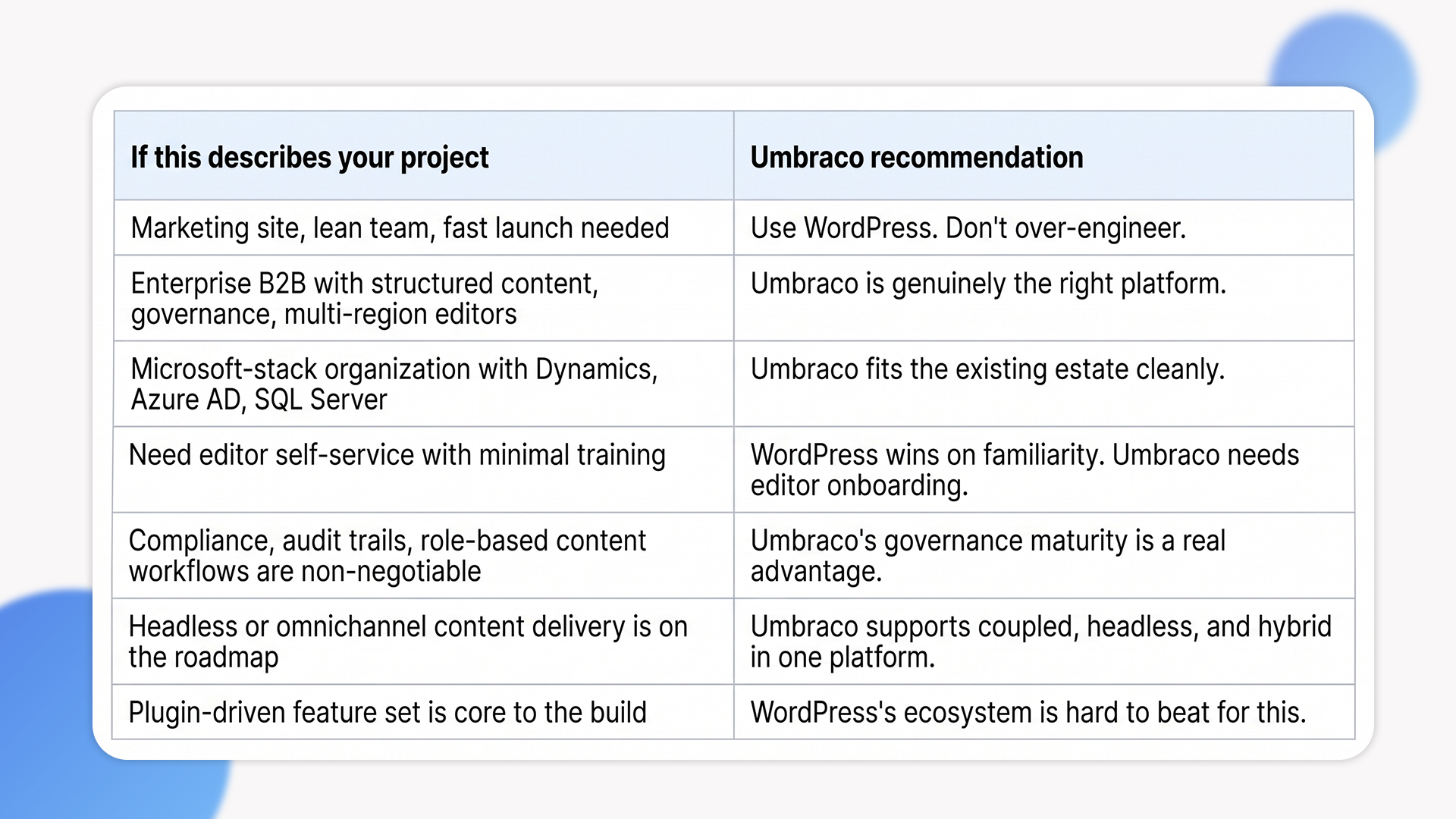
You need to launch a marketing site in 3 to 6 weeks with a marketing-led team. Umbraco’s modeling discipline and developer-first orientation make it the slower path. WordPress will get you live faster, with editors who can self-serve from day one. Choosing Umbraco here adds friction without adding the long-term value that justifies it.
You don’t have, and can’t sustain, .NET engineering capacity. Umbraco’s TCO assumes ongoing .NET maintenance. Without that capacity in-house or through a partner, the platform decays faster than a comparable WordPress site, because the things WordPress’s plugin ecosystem handles automatically (security patches, feature additions, integrations) are your code on Umbraco.
Your business case rests on plugin economics. If your competitive advantage is shipping fast with off-the-shelf functionality, the plugin gap matters. Umbraco’s smaller marketplace means more custom build, which is the right answer for differentiation but the wrong answer for speed.
If those situations don’t describe your project, Umbraco is genuinely worth evaluating against the alternatives.
The Umbraco Patterns That Actually Work at Scale
Across enterprise Umbraco builds, the same architectural decisions separate the projects that scale cleanly from the ones that need rework by year three.
Compositions over inheritance
Umbraco supports both inheritance and composition for document types. Inheritance feels cleaner early on, but breaks at scale because every change cascades through child types. Composition (small, reusable property sets that combine into document types) gives you flexibility without the cascade risk. Most enterprise sites we deliver use composition almost exclusively.
Block list and block grid editors over rich text dumping grounds
Editors will do what the platform allows. If you give them a single rich text field, they will paste in tables, images, and inline styles that break the design system. Block-based editing constrains the editor to approved components, which keeps the front end predictable and the design system enforceable. This is one of the highest-leverage decisions in the entire build.
Content delivery API for headless or hybrid use
Umbraco 12 onward ships with a first-class Content Delivery API and Media Delivery API. That means you can run Umbraco coupled, headless, or hybrid without changing platforms. For organizations that aren’t sure whether they need headless yet, this is the cleanest middle ground in the market.
Integration through services, not plugins
Umbraco’s strength as an enterprise CMS shows up in how cleanly it integrates with Microsoft Dynamics 365, Active Directory, Azure AD, SQL Server data sources, and external APIs. The right pattern is to expose those integrations through application services in the .NET layer, not plugin glue. We’ve delivered Umbraco builds with multi-region content trees, region-based permissioning, and live integrations to logistics CRMs and shipping providers.
Governance from day one, not phase two
Role-based access, content approval workflows, scheduled publishing with fallback, and audit trails are core to Umbraco. Configuring them properly during the initial build takes weeks. Retrofitting them after launch takes months. The teams that get long-term value from Umbraco set up governance during the modeling phase, not after the first content team complaint.
Should You Choose Umbraco? A Decision Lens
How Ariel Approaches Umbraco Builds
We don’t lead with platform pitches. We start with three questions:
- Who publishes content and how often.
- What the integration surface looks like.
- What the team can sustain over a five-year horizon.
The recommendation, Umbraco, WordPress, or something else entirely, falls out of those answers.
Here’s when Umbraco is the right call:
- Content modeling is treated as a workstream, not a phase-one task.
- Block-based editing is configured to enforce the design system from day one.
- Governance is wired in during modeling, not bolted on after launch.
- Integrations are built through clean .NET application services, not plugin glue.
- Upgrade paths are planned as part of operations, with a clear cadence rather than ad-hoc cycles.
Across industries (logistics, healthcare, fintech, retail) we’ve delivered Umbraco builds that scale to thousands of pages, multilingual content, region-based permissioning, and integrations with ERP and CRM systems. The platform isn’t the differentiator. The decisions made during modeling and governance are.
Evaluating Umbraco for an enterprise build and want a delivery-grade assessment, not a vendor pitch?
Our team has delivered Umbraco builds across enterprise and mid-market clients for 16 years. We’ll review your requirements, your stack, and your team capacity, then give you an honest recommendation, even if it isn’t Umbraco.
Frequently Asked Questions
1. Is Umbraco better than WordPress?
Not universally. WordPress wins for marketing-led sites, fast launches, and plugin-driven feature sets. Umbraco CMS wins for enterprise B2B, structured content governance, and Microsoft-stack integration. The right comparison is built around which workload you’re optimizing for, not which platform is “better.”
2. How much does Umbraco actually cost at enterprise scale?
The core CMS is free. Umbraco Cloud Standard runs around USD 250 per month with Forms included in the plan. For self-hosted Umbraco installations, Forms is licensed separately at around USD 250 per domain, and Deploy adds further licensing if you go that route. The dominant cost line is Umbraco development, because .NET specialist rates are higher than equivalent WordPress rates. Plan for development cost, not licensing, when scoping the project.
3. Can Umbraco run as a headless CMS?
Yes. Umbraco ships with a Content Delivery API and Media Delivery API, and it can run coupled, headless, or hybrid in the same platform. That flexibility is one of its strongest enterprise differentiators because it removes the lock-in pressure of choosing an architecture upfront.
4. How long does an enterprise Umbraco build typically take?
4 to 12 weeks for a focused build with clean requirements. Larger enterprise platforms with multi-region content, integrations, and custom workflows run 3 to 6 months. The biggest variable isn’t platform complexity, it’s how much content modeling and governance work is done before development begins.
5. Does Ariel handle Umbraco migrations and ongoing support?
Yes. We handle migrations from WordPress, Sitefinity, DNN, and legacy Umbraco versions, plus ongoing development, upgrade management, and support. Get in touch to scope your project.
The Decision Behind the Decision
The strongest Umbraco CMS projects aren’t the ones that picked the platform fastest. They’re the ones that picked it deliberately, with clear reasons that matched the business.
Pick Umbraco when content discipline, integration depth, and stability over five years matter more than time-to-launch. Pick WordPress when launch speed and editor self-service matter more than long-term governance. Pick something else entirely when neither fits cleanly. The architecture follows from the operating reality, not the other way around.
Ready to make a CMS decision built on five-year reality, not first-year convenience?
Book a free consultation with Ariel’s CMS team. We’ll map your requirements, assess your stack, and give you a sequenced roadmap whether the answer is Umbraco, WordPress, or something else.