The cloud migration services market hit $0.30 trillion in 2025 and is projected to reach $1.03 trillion by 2030 at a 28.24% CAGR. Spending is growing. Execution quality is not. 62% of migration projects either fail outright or end up significantly harder than expected (IDC).
The root issue is planning, not tooling. Organizations that run a formal cloud readiness assessment before migrating report 2.4x higher success rates than those that skip it (IDC).
This guide will break down what a cloud migration strategy actually involves, phase by phase, and what separates projects that deliver ROI from those that stall.
What Is a Cloud Migration Strategy and What Does It Cover?
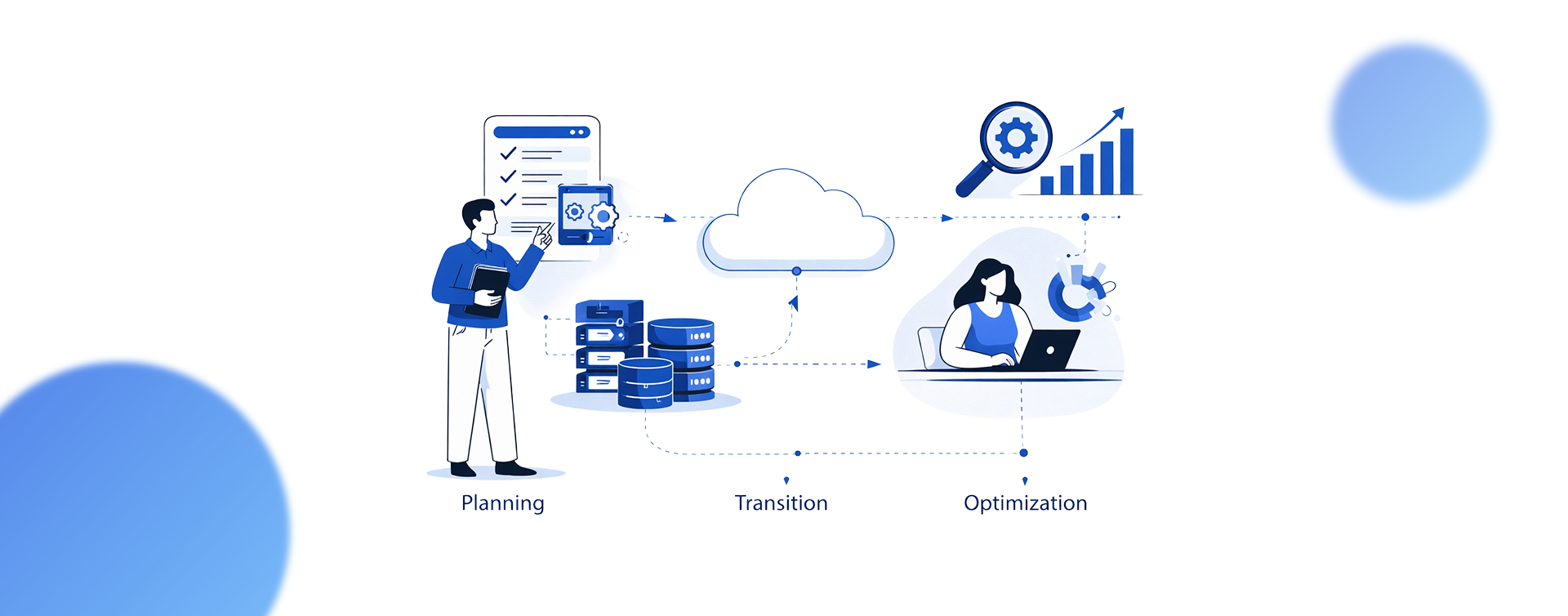
A cloud migration strategy is a documented plan that defines which workloads move to the cloud, in what sequence, using which migration method, and under what cost and compliance constraints. It covers three phases: cloud migration planning, transition execution, and post-migration optimization. Without it, teams migrate blindly and consistently overspend.
The standard framework breaks migration into six methods, commonly called the 6 Rs: Rehost, Replatform, Refactor, Repurchase, Retire, and Retain. Organizations that only rehost (lift and shift migration) see approximately 40% lower ROI compared to those that modernize, per industry benchmarks.
“Security-first architecture decisions depend on understanding where cloud technology is moving next, a topic we explore in Innovations in Cloud Computing: Paving the Path to the Future.“
Retire and Retain are often overlooked. A practical rule: plan to retire 10% to 25% of your application portfolio before migration. That alone is a free cost reduction. Meanwhile, 25% of organizations have repatriated at least one workload back to on-premises, with cost cited as the #1 reason by 54% (IDC, 2025).
1. The 6 R Migration Methods Compared
Each of the six methods fits a specific workload profile. Here is how they break down:
- Rehost (Lift and Shift): Move workloads to the cloud with minimal changes. Best for quick migrations of stable applications with no major performance requirements. Lowest upfront cost but limited cloud-native benefits.
- Replatform (Lift, Tinker, and Shift): Apply targeted optimizations during migration, such as switching to managed databases. Balances speed with moderate cloud-native gains.
- Refactor (Re-architect): Rebuild applications for cloud-native architecture. Carries the highest upfront cost and longest timeline, but delivers the strongest long-term ROI for applications that will be in production for 5+ years.
- Repurchase: Replace existing software with SaaS alternatives (e.g., moving from on-prem CRM to Salesforce). Reduces maintenance overhead at the cost of customization flexibility.
- Retire: Decommission applications that no longer serve business needs. Directly reduces licensing, hosting, and maintenance costs.
- Retain: Keep applications on-premises where regulatory, latency, or cost factors make cloud migration impractical.
2. What a Cloud Migration Strategy Is Not
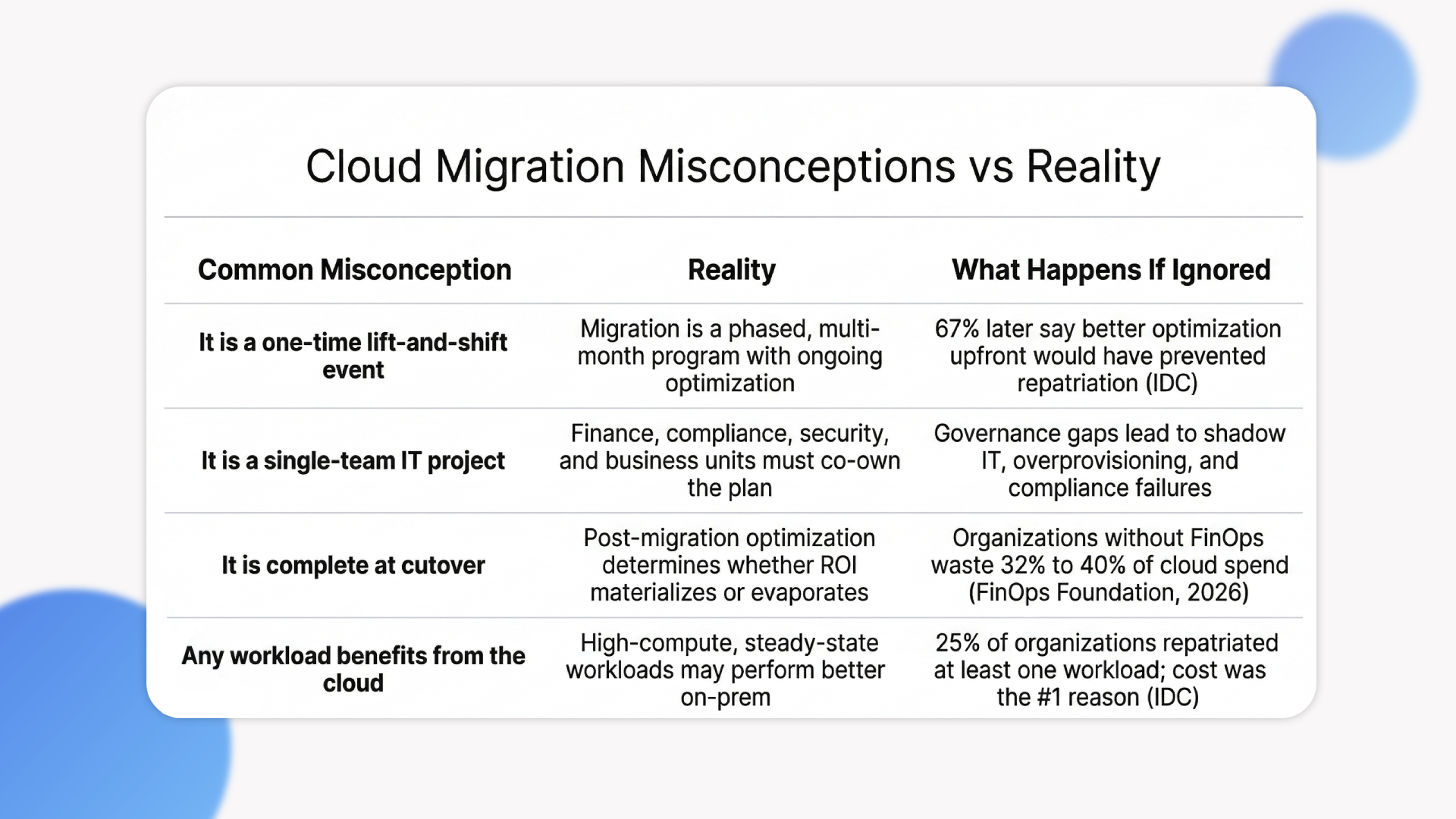
A cloud migration strategy is not a one-time lift-and-shift event. It is not a single-team IT project. Finance, compliance, and business units must align on costs, data governance, and timelines. And it is not complete at cutover. Organizations that treat go-live as the finish line are the ones who end up repatriating workloads 12 months later.
Quick Strategy Glance:
The planning phase determines whether a migration succeeds or fails, and that starts with the framework.
How Do You Build a Cloud Migration Planning Framework That Holds?
Cloud migration planning starts with a full infrastructure audit: mapping every application, its dependencies, data classification, and compliance requirements. Without this, 38% of failed projects hit unanticipated dependency conflicts during testing. A validated dependency map and workload prioritization matrix are non-negotiable before any migration starts.
Here is the four-step framework that holds under pressure:
- Step 1: Cloud Readiness Assessment. Inventory every application. Classify data by sensitivity. Identify regulatory obligations: GDPR, HIPAA, PCI DSS. This step alone eliminates the dependency surprises that derail timelines.
- Step 2: Workload Prioritization. Start with non-critical workloads to build team confidence and validate tooling. Score workloads by business criticality, migration complexity, dependency count, and compliance tier.
- Step 3: Landing Zone Design. Define account structure, IAM roles, network topology, and compliance controls before migrating anything. Retrofitting these after go-live costs 3x to 5x more.
- Step 4: Migration Wave Planning. The median enterprise migration wave takes approximately 8 months end-to-end. Break the full migration into 3 to 5 waves, each with its own testing, cutover, and stabilization window.
Quick Framework Glance:
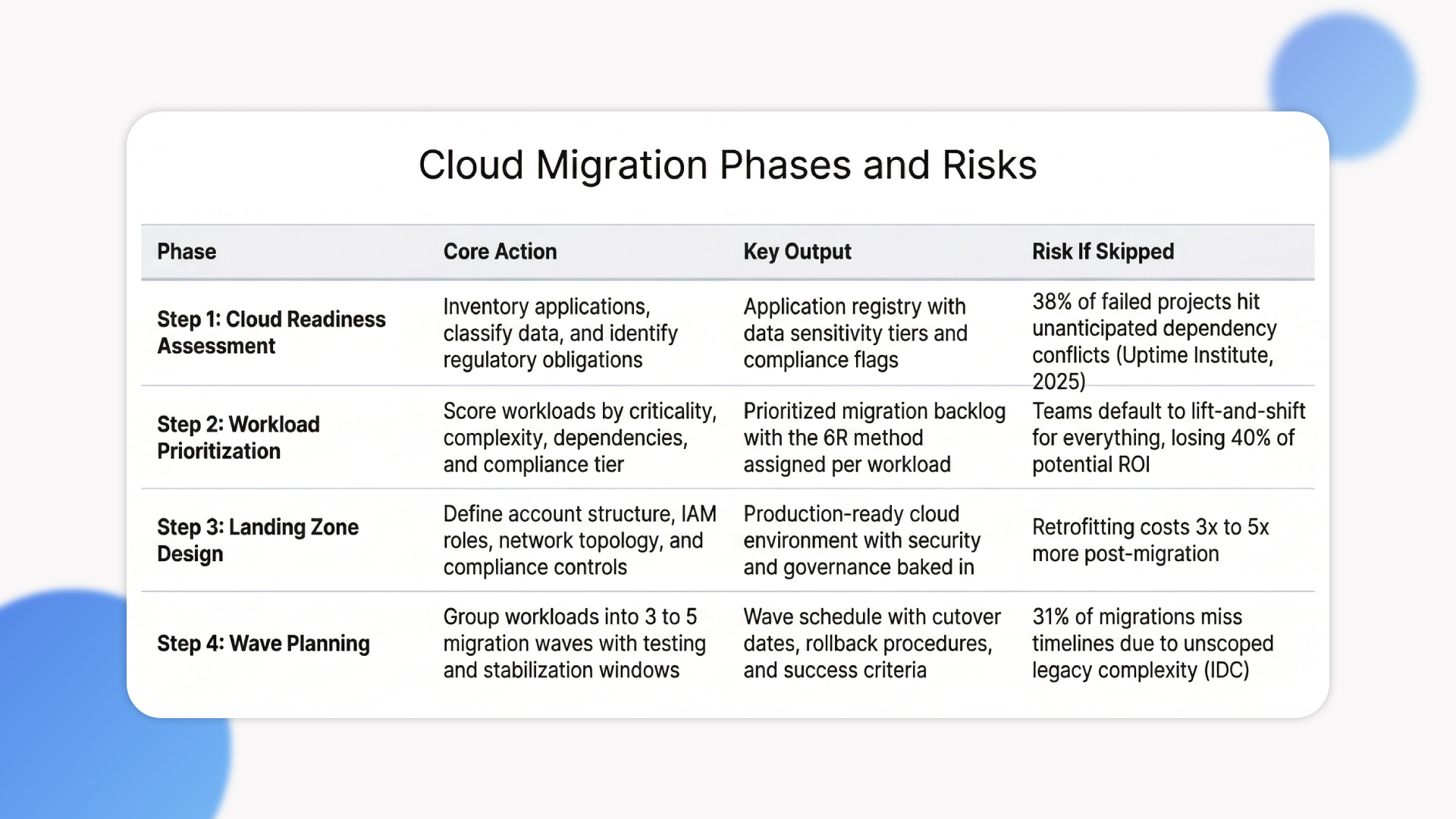
1. Workload Prioritization Matrix
Score each workload across four dimensions: business criticality (revenue impact if offline), migration complexity (architecture changes required), dependency count (systems that break if this moves), and compliance tier (regulatory sensitivity).
Migrate low-complexity, low-dependency workloads first. Save tightly coupled, compliance-heavy systems for later waves when tooling and team expertise are proven.
“Organizations running workloads across multiple providers need a unified strategy beyond security tooling alone, which we detail in our Multi-Cloud Strategy Guide 2025.”
2. Compliance and Data Sovereignty in the Planning Phase
Cross-border data transfers are now subject to 130+ overlapping jurisdictional controls. Retrofitting compliance post-migration is expensive and avoidable. Regulatory frameworks to address early, by industry: GDPR (EU data subjects), HIPAA (healthcare), SOC 2 (B2B SaaS), PCI DSS (payments).
Design compliance into the landing zone architecture from day one. This is where cloud migration planning either pays off or creates months of rework.
What Are the Biggest Cloud Migration Risks and How Do You Contain Them?
The top cloud migration strategy risks are misconfigured services, legacy application incompatibility, cost overruns, and talent gaps. Leaked credentials from IAM misconfigurations were the initial access point in 65% of cloud breaches in 2025. Security must be built into the migration plan, not applied after cutover.
38% of organizations struggle with integration as their top challenge. 30% cite security. 25% cite skill gaps. Only 65% of cloud users currently encrypt sensitive data in transit and at rest. That leaves a third of organizations running production workloads without basic encryption in place.
Governance failures, specifically the absence of formal approval workflows, lead to overprovisioning, sprawl, and shadow IT.
Gartner predicted: “99% of cloud security failures through 2025 would be the customer’s fault.“
1. The Hidden Cost Risk: Why FinOps Must Start Before Cutover
Organizations without formal FinOps practices waste 32% to 40% of cloud spend. Mature programs still waste 15% to 20%. 59% of organizations now have a dedicated FinOps team, up from 51% the previous year. Start FinOps during planning, not after go-live.
2. Legacy Application Incompatibility
Monolithic architectures, coupled dependencies, and reliance on environment-specific configs are the #1 cause of missed timelines, contributing to 31% of delays (IDC). Containerization and microservices provide a modernization path before or during migration.
For workloads stuck on legacy stacks, run a cloud readiness assessment early. Discovering incompatibility in production is where budgets and timelines break.
Containing risk upfront reduces the damage. What comes next, the post-cutover phase, determines whether the investment actually pays off.
What Does Post-Migration Optimization Actually Require?
Post-migration optimization is where most cloud ROI either materializes or evaporates. The work includes continuous cost rightsizing, security governance, performance benchmarking, and application modernization. Organizations that skip this phase are among the 67% who later say better cloud cost optimization upfront would have prevented repatriation (IDC).
Three areas require ongoing attention: an observability stack (unified dashboards for logs, metrics, and traces), continuous application modernization (gradually refactoring apps to capture developer productivity gains that lift-and-shift leaves behind), and resilience drills (regularly testing backup and disaster recovery in the new environment).
1. Cloud Cost Optimization Benchmarks to Track
Track three core metrics: cost per workload unit, infrastructure utilization rate, and idle resource percentage. Cloud budgets currently exceed limits by an average of 17%, and estimated wasted IaaS/PaaS spend sits at 27%. If your idle resource percentage sits above 30%, FinOps is not optional.
“Building security into the migration process, rather than retrofitting it after, is the approach we outline in Cloud Migration Services for Businesses.”
2. When Repatriation Is the Right Call
High-compute, steady-state workloads (databases, rendering pipelines) are 3.2x more likely to be repatriated than variable workloads (IDC). Repatriation does not mean cloud failure.
The smart move: evaluate steady-state workloads separately in your cloud migration strategy and keep them on a hybrid cloud path if the cost math does not work in the public cloud.
How Ariel Integrates AI into Your Cloud Transition Strategy
The biggest migration failures traced in this blog (dependency conflicts, FinOps waste, legacy incompatibility) share a root cause: teams scope manually, miss critical connections, and discover problems during cutover instead of planning.
Ariel’s engineering team applies AI and ML at the assessment stage itself. Automated dependency mapping catches the integration conflicts that cause 38% of budget overruns. AI-driven workload classification scores each application across complexity, compliance tier, and modernization ROI before a migration method is assigned. This is the difference between choosing a 6R path based on data and defaulting to lift-and-shift because no one ran the analysis.
For regulated industries, Ariel designs compliance controls (HIPAA, SOC 2, PCI DSS) into the landing zone architecture from day one, not as a retrofit. And post-cutover, their FinOps governance stays active as an ongoing engagement, catching the idle resource waste and cost drift that hits organizations without continuous optimization.
If your team is approaching a migration or stuck mid-execution, Ariel’s engineers can run a scoping assessment to identify where the plan needs tightening. See how Ariel approaches cloud migration →
Conclusion
A cloud migration strategy fails when treated as an IT task instead of a cross-functional business decision. The data is consistent: formal readiness assessments drive 2.4x higher success rates, lift-and-shift defaults cost 40% in lost ROI, and absent FinOps discipline wastes 32% to 40% of cloud spend post-cutover.
The 38% budget overrun rate and 62% failure rate are symptoms of skipped assessments and ungoverned cost structures. Every organization’s cloud migration strategy will differ by workload complexity and regulatory environment, but the sequence stays constant: assess, prioritize, migrate in waves, optimize continuously.
If you are planning a migration or revisiting one that stalled, Ariel Software Solutions can help scope a structured approach for your environment. Start a conversation with Ariel’s cloud engineering team →
Frequently Asked Questions
1. What is a cloud migration strategy in simple terms?
A cloud migration strategy is a plan that defines what moves to the cloud, in what order, and how. It covers assessment, workload selection, migration method, security setup, and post-migration governance. Without one, most organizations overspend or miss timelines.
2. What are the 6 Rs of cloud migration?
The 6 Rs are Rehost (lift and shift), Replatform (targeted changes), Refactor (rebuild for cloud-native), Repurchase (swap for SaaS), Retire (decommission), and Retain (keep on-prem). Each applies to a different workload type based on complexity, cost, and business value.
3. How long does a cloud migration take?
A typical enterprise migration wave takes approximately 8 months from assessment to stabilization. Simple environments can be completed in 4 to 6 weeks. Complex multi-system or regulated-industry migrations often run 12 months or more, primarily driven by legacy dependency complexity.
4. What is the biggest cause of cloud migration failure?
The most common causes are skipped readiness assessments, underestimated legacy dependencies, and inadequate cloud expertise. Organizations that conduct a formal readiness assessment before migrating have 2.4x higher success rates than those that proceed without one (IDC).
5. How much does cloud migration cost for a mid-sized company?
For large enterprises, a full-scale cloud migration (50+ applications) averages around $1.2 million and spans approximately 8 months. Costs vary significantly by organization size, migration method, and refactoring depth. SMBs typically invest less per project but face higher FinOps maturity gaps.
6. What happens after a cloud migration is complete?
Post-migration optimization covers cost rightsizing, security governance, performance benchmarking, and ongoing application modernization. Organizations without formal FinOps practices waste 32% to 40% of their cloud spend. Treating cutover as the finish line is the most common reason ROI targets are missed.