
Enterprise AI is moving past the chat window. For years, most production AI systems have focused on answering questions: a user asks, a model responds, and a human decides what happens next.
That is changing as AI systems increasingly retrieve information, call internal tools, make bounded decisions, and execute actions inside business-critical workflows with limited human intervention.
That shift creates a fundamentally different engineering problem. A wrong chatbot response can be reviewed and corrected; a wrong agent action can modify a customer record, trigger a transaction, expose sensitive data, or set off a downstream workflow before anyone notices.
For CTOs and platform teams, the challenge is therefore not simply making agents more autonomous, but making that autonomy bounded, observable, authorized, and recoverable.
That is where enterprise AI integration services need to go beyond connecting a model to an existing system. Production-ready agents require the same engineering discipline as other critical software: controlled access, clear boundaries, failure handling, observability, and governance.
What Changes When AI Moves From Chat to Action?
A conventional AI assistant and an autonomous agent may use the same underlying language model, but they solve fundamentally different engineering problems. A chatbot generates an output for a person to evaluate. An agent can interpret a goal, gather context, select tools, and trigger actions across connected systems. Once AI can act, orchestration, authorization, state management, and failure handling become part of the architecture.
A chatbot responds; an agent executes. Here’s how the execution path looks for a chatbot and an AI agent:
Chatbot pattern: User → AI → Response → Human action
Agentic workflow: Trigger → Agent → Context → Tool/API → Business action → Result → Next step
In the first model, the human remains the decision point between the AI’s output and any consequential action. In the second, the system can move through multiple steps and interact with downstream services without requiring a person at every stage.
That changes the risk boundary: an incorrect response can be reviewed, while an incorrect tool call can immediately change data or trigger another system.
Autonomy creates new failure modes
Once an agent can act across systems, teams also need to account for failures that do not exist in a simple request-and-response interaction:
- A tool returns incomplete or contradictory data.
- An agent selects the wrong tool.
- A downstream API becomes unavailable.
- A workflow retries an action that already succeeded.
- A dependency responds slowly and causes execution to cascade.
- An agent receives untrusted instructions through retrieved content.
- A multi-step workflow reaches an unexpected state.
These scenarios require controls such as timeouts, idempotency, bounded retries, schema validation, tool-level permissions, circuit breakers, and explicit escalation paths. The goal is not to prevent every possible failure, but to ensure that one incorrect decision cannot propagate unchecked through the rest of the system.
Retries should also be operation-aware. A read request can often be retried safely, while payment, deletion, message-sending, or record-creation operations may require idempotency keys, state checks, or compensating workflows to prevent duplicate side effects.
Not every AI use case needs an autonomous agent
More autonomy is not automatically better architecture. A workflow that only requires summarization, classification, drafting, or question answering may be better served by conventional LLM integration with a human remaining responsible for the resulting action.
When the workflow requires the system to interpret context, choose among tools, maintain state, and execute multiple steps, an agent may be more appropriate. The architectural decision should follow the workflow’s requirements and risk profile, not the availability of an agent framework.
For a deeper comparison of when a conventional integration is sufficient and when a custom agent makes more sense, see Custom AI Agents vs. ChatGPT Integration.
How Do You Operationalize Autonomous AI Agents in Enterprise Workflows?
Moving an agent into production requires more than connecting a model to business data. The enterprise AI integration services account for workflow boundaries, controlled system access, authorization, failure handling, observability, and governance.
The architecture should give the agent enough capability to complete its task while keeping consequential decisions and system access under explicit application controls. Here’s a practical look at the architectural controls that turn an autonomous AI agent from a prototype into a production-ready enterprise workflow:
1. Start With the Business Workflow, Not the AI Agent
The first architectural decision isn’t which model to use. It’s which workflow actually benefits from autonomy. Evaluate candidate workflows based on:
- Frequency and volume
- Repetitiveness
- Availability of structured data
- Number of systems involved
- Decision complexity
- Cost of manual processing
- Measurable outcomes
- Reversibility of actions
- Business impact of errors
- Compliance requirements
Good candidates can include support-ticket triage, document processing, internal IT operations, sales operations, procurement, and other knowledge-driven workflows with relatively structured inputs and well-understood outcomes.
Once selected, define the agent’s boundary, and it should look like this:
Trigger → Goal → Context → Permitted tools → Allowed actions → Escalation conditions → Completion criteria
The objective should be bounded autonomy, not unrestricted access to an enterprise environment. For a deeper look at structuring these workflows, see this guide to agentic AI workflows, including how to define triggers, tools, and escalation paths.
2. Build an Integration Layer Around the Agent
An enterprise agent typically sits behind an integration layer rather than connecting directly to critical business systems. This layer separates the model’s reasoning from the policies, APIs, and controls that govern what happens in the underlying systems. Here’s a reference architecture:
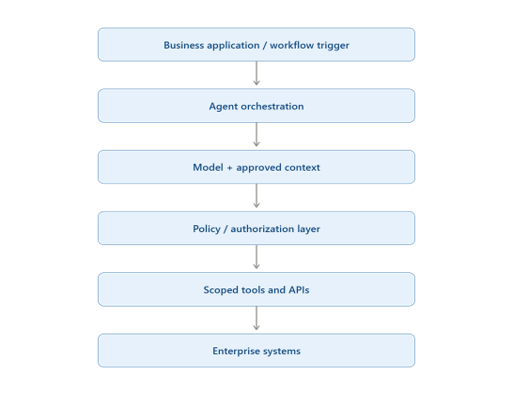
However, it is important to ensure that the following responsibilities remain distinct:
- Model: Determines a potential next step.
- Application: Applies workflow logic and authorization.
- Tool/API: Executes the approved operation.
Keeping these responsibilities separate means the model can reason about an action without becoming responsible for the authorization decision itself. In a production environment, that separation helps keep security and business rules outside the model’s probabilistic behaviour.
Downstream systems should also enforce their own authorization checks where possible. Approval or authorization in the agent layer should not automatically become unrestricted trust across every connected service.
The same principle applies to how agents interact with enterprise systems. Rather than exposing broad system access, a more controlled pattern is to give the agent narrowly defined capabilities. For example, instead of giving a general-purpose capability, such as execute_database_query(), give specific queries, like get_customer_order(), create_support_ticket(), and update_ticket_status().
Purpose-built tools provide clearer permission boundaries and make individual operations easier to validate, test, monitor, and audit. They also limit the potential blast radius when an agent makes an incorrect decision.
Also, agent integration does not necessarily require replacing the controls already surrounding business systems. In many environments, the agent can operate through existing application and security boundaries, including those governing CRM, ERP, HR, ITSM, finance, and data platforms.
This creates a useful architectural principle: the agent adds an intelligent decision layer to an existing workflow; it does not need to become the authority over the systems that execute that workflow.
Is Your Agent Ready to Work Across Your Existing Systems?
See how agent architecture designed by experts can connect models, APIs, enterprise data, and business workflows without bypassing the controls already in place.
3. Give Agents Enough Authority to Work, Not Enough to Cause Damage
Once the integration layer is in place, the next architectural consideration is what the agent is actually permitted to access and do. This typically comes down to identity and least privilege.
An agent operating in an enterprise environment needs a distinct identity that can be authenticated, authorized, and traced independently. Depending on the workflow, this can include:
- Authentication as a distinct principal
- Agent or workload identity separate from a human user
- User-identity propagation when an action is performed on someone’s behalf
- Service-to-service authorization with downstream systems
- Clear attribution in audit logs, so actions can be traced back to the agent that performed them
Permissions also need to reflect the actual boundaries of the workflow rather than providing broad access by default. This includes defining which tools the agent can invoke, which operations it can perform, which resources it can access, and which tenant or user’s data it can reach. Read and write authority may also need to be separated depending on the consequences of the action. Teams should be able to disable an agent, revoke its credentials or tokens, and stop privileged workflows quickly without waiting for the model or orchestration layer to cooperate.
A useful framework for thinking about increasing agent authority is: Read → Recommend → Prepare → Execute
Each step gives the agent greater ability to affect the underlying system, so the controls around the action can become progressively stronger. An agent may be able to read customer information automatically, for example, while preparing or executing a consequential change could require additional validation or approval.
Most importantly, permissions remain defined by the system that owns the resource. The agent can operate within the authority assigned to it, but it should not be able to determine, expand, or negotiate those permissions at runtime.
4. Put Human Approval Where the Business Risk Requires It
Human oversight does not necessarily need to be part of every agent action. A more practical approach is to align the level of human involvement with the potential impact and reversibility of the action. Risk depends on what the output controls, not simply the type of AI task.
- Low risk → automatic execution: Low-impact, reversible tasks such as summarization or internal enrichment, where an incorrect result is relatively easy to identify and correct.
- Moderate risk → bounded execution: Creating tickets or updating non-critical records, with defined limits on what the agent can change.
- High risk → policy validation + human approval: Financial transactions, permission changes, irreversible deletions, contractual actions, and other decisions with significant customer or business consequences.
The important distinction is that approval requirements should be enforced outside the model. An agent can determine that an action appears appropriate, but it should not be able to decide that an approval requirement no longer applies.
For high-risk actions, deterministic policy checks and sufficient supporting evidence should also be available to the approver, rather than reducing the control to an unexplained “Approve” button. The application or policy layer can determine when approval is required and prevent execution until those conditions are satisfied.
This creates a more useful model of human-in-the-loop design: not a human reviewing everything, but the system ensuring that the right actions reach a human before they become consequential.
5. Design for Failure, Prompt Injection, and Runaway Actions
Once an agent can act across business systems, failure handling becomes part of the architecture rather than an afterthought. The useful question is not whether an agent will eventually make an incorrect decision or encounter an unexpected input, but how much damage that failure can cause before the system contains it.
Three layers of control are particularly important:
- Validate every tool call: Agent-generated tool calls can be treated like any other external input. Structured schemas, input validation, allowed-value constraints, authorization checks, and business-rule validation can verify that the requested operation is valid before it reaches the underlying system.
- Bound autonomous execution: Controls such as maximum tool calls per workflow run, execution timeouts, token and cost budgets, bounded retries, exponential backoff, and circuit breakers can prevent a faulty workflow from repeatedly invoking downstream systems or consuming uncontrolled resources.
- Treat external content as untrusted: Agents may process emails, documents, customer messages, retrieved content, web pages, API responses, tool outputs, or responses from other connected agents that contain instructions designed to influence their behaviour. These inputs can inform the model’s reasoning, but they should not grant additional authority. Permissions, validation, and approval requirements remain enforced by the surrounding application.
This is the architectural distinction that makes prompt injection particularly important in agentic systems: an untrusted input may influence what the model wants to do, but it should not be able to change what the system allows it to do.
6. Make Agentic AI Workflows Observable and Auditable
Once agents start executing real actions, monitoring model latency alone doesn’t tell you whether the workflow is actually working as intended. Agentic AI workflows need visibility into execution, tool usage, failures, and the business outcomes they produce.
Useful signals include:
- Workflow health: Success and failure rates, execution time, and escalation frequency
- Tool behavior: Tool-call failures, retry counts, and unexpected or off-pattern tool usage
- Resource consumption: Token usage and cost per workflow
- Human intervention: Approval and override frequency
For actions with meaningful business impact, observability also needs to extend into an audit trail. Relevant events can include:
- User or request identity
- Agent identity and version
- Workflow ID
- Tools invoked
- Requested action
- Authorization result
- Approval event
- Resulting system change
- Errors or failures
This information helps teams reconstruct what happened when an agent produces an unexpected result, while also providing the evidence needed to support applicable regulatory, contractual, and internal governance requirements. At the same time, logging needs its own boundaries. Sensitive prompts, credentials, and raw customer data shouldn’t be captured by default simply because they are available.
Once an agent can act independently, knowing what it did, under whose authority, and what changed as a result becomes as important as knowing whether the workflow succeeded. For a deeper look at the identity, permissions, accountability, and audit controls around autonomous agents, read this AI agent audit guide.
7. Turn Governance and Compliance Requirements Into Runtime Controls
AI agent compliance is more useful when it is reflected in the architecture itself rather than left as a policy document that teams consult after implementation. The requirements can be translated into technical controls that operate as part of the agent’s normal execution path.
| Requirement | Technical control |
|---|---|
| Data access restrictionsData access restrictions | Resource-level authorization |
| High-risk operations | Human approval |
| Audit requirements | Structured action logs |
| Sensitive data | Access controls and redaction |
| Retention requirements | Retention policies |
| Model governance | Model and version tracking |
| Change control | Versioned workflows and tools |
Note: These controls are architectural examples, not a complete compliance checklist. Actual obligations depend on the jurisdiction, industry, data involved, system role, and specific use case.
When is an AI Agent Ready for Controlled Production?
An agent can take on greater responsibility as it demonstrates consistent performance within its defined boundaries. A staged progression allows teams to introduce autonomy gradually and use real workflow data to decide when additional execution authority is appropriate.
Here is an example of a practical staged model:
- 1. Observe: The agent analyzes the workflow without taking action, establishing a baseline for accuracy and behaviour.
- 2. Recommend: The agent proposes an action while a human remains responsible for executing it.
- 3. Approve: The agent prepares the action, but execution requires explicit human approval.
- 4. Bounded autonomy: The agent executes predefined, lower-risk actions independently within defined limits.
- 5. Conditional autonomy: The agent operates independently within policies, thresholds, escalation rules, and other runtime controls.
Before increasing autonomy, teams can evaluate:
- Task completion and error rates
- Human override frequency
- Escalation frequency
- Policy violations
- Tool-call accuracy
- Workflow cost
- Recovery from failed or interrupted actions
Autonomy should expand with demonstrated reliability. This gives enterprise teams a measurable path from supervised operation to controlled production execution, without treating full autonomy as the default endpoint.
For Ariel, the same principle fits naturally into an engineering-led approach to enterprise AI integration services: the goal is not maximum autonomy, but reliable execution within real business workflows and clearly defined boundaries.
What Enterprise AI Integration Services Should Actually Cover?
The term enterprise AI integration services can mean very different things, so it helps to define what production-grade integration actually covers. It goes beyond connecting an LLM to an API and brings together enterprise data, APIs, identity, workflow orchestration, security, governance, and observability within a coherent architecture.
The integration layer ultimately defines what an agent can see, what it can change, and where its authority stops. It also determines which actions require approval, how failures are contained, how execution is monitored, and how the agent’s access can be revoked when necessary. These controls need to work together rather than exist as disconnected safeguards.
An integration architecture that cannot clearly establish what the agent can access, what it can change, which actions require approval, how failures are contained, how activity is monitored, and how authority can be revoked is difficult to justify for production autonomy, regardless of how capable the underlying model may be.
Autonomy Should Be an Engineering Decision
The goal was never to make agents capable of doing everything inside an enterprise. It is to make them capable of doing useful work within clearly defined boundaries, with identity, least-privilege access, controlled tools, validation, approval gates, failure limits, observability, auditability, and compliance working together.
The enterprise advantage won’t come from giving AI unlimited autonomy. It will come from engineering the boundaries that make useful autonomy safe to operate at scale.
Want to Talk Through Your AI Agent Use Case?
Discuss your workflow, integration requirements, and autonomy goals with the Ariel’s team to explore what a production-ready approach could look like.
Frequently Asked Questions
1. What is an autonomous AI agent?
An autonomous AI agent is a system that can interpret a goal, reason about the next step, use approved tools or APIs, and take actions within defined permissions. Unlike a conventional AI assistant, it can carry a workflow forward with limited human intervention.
2. How are agentic AI workflows different from chatbots?
A chatbot primarily generates a response for a person to review and act on. Agentic AI workflows can retrieve information, use tools, make bounded decisions, and execute actions across business systems as part of a defined workflow.
3. How do you secure AI agents in enterprise systems?
Security typically combines distinct agent identity, least-privilege access, scoped APIs and tools, authorization checks, input validation, execution limits, risk-based human approval, monitoring, and audit trails. Together, these controls help keep an agent’s capabilities within the boundaries of its assigned workflow.
4. What does compliance mean for enterprise AI agents?
Compliance for enterprise AI agents depends on the applicable industry, jurisdiction, data, and use case. Technical controls such as authorization, logging, approval workflows, monitoring, and data protection can help enforce relevant requirements, but they operate alongside governance, documentation, risk assessment, and other organizational responsibilities.
5. How should enterprises introduce autonomous AI agents?
A practical approach is to begin with a well-defined workflow and increase autonomy gradually: observe → recommend → approve → bounded autonomy → conditional autonomy. Performance, error rates, overrides, policy adherence, and other operational signals can help determine when an agent is ready for greater responsibility.