
The AI automation pitch aimed at small businesses tends to either oversell the magic or hand-wave the cost. Neither version helps a 20-person operation actually decide what to automate, what to leave alone, and what the real spend looks like once everything is running. The honest answer is that small businesses get the highest leverage from AI automation in a narrow band of workflows, and the cost depends almost entirely on which band you pick first.
Salesforce’s 2024 small business research found that 75% of SMBs are experimenting with AI, and Goldman Sachs analysis suggests AI automation could free up roughly 8 to 12 hours per employee per week across SMB operations. Those numbers describe the opportunity. The reality of ai automation for small business is that the opportunity converts to ROI only when the workflow is well-scoped, the data foundation supports it, and the team is ready to operate the new tool. This guide walks through where to start, what each automation actually costs, and the patterns that consistently land cleanly inside small business operations.
Key Takeaways
- Small businesses get the highest ROI from AI automation in narrow workflows: customer support, lead handling, document processing, scheduling, and finance ops.
- Off-the-shelf SaaS tools handle most SMB automation needs. Custom builds are reserved for workflows where existing tools genuinely don’t fit.
- AI automation cost ranges from USD 50 per month for basic SaaS tools to USD 25,000+ for custom integrations across multiple systems.
- The biggest cost most SMBs miss is implementation time and change management, not subscription fees.
- Pilot purgatory is real for SMBs too. Start with one workflow, prove the ROI, then expand.
- Data readiness is the hidden prerequisite. Automating bad data produces faster bad outcomes.
- The right partner for SMB AI work is one who scopes against your actual constraints, not one who pitches enterprise-grade architecture you don’t need.
Where AI Automation Actually Pays Off for Small Businesses
The AI automation conversation in the SMB space gets noisy fast. Marketing automation, sales automation, customer service automation, finance automation, HR automation, the list keeps expanding. The signal cuts through when you focus on workflows where three conditions overlap: the work is repetitive enough to justify automation, the data is structured enough for AI to act on, and the failure cost is low enough that probabilistic output is acceptable.
Across the small business engagements we’ve scoped, five workflows consistently produce the bulk of measurable ROI. The business process automation ai category is broad in theory and narrow in practice; these are the patterns that actually work.
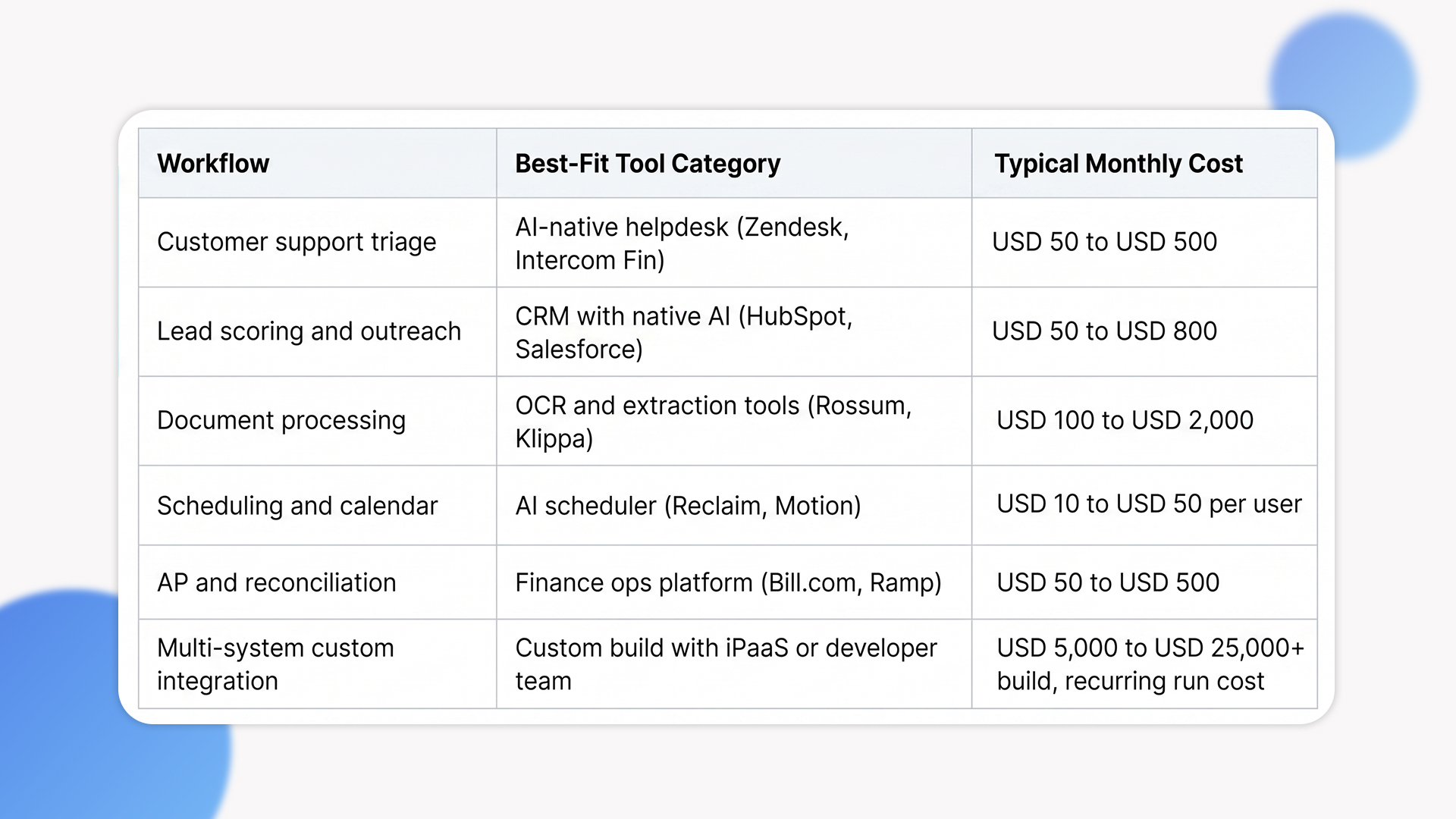
1. Customer support triage and response drafting
AI categorizes incoming tickets, drafts initial responses, and escalates the cases that need a human. Tools like Zendesk AI, Intercom Fin, and HubSpot AI handle this out of the box. The ROI shows up as faster response times and lower per-ticket cost, with the human team focused on the 20% of cases that genuinely need them.
2. Lead qualification and outreach
AI scores incoming leads, drafts personalized outreach, and routes high-intent prospects to the right rep. CRMs from HubSpot, Salesforce, and Pipedrive include native AI features for this. The leverage compounds as the database grows; the same team handles more leads with better signal.
3. Document processing and data extraction
Invoices, receipts, contracts, claims, intake forms. AI extracts structured data from documents and pushes it into accounting, CRM, or operations systems. Tools like Rossum, Klippa, and Microsoft Power Automate handle this for most SMB use cases. The ROI is hours of manual data entry replaced with seconds of automated processing.
4. Scheduling and calendar coordination
AI handles back-and-forth scheduling, books meetings, and manages calendar conflicts. Tools like Reclaim, Motion, and Calendly’s AI features handle this. The leverage is small per instance but compounds across a team.
5. Finance operations: reconciliation, expense, and AP automation
AI reconciles transactions, flags anomalies, and automates approval workflows. Tools like Bill.com, Ramp, and QuickBooks AI handle this for most SMB scopes. The ROI is finance team time freed up for analysis instead of data entry.
How to Choose the Right Pattern: A Decision Lens
The table below maps SMB workflow types to automation patterns. Treat it as a starting point for ai automation for small business decisions; the right answer depends on your specific operations, team size, and data foundation.
What AI Automation Actually Costs for Small Businesses
Cost in this space is wide because it depends on tool choice, integration depth, and team size. The ranges below are illustrative bands drawn from our delivery experience for SMB engagements, not industry-wide benchmarks.
Tier 1: Off-the-shelf SaaS (USD 50 to USD 500 per month)
This is where most SMBs should start. SaaS tools with built-in AI features handle the highest-leverage workflows without custom development. Setup time is days, not weeks. The trade-off is that the automation is constrained to what the tool supports; deeper customization requires moving up a tier.
Tier 2: SaaS with iPaaS integration (USD 500 to USD 3,000 per month plus setup)
When automation needs to span multiple systems, an integration-platform layer (Zapier, Make, Workato) connects them. The setup cost is meaningful (USD 2,000 to USD 10,000 typically), and the run cost compounds as you add more workflows. This tier handles most multi-system SMB automation needs.
Tier 3: Custom AI integration (USD 10,000 to USD 50,000 build, recurring run cost)
Reserved for workflows where existing tools genuinely don’t fit: industry-specific document processing, custom predictive models on operational data, AI features inside proprietary software. The investment is meaningful, but for the right workflows it produces leverage that off-the-shelf tools can’t match. Plan for an ongoing run cost on top of the build for hosting, model API spend, and ongoing tuning.
Most ai automation for small business engagements we scope at Ariel land in Tier 1 or Tier 2. Tier 3 makes sense when the workflow is core to the business and the existing tools don’t fit. Picking the wrong tier first is the most common cost mistake; SMBs commission custom builds for problems off-the-shelf tools would solve, or try to force off-the-shelf tools to handle workflows that genuinely need custom architecture.
What SMBs Underestimate About AI Automation
These are the cost and complexity lines that don’t appear in the original automation plan but determine whether the project produces ROI.
Implementation time exceeds subscription cost
The SaaS subscription is the smallest line. The real cost is the time to configure the tool, integrate it with existing systems, train the team, and iterate until it produces useful output. From our delivery experience, most SMB AI automation projects spend more on internal time than on tools, and most teams under-budget for it at the start.
Change management is harder than tool selection
AI automation changes how people work. The customer support agent who used to answer tickets manually now reviews AI-drafted responses. The salesperson who used to research leads now acts on AI-scored prioritization. Without deliberate change management (training, redesigned KPIs, feedback loops), tools get adopted partially and the projected ROI never materializes.
Data readiness is the silent prerequisite
AI automation works only as well as the data it sees. CRMs with inconsistent fields, contact databases full of duplicates, document systems with mixed file formats, all of these constrain what AI can actually do. Most SMBs discover during their first automation project that the data they assumed was “clean enough” needs more work than expected. Plan for data preparation as a first-sprint activity, not a phase-two task.
Pilot purgatory hits SMBs too
Most SMBs run a pilot, see promising results, and never quite scale it across the full team. The reasons are usually operational (no clear owner, no graduation criteria, competing priorities) rather than technical. Decide upfront what success looks like, who owns the rollout, and what triggers full deployment. Without that, the pilot becomes a permanent demo.
When AI Automation Is the Wrong Move
Not every workflow benefits from automation. Here is when we tell SMB clients to wait or pick a different path.
Your team is too small to absorb the change. Sustainable ai automation for small business has fixed setup and maintenance overhead. For a 5-person business, manual workflows often outperform automated ones because the time to set up and operate the automation exceeds the time it saves. Cross the threshold of about 10 to 15 employees before investing in serious automation infrastructure.
The workflow is genuinely ambiguous. AI handles repetitive work with structured inputs. Workflows that require judgment, context, or relationship management resist automation in ways that show up as quality problems after deployment. Automate the repetitive parts; keep the judgment work human.
Your data foundation isn’t ready. If your customer database, document store, or operational data is fragmented and inconsistent, AI automation accelerates the underlying problem rather than solving it. Fix data quality first.
The compliance posture isn’t designed for AI. Some regulated SMB workflows (healthcare, financial services, legal) have audit and explainability requirements that AI automation can complicate. The work is sometimes still possible, but only with deliberate compliance scoping.
How Ariel Approaches AI Automation for SMBs
From our delivery experience, the SMB engagements that produce ROI start with workflow analysis, not tool selection. We map the existing process, identify where automation would actually change the outcome, and pressure-test whether off-the-shelf tools can handle it before scoping a custom build. Most of the time, off-the-shelf tools win.
The operating disciplines that consistently make SMB automation engagements land cleanly are:
- Workflow first, tool second. Map the process before evaluating any AI product.
- Off-the-shelf before custom. Custom builds are reserved for workflows where existing tools genuinely don’t fit.
- Owner named upfront. Every automation has a designated person responsible for measuring its outcome and tuning it over time.
- Graduation criteria written down. Pilots run with clear success metrics and a defined trigger for full rollout.
Across industries, the patterns we apply for SMB AI work follow the same disciplines we use across our custom software development engagements. The leverage for small businesses is real, but the discipline matters more than the tool. Picking the wrong workflow first or the wrong tier of solution is what separates SMBs that capture the AI productivity gain from SMBs that absorb the cost without the upside.
Planning AI automation for your small business and want a delivery-grade scoping conversation, not a vendor pitch?
Our team has scoped automation engagements for SMBs across industries for 16 years. We’ll review your workflows, your data foundation, and the tier of solution that actually fits, then give you an honest read on whether to start with off-the-shelf tools, iPaaS integration, or custom development.
Frequently Asked Questions
1. What’s the cheapest way to automate business workflows with ai for a small business?
The fastest and cheapest way to automate business workflows with ai is to start with a SaaS tool you already use. Most modern SMB platforms (HubSpot, Zendesk, QuickBooks, Bill.com) include native AI features that need only configuration, not development. Subscription cost typically lands between USD 50 and USD 500 per month per workflow, with setup measured in days rather than weeks.
2. How do I know if business process automation ai is right for my company?
Three conditions need to overlap. The workflow has to be repetitive enough to justify the setup cost. The data has to be structured enough for AI to act on. And the failure cost has to be low enough that probabilistic output is acceptable. If all three are met, business process automation ai tends to produce measurable ROI within 60 to 90 days. If any one is missing, the project usually stalls.
3. How long does it take to deploy AI automation in a small business?
Off-the-shelf SaaS automation typically deploys in 2 to 6 weeks including configuration, integration, and team training. iPaaS-connected automation across multiple systems runs 4 to 12 weeks. Custom AI integration runs 3 to 9 months depending on data preparation and integration complexity. The biggest variable is rarely the technology; it’s the data work and team change management that has to land before the automation produces value.
4. Should small businesses use off-the-shelf AI tools or custom development?
Off-the-shelf for almost everything. Custom development is reserved for workflows where existing tools genuinely don’t fit, where the workflow is core to your business model, and where the volume justifies the build. For most SMBs, off-the-shelf tools handle the highest-leverage workflows at a fraction of the cost and complexity. Custom is the right call when you’ve validated demand and the off-the-shelf option clearly doesn’t scale.
5. Can Ariel help us scope AI automation for our small business?
Yes. We help SMBs scope automation engagements before any tool decision is made. The review covers workflow analysis, data readiness assessment, tier-of-solution recommendation, and rollout planning. Get in touch if you want a delivery-grade perspective on your specific workflows.
The Decision Behind the Decision
The ai automation for small business question stops being abstract once you anchor it to a specific workflow with specific data and specific team capacity. Customer support triage. Lead qualification. Document processing. Scheduling. Finance operations. Pick the one with the highest repetitive volume and cleanest data, prove the ROI in 60 to 90 days, then expand from there.
Match the tier of solution to the workflow. Start off-the-shelf. Move to iPaaS when systems need to talk. Reserve custom for the workflows where it actually pays. Name an owner. Write down graduation criteria. Plan for the change management work, not just the tool subscription. The architecture follows from those decisions, not the other way around.
Ready to start AI automation with a plan that fits a small business, not an enterprise?
Book a free consultation with Ariel’s automation team. We’ll review your workflows, your team, and the tier of solution that actually fits, then design a sequenced rollout plan that respects what the work costs at SMB scale.