The agent demos that get applauded in boardrooms are not the agents that get deployed in production. They never are. The demo is a happy path running against clean data on a laptop. The deployment is a non-deterministic system running against real workflows, real users, real edge cases, and real consequences when it gets a decision wrong.
This is the gap that defines AI agent development today. 85% of organizations have integrated AI agents in at least one workflow, and the global agent market is on track to grow from USD 7.38 billion in 2025 to USD 103.6 billion by 2032. But scratch beneath the adoption numbers and the picture changes. The same research finds that 64% of agent deployments are concentrated in business process automation, which is exactly where the failure rates are highest.
Across custom AI agents we’ve built and stabilized at Ariel, the projects that move from demo to production aren’t the ones with the smartest models. They’re the ones designed around the realities most blog posts skip: messy input data, non-deterministic behavior, governance from day one, and a tight definition of what “working” actually means.
Key Takeaways
- Most agent demos succeed. Most agent deployments don’t. The gap is operational, not technical.
- AI agent development is workflow design first, model selection second. Reverse the order and projects stall.
- Custom AI agents earn their cost when scoped against composite, multi-step processes. Single-task work usually doesn’t justify the build.
- Tool integration is the dominant engineering line item, not the model. Plan for MCP servers and authentication design upfront.
- Governance, audit logging, and human-in-the-loop checkpoints are architectural decisions, not phase-two features.
- Off-the-shelf agents fit narrow patterns. Custom agents fit your business. Picking wrong here drives most TCO miscalculations.
- The right success metric is process outcome, not prompt accuracy. Scope evals at the workflow level.
Why Custom Agent Projects Fail (When the Models Work)
Most agent failures don’t trace back to the model. They trace back to scoping decisions made before the model was even chosen. This is especially true in business process automation, where the work isn’t writing code, it’s reasoning across systems.
The pattern looks like this. A team identifies a process that “feels like AI work,” scopes it as an agent build, and shapes the project around the model’s capabilities. Three months later, they discover that the inputs are inconsistent across systems, that the process they were automating was much more judgment-driven than rule-based, that downstream systems can’t accept the agent’s output reliably, and that the success criteria nobody nailed down upfront mean nobody can tell whether the agent is actually performing.
The teams getting AI agent development right invert the order. They start with the workflow: what’s the process, who owns it, what data flows through it, what the failure cost looks like, and what “good enough” actually means in measurable terms. The model choice falls out of that analysis.
When Custom AI Agents Are the Right Call
Not every business process needs a custom agent. Some are better served by deterministic automation. Others are well-handled by off-the-shelf agent platforms. The honest framing for AI agent development investment is which workflows actually justify the build.
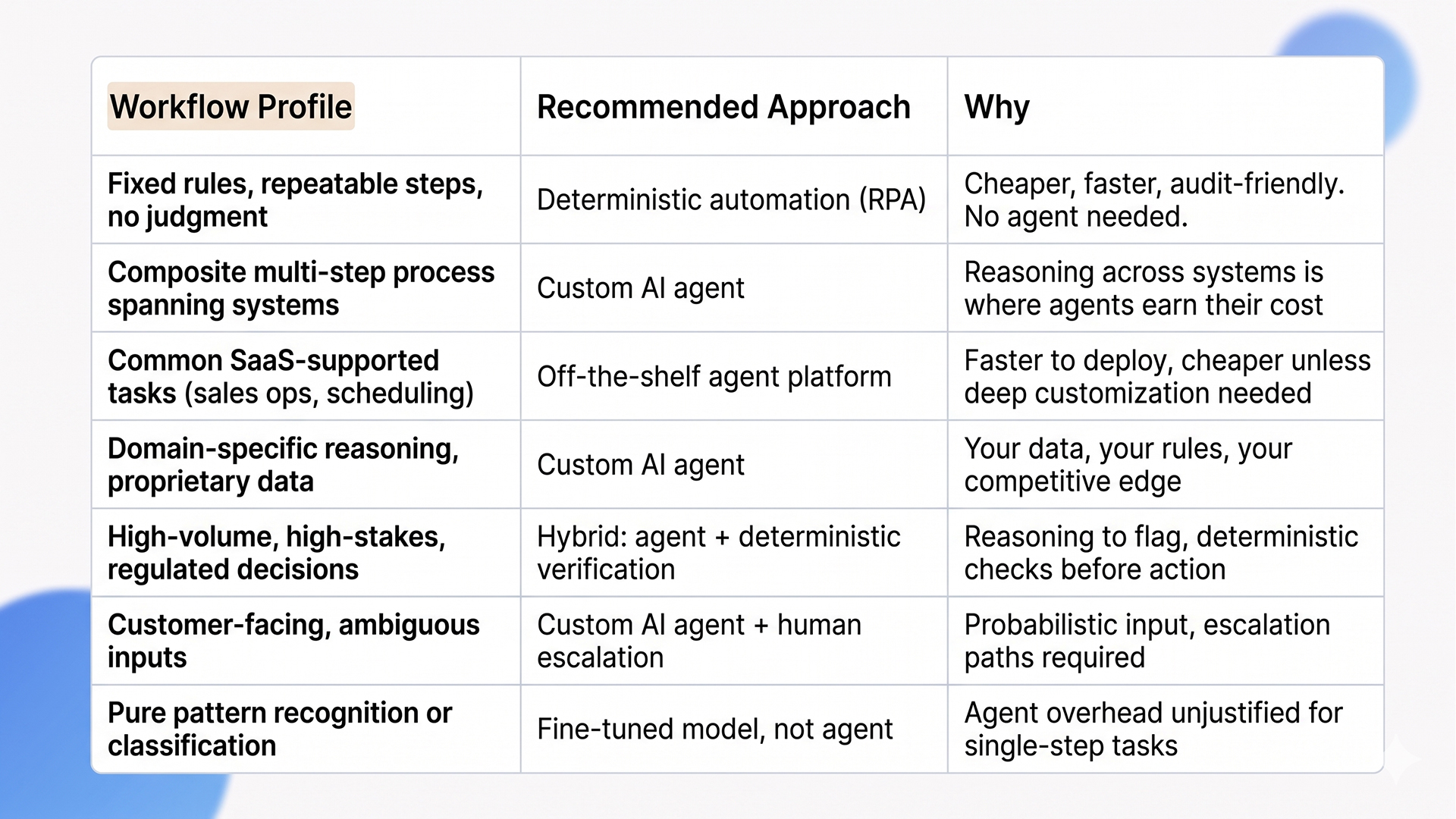
The deciding factors aren’t industry or scale. They’re three operational questions: does the workflow span multiple systems and require reasoning between them, is the input ambiguous enough that rules-based automation breaks, and does the business have data or domain context that off-the-shelf agents can’t access. Yes to all three is where custom AI agents reliably outperform every other option. Yes to one or two suggests a hybrid approach. No to all three means you don’t need an agent.
How to Build Custom AI Agents: The Six-Stage Process
The mechanics of AI agent development follow a sequence that most successful projects respect and most failed ones skip. Here’s the version we apply at Ariel.
Stage 1: Workflow analysis and decomposition
Map the existing process end-to-end before touching architecture. The map needs to identify, for every step:
- Inputs (what data triggers the step, where it comes from, what shape it arrives in).
- Decision points (what choices get made, on what basis, by whom).
- Systems touched (every CRM, ERP, ticket, or document system involved).
- Outputs (what gets produced, where it goes, what format it needs).
- Failure modes (what goes wrong today, how often, and what the cost is).
- Ownership (who is accountable when the step fails or stalls).
Decompose composite workflows into discrete steps. The output of this stage is a process map, not a feature list. Skip it and you are scoping against assumptions, not reality.
Stage 2: Agent topology design
Decide whether the work is best handled by a single agent or multiple specialized agents working together. Multi-agent topologies (planner, executor, reviewer) often outperform single-agent designs for composite processes because each agent stays inside the context window where it performs well. Single-agent designs work for narrower scopes. The choice has implications for cost, observability, and orchestration complexity, so make it deliberately.
Stage 3: Tool and integration surface
This is the dominant engineering line item, not the model. Agents need to call CRMs, ERPs, ticketing systems, data warehouses, internal APIs, and document stores. Each integration needs scoped permissions, authentication, error handling, and audit logging. Model Context Protocol (MCP) is now the standard layer for this work and removes a class of bespoke integration overhead, but the security and authorization design around it is still your responsibility. Plan for 30 to 50% of total project effort on tool integration and authorization, not on the agent’s reasoning logic.
Stage 4: Governance and human-in-the-loop checkpoints
Agents are non-deterministic. Two runs of the same task can take different paths. That’s a feature for handling ambiguity, but it makes traditional governance inadequate. Four decisions need to be made upfront, not retrofitted later:
- Which actions require human approval. Anything touching revenue, compliance, or customer data is a strong default.
- How decisions get logged for audit. Decision provenance, reasoning paths, and tool calls captured per action.
- What scoped permissions each agent gets. Delegated, audited access is bound to what the workflow actually requires.
- What happens when the agent encounters something outside its training. Escalation paths, fallback behavior, and clear handoff to a human reviewer.
Stage 5: Evaluation harness and outcome metrics
Build the evaluation set before the agent. A representative dataset of 50 to 200 inputs with known-good outputs gives you a regression baseline that catches drift across model updates, prompt changes, and tool additions. The metric that matters isn’t prompt accuracy, it’s process outcome: did the workflow complete correctly, in time, with the right side effects. Eval harnesses tied to outcome metrics are what separate agents that improve over time from agents that quietly degrade.
Stage 6: Phased deployment with shadow mode
Production rollout shouldn’t be binary. Deploy the agent in shadow mode first, where it runs on real workloads alongside the existing process but doesn’t take action. Compare outcomes for two to four weeks. Then move to assistive mode, where the agent proposes actions for human review. Then to autonomous mode for the workflows where the eval and shadow data justify it. Skipping these stages is how organizations discover the agent’s failure modes in production rather than in controlled environments.
The Architecture Stack for Production Agents
A production-grade agent stack has more moving parts than most prototypes. Here’s the layered view we use across AI agent development engagements.
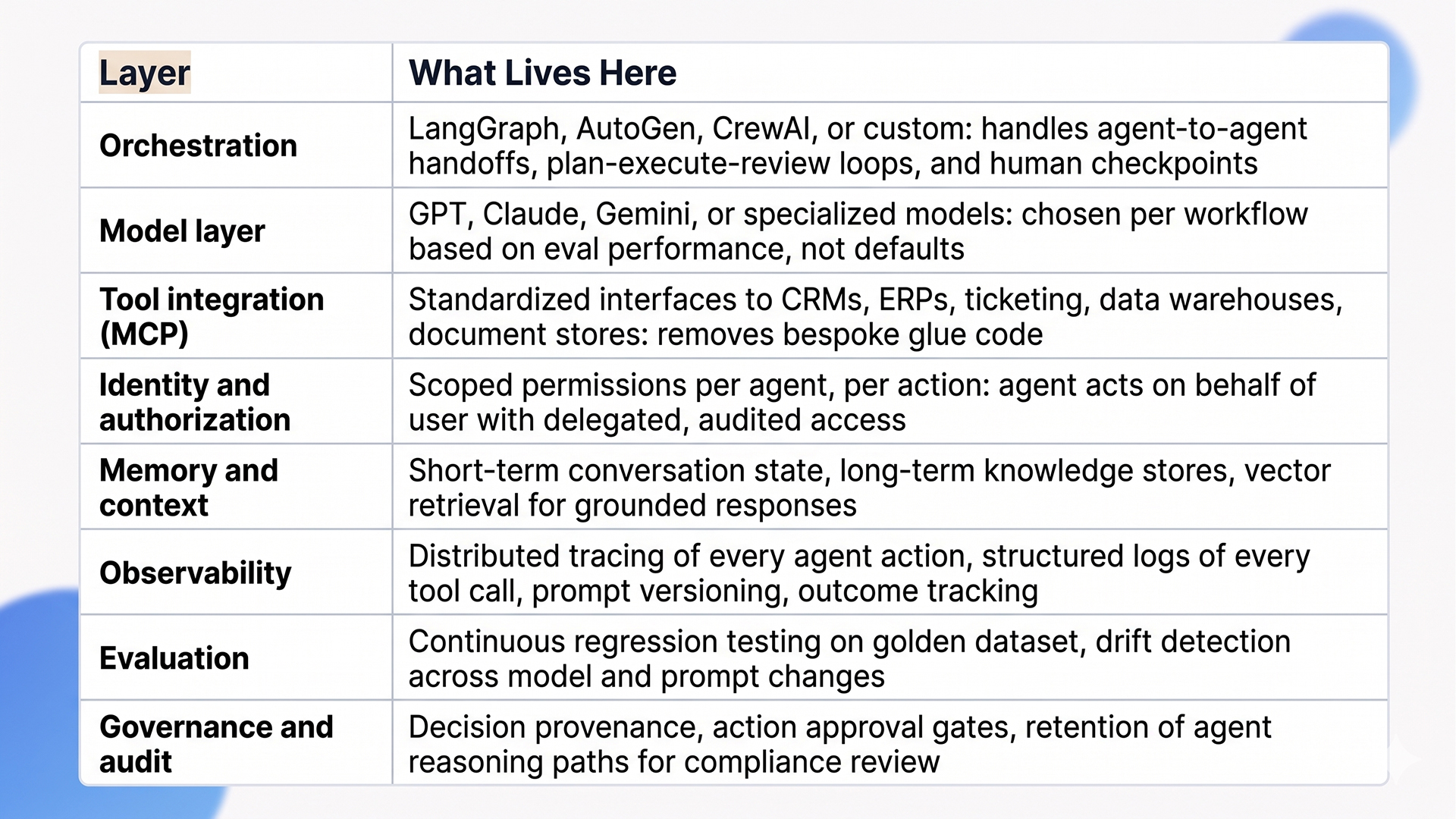
What Teams Underestimate About Building Custom AI Agents
These are the cost and complexity lines that don’t appear in most build estimates but determine whether the project lands in production.
Data readiness is the longest pole
Agents are only as good as the data they reach. Most enterprises discover during their first agent build that the data they assumed was “available” is fragmented across systems, inconsistently labeled, missing context, or governed by access controls that don’t translate to agent-level authentication. The remediation isn’t optional. We typically allocate 30 to 40% of an agent project budget to data preparation and integration before agent code ships. That ratio is what separates projects that deliver from ones that stall.
Permissions design is harder than it looks
In a multi-user environment, an agent acting on behalf of one user cannot inherit blanket access to enterprise systems. It needs scoped, delegated permissions per action, with audit trails that link every tool call back to the originating user. Most enterprise SSO and IAM stacks weren’t designed for non-human actors. Getting this right requires either a runtime authorization layer (Arcade, Workato, custom MCP servers) or significant identity-system rework, and projects that skip this discover compliance problems during their first audit.
Drift management is a steady-state cost
Models change. Prompts get updated. Tools get added. Without continuous evaluation against a golden dataset, agent quality degrades silently. Production custom AI agents need evaluation harnesses that run on every change, monitoring dashboards for accuracy and latency, and rollback paths when quality drops. Most teams budget for the build and forget that agents have a continuous operating cost. We typically estimate 10 to 15% of build cost annually for ongoing eval, prompt iteration, and model migration.
The 80/20 of edge cases
The 80% case is easy. The remaining 20% is where projects break:
- Customer messages that mix three intents in one sentence.
- Tool outputs that come back malformed or partially missing.
- Data sources that go offline mid-task.
- Tickets that contain PHI mid-conversation.
The robustness of an agent isn’t measured by how well it handles common cases. It is measured by how it fails when something unexpected happens. Plan for graceful degradation, not just happy path execution. Build retry logic, fallback chains, and clear escalation paths from the first sprint.
Change management is the hidden cost
Agents change how humans interact with their work. Customer support agents shift from handling tickets to supervising agents handling tickets. The skills, metrics, and workflow patterns all change. Without deliberate change management (training, redesigned KPIs, feedback loops), the human side of the workflow stays unchanged while the agent layer transforms underneath it. The result is a deployed agent and an unchanged team, which delivers a fraction of the projected ROI.
When Custom AI Agents Are the Wrong Call
Not every team should be building custom agents right now. Here is when we tell clients to wait or pick a different path.
Your data foundation isn’t ready. If your data is fragmented, inconsistently labeled, or locked in silos requiring political effort to unlock, building agents on top accelerates the underlying problem rather than solving it. Fix data quality and access first. The agent project lands cleanly when the foundation supports it.
Your workflow is already well-served by deterministic automation. If RPA, scheduled jobs, or simple integrations handle your process reliably and cheaply, agents add cost without adding value. Agents earn their place where reasoning, judgment, or unstructured input handling matter. Forcing agents into purely rule-based work is how budgets get spent on infrastructure that isn’t needed.
An off-the-shelf platform fits 80% of the requirement. If your use case is well-supported by existing agent platforms (sales ops automation, customer support orchestration, basic document processing), the speed and cost advantages of off-the-shelf usually beat custom build. Reserve custom for cases where your data, domain, or process is genuinely differentiated. Building custom for commodity workflows is how teams spend six months reproducing what they could have bought.
How Ariel Approaches Custom AI Agent Projects
We don’t lead with model selection or framework recommendations. We start with workflow analysis: what’s the process, who owns it, what data flows through it, what the failure cost looks like, and what “good enough” looks like in measurable terms.
From there, the engineering work follows the six-stage process described above. Workflow decomposition first. Agent topology designed against the process map. Tool surface scoped with authorization design as a first-class concern. Governance and human-in-the-loop checkpoints embedded in the architecture. Evaluation harness built before the agent is deployed. Phased rollout through shadow and assistive modes before autonomous operation. Across this lifecycle, observability and audit logging are wired in from the first sprint, not retrofitted before launch.
Across industries (logistics, healthcare, financial services, retail) we’ve delivered AI agent development projects that handle support triage, document processing, multi-system reconciliation, and compliance monitoring. The platform isn’t the differentiator. The decisions made during scoping, topology, and governance design are.
Planning a custom AI agent build and want a delivery-grade scoping conversation, not a vendor pitch?
Our team has scoped and shipped custom AI agents across financial services, healthcare, retail, and logistics. We’ll review your workflow, your data foundation, and your integration map, then give you an honest read on whether custom is the right call.
Frequently Asked Questions
1. How long does it take to build a custom AI agent?
Single-agent workflows with focused scope and clean data run 3 to 5 months from kickoff to production. Multi-agent systems with deep integration surfaces and governance layers run 6 to 12 months. The biggest variable isn’t the agent code, it’s the workflow analysis, data preparation, and authorization design that has to land before the agent ships.
2. How much does AI agent development cost?
From our delivery experience, production-grade single-agent builds typically land in the USD 80,000 to USD 200,000 range. Multi-agent systems with extensive tool integration and governance run higher, often USD 200,000 to USD 500,000+. These are illustrative ranges from our project work, not industry-wide benchmarks. Plan for a non-trivial annual operating cost on top of the build for ongoing evaluation, prompt iteration, and model migration. Off-the-shelf platforms cost less upfront but often hit ceilings that drive teams back to custom anyway.
3. Should I build a custom agent or use an off-the-shelf platform?
Off-the-shelf platforms fit narrow, well-supported patterns. Custom AI agents fit your business reality: your data, your processes, your differentiation. The decision rule we apply: if 80% of the requirement is met by an existing platform, start there. If the workflow needs deep proprietary data, custom integrations, or domain reasoning that off-the-shelf can’t access, custom build is the right call.
4. What’s the most underestimated cost in agent projects?
Data preparation, permissions design, and change management, in that order. The agent code is usually well-scoped. The data quality work, scoped authentication design, and human-side workflow redesign are consistently underestimated in initial business cases, often by a meaningful margin.
5. Can Ariel handle AI agent development end-to-end?
Yes. We cover workflow analysis, agent architecture, tool integration, governance design, observability, evaluation harnesses, phased deployment, and ongoing optimization. Get in touch to scope your project.
The Decision Behind the Decision
AI agent development for business process automation isn’t a feature you bolt onto your stack. It’s an architectural commitment that touches workflow design, data, integrations, governance, observability, and ongoing operations. The agents that scale are the ones designed against production reality from day one. The ones that stall are the ones scoped against the demo.
Pick the workflows where agents earn their cost. Build the data foundation before the agent. Design tool integration and authorization upfront. Embed governance and human-in-the-loop checkpoints architecturally. Scope success at the process level, not the prompt level. Deploy through shadow mode before autonomy. The architecture follows from those decisions, not the other way around.
Ready to scope a custom AI agent build that holds up in production, not just at demo day?
Book a free consultation with Ariel’s AI engineering team. We’ll review your workflow, assess your data and integration foundation, and design an architecture your team can ship and operate.