The AI conversations that get attention are the greenfield ones. New AI products. Custom agents. LLM-native applications built from scratch. The AI work that actually pays the bills inside most companies looks different. It’s the CRM that needs intelligent lead scoring. The ticketing system that needs auto-routing. The document workflow that needs OCR and entity extraction. The ERP that needs anomaly detection on transactions. The analytics dashboard that needs natural-language querying. The AI sits on top of software the business already operates, and the integration is where most of the value (and most of the failure) actually happens.
IDC forecasts global AI spending will surpass USD 301 billion in 2026, up from USD 223 billion in 2025, and Deloitte’s 2025 enterprise AI research found 71% of firms using generative AI in one or more functions, up from 55% in 2024. The market expansion is real. The integration challenge is what determines whether the spending produces ROI or absorbs into the technical debt budget. From our delivery experience at Ariel, the ai integration services engagements that succeed look almost nothing like the ones that fail, and the difference shows up in the scoping decisions made before any model is selected.
Key Takeaways
- Most enterprise AI work is integration, not greenfield. The CRMs, ERPs, ticketing systems, and document workflows already running are where AI actually lives.
- Workflow redesign is the biggest predictor of AI’s profit impact, more than model choice or technology investment. Adding AI on top of broken processes accelerates the breakage.
- Integration architecture (data flows, authentication, audit, governance) determines whether AI features ship cleanly or stall mid-deployment.
- The 5 highest-leverage integration patterns: intelligent automation, embedded copilots, predictive analytics, document intelligence, and natural-language interfaces over existing data.
- Data readiness is the longest pole. Most enterprises discover during their first AI integration that the data they assumed was “available” is fragmented, inconsistently labeled, or governed by access controls that don’t translate to AI-level authentication.
- Pilot purgatory is real. Only a fraction of pilots reach production. The gap is operational discipline, not model quality.
- AI integration cost ranges depend on data readiness, integration surface, and governance posture. Build cost is the smaller line. Run cost compounds.
Why Integration Is Where Most AI Work Actually Happens
The greenfield AI narrative dominates the headlines, but the operational reality inside most enterprises is different. The systems that run the business (CRM, ERP, ticketing, billing, analytics, content management) were built before LLMs existed. They are not going to be replaced. The work is to add intelligence on top of them, in ways that respect their existing data models, authentication systems, audit requirements, and operational constraints.
This is what AI integration for business actually means in 2026: not a new system that uses AI, but an existing system that gets smarter. The CRM that now scores leads automatically. The ticketing system that now drafts responses. The accounting system that now flags anomalies. The customer support stack that now routes tickets to the right specialist based on content rather than category tags.
The challenge is that integration work is harder than greenfield in specific ways. Existing data models constrain what you can do. Existing authentication systems weren’t designed for AI agents. Existing audit and compliance frameworks didn’t anticipate non-deterministic behavior in production systems. Each of these is solvable, but each requires architectural decisions that the marketing version of ai integration for business tends to skip.
The Five Highest-Leverage AI Integration Patterns
Across the engagements where teams integrate ai into existing software, the same five patterns produce the bulk of measurable value. They sit on top of systems that already exist, augment workflows that already run, and ship without requiring a complete platform rebuild.
Pattern 1: Intelligent automation embedded in existing workflows
This is the highest-volume integration pattern. AI takes work that was previously rule-based or manual and adds judgment to it. Examples include:
- Auto-routing tickets in a support system based on content rather than tags.
- Triaging incoming emails in a sales pipeline by intent and urgency.
- Classifying documents in a content management system without human tagging.
- Flagging anomalies in transactional data that rule-based systems miss.
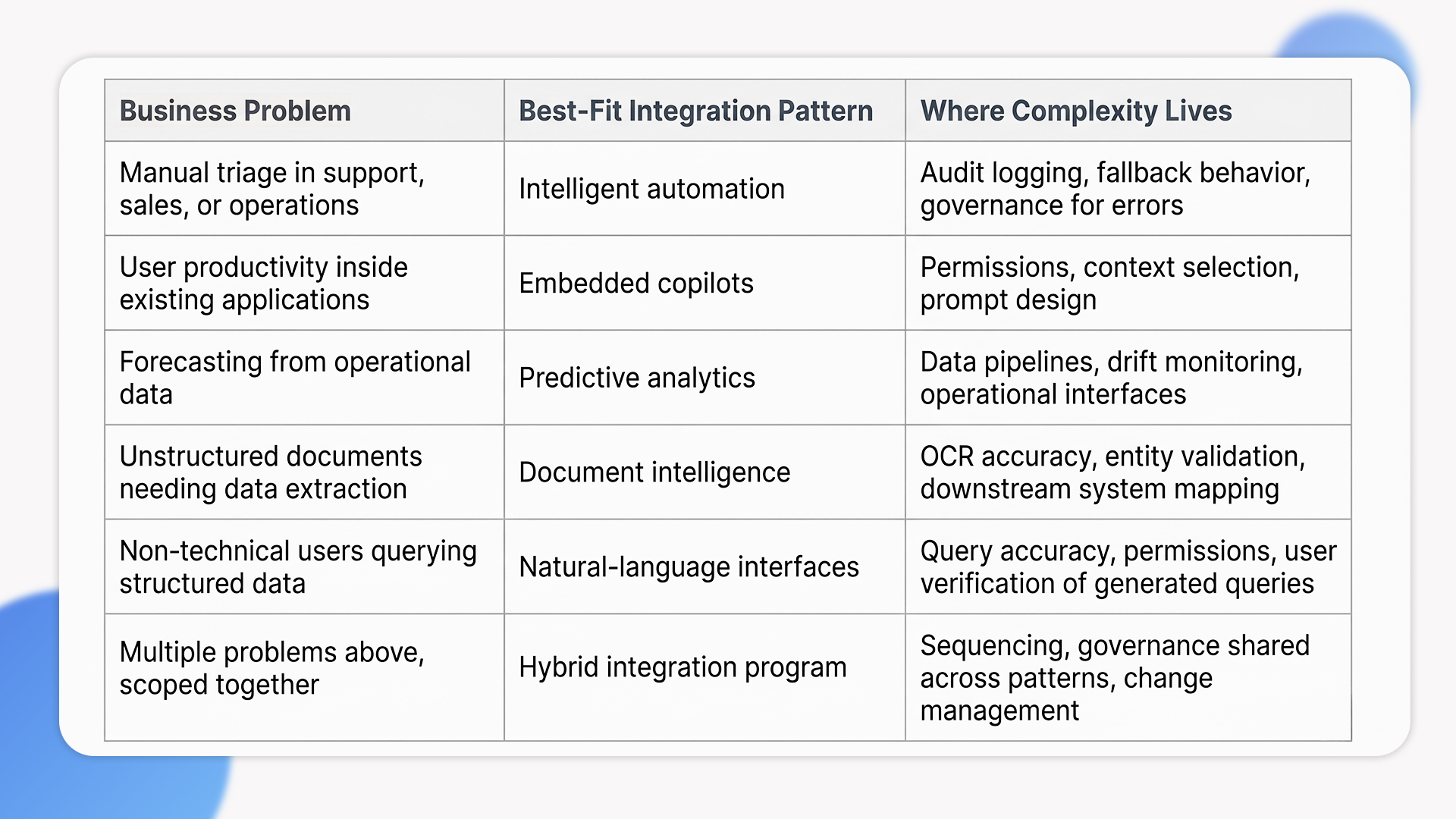
The integration is usually shallow but high-value. The AI sits behind an API, the existing system calls it, the result flows back into the existing workflow. The architectural complexity is in audit logging, fallback behavior when the AI is uncertain, and governance for the cases where the AI is wrong.
Pattern 2: Embedded copilots inside the application
Copilots add a generative AI layer directly into the user interface of an existing application. The user keeps using their familiar tool, but now has access to AI assistance for specific tasks: drafting responses, summarizing records, generating reports, querying data in natural language.
The architecture pattern is well-established. The complexity is in the integration with existing permissions models (the copilot can only see what the user can see), context windows (which records to include, which to exclude), and prompt design that surfaces the right behavior for each use case. Done well, copilots are the highest-impact UX shift in enterprise software since the move to web-based interfaces. Done poorly, they become novelty features that users abandon.
Pattern 3: Predictive analytics layered onto existing data
Most enterprises sit on years of operational data that’s never been used for prediction. Predictive analytics integration adds forecasting models on top of existing data warehouses to produce things like:
- Churn prediction in a CRM with subscription history.
- Demand forecasting in an inventory system with order history.
- Risk scoring in a financial platform with transaction history.
- Maintenance prediction in an asset management system with sensor data.
The integration sits between the data warehouse, the model serving layer, and the operational system that consumes the predictions. The hard part is rarely the model. It’s the data pipeline that keeps predictions current, the monitoring that detects model drift, and the operational interface that surfaces predictions where they’re useful.
Pattern 4: Document intelligence over existing content stores
Most enterprises have document repositories (contracts, invoices, claims, reports) that have never been queried at scale. Document intelligence integration extracts structured data from unstructured documents, classifies content, and makes it queryable. OCR for scanned documents. Entity extraction from contracts. Summarization of long reports. Classification of incoming claims. The integration replaces hours of manual processing per document with seconds of automated processing, and the ROI compounds across volume.
Pattern 5: Natural-language interfaces over existing systems
This is the most user-visible integration pattern: turning structured query systems (databases, BI tools, analytics dashboards) into systems that respond to natural language. “Show me last quarter’s revenue by region, excluding pilots” produces the right SQL, runs the query, and returns the result. The integration sits between the natural-language interface, the existing query engine, and the permissions model that determines what the user is allowed to see.
The accuracy challenge is real. Natural-language queries that produce subtly wrong answers are worse than no natural-language interface at all, because users trust the answers without checking. The right pattern is to surface the generated query alongside the result, so users can verify the AI translated their intent correctly before acting on the data.
Choosing the Right Integration Pattern: A Decision Lens
The table below summarizes how we map business problems to integration patterns during scoping conversations. Treat it as a starting point for ai integration services decisions; the right pattern depends on the specific data, system, and workflow constraints of your environment.
What Teams Underestimate About AI Integration
These are the cost and complexity lines that don’t show up in the original integration plan but determine whether the project lands in production.
Data readiness is the longest pole
Most enterprises discover during their first AI integration that the data they assumed was “available” is fragmented across systems, inconsistently labeled, missing context, or governed by access controls that don’t translate to AI-level authentication. McKinsey’s 2025 enterprise AI research found that workflow redesign had the single biggest effect on profit impact, more than model quality or technology investment. The implication is direct: AI sitting on top of broken data and broken processes accelerates the breakage. The data work isn’t optional. From our delivery experience, a meaningful share of any AI integration budget consistently goes to data preparation and integration before the AI itself ships.
Permissions design is harder than it looks
In a multi-user environment, an AI feature acting on behalf of one user cannot inherit blanket access to enterprise systems. It needs scoped, delegated permissions per action, with audit trails that link every AI call back to the originating user. Most enterprise SSO and IAM stacks weren’t designed for non-deterministic actors. Getting this right requires either a runtime authorization layer or significant identity-system rework, and projects that skip this discover compliance problems during their first audit.
The 80/20 of edge cases
The 80% case is easy. The remaining 20% is where AI integrations break. Inputs that fall outside the training distribution. Documents that scan poorly. Customer queries that mix three intents. The robustness of an integration isn’t measured by how well it handles common cases. It’s measured by how it fails when something unexpected happens. Plan for graceful degradation, retry logic, fallback chains, and clear escalation paths from the first sprint.
Pilot purgatory is the dominant failure mode
Across enterprise AI surveys, only a fraction of AI pilots successfully graduate to production deployment. The gap is rarely model quality. It’s the operational work between “the model produces good answers in a notebook” and “the model serves traffic in production with audit logs, monitoring, fallback behavior, and integration with downstream systems.” Plan for that work as part of the integration scope, not as phase two.
Run cost compounds in ways teams don’t initially scope
AI integration build cost is often the smaller line item. The annual run cost (LLM API spend, model serving infrastructure, ongoing evaluation, prompt iteration, model migration as new versions ship) is meaningful and grows over time. From our delivery experience, run cost on AI integrations consistently lands as a non-trivial percentage of build cost, and most teams under-budget for it. Plan for the steady-state operating cost from the first sprint, not the first invoice.
When AI Integration Is the Wrong Move
Not every workflow needs AI added to it. Here is when we tell clients to wait or pick a different path.
The underlying workflow is broken. AI sitting on top of a broken process produces faster broken outcomes. McKinsey’s research is direct on this: workflow redesign matters more than model choice. If the workflow itself doesn’t make sense, fix the workflow first, then add AI on top of the cleaner version. Adding intelligence to dysfunction just produces intelligent dysfunction.
The data foundation isn’t ready. If your data is fragmented, inconsistently labeled, or locked in silos requiring political effort to unlock, AI integration will surface those problems faster than fix them. Fix data quality and access first. The integration project lands cleanly when the foundation supports it, and accelerates the underlying problem when it doesn’t.
Deterministic automation already handles it. If RPA, scheduled jobs, or simple integrations handle a process reliably and cheaply, adding AI introduces non-determinism without adding value. AI earns its place where reasoning, judgment, or unstructured input handling matter. Forcing AI into purely rule-based work is how budgets get spent on infrastructure that wasn’t needed.
The compliance posture isn’t designed for AI yet. Some regulated environments (defense, certain healthcare workflows, regulated financial systems) require chain-of-custody documentation and explainability that AI integrations can’t always provide cleanly. The work is sometimes still possible, but only with significant contractual and operational overhead. If that overhead exceeds the benefit, in-house deterministic systems remain the right call.
How Ariel Approaches AI Integration
From our delivery experience across enterprise and mid-market clients, the AI integrations that hold up are the ones that started with workflow analysis, not model selection. We map the existing process end-to-end, identify where intelligence would actually change the outcome, and pressure-test whether the data and integration surface support the change. The model decision falls out of that analysis. The vendor selection comes after.
The operating disciplines that consistently make AI integrations land cleanly are:
- Workflow redesign before model selection. If the underlying process is broken, AI accelerates the breakage. Fix the workflow first.
- Data preparation as a budgeted line item. Most projects underestimate this. We scope it explicitly during discovery, before any model work begins.
- Permissions and audit designed in, not retrofitted. Every AI call links back to the originating user, with scoped permissions and audit trails from the first sprint.
- Production-grade rollout in stages. Shadow mode first, then assistive, then autonomous for the workflows where eval data justifies it. Pilot purgatory is avoided through deliberate graduation criteria.
Across industries, the integration patterns that produce real value tend to be operationally specific. In our logistics software development work, AI integration powers route optimization, demand forecasting, and real-time supply chain visibility on top of existing TMS and WMS platforms. In our e-commerce engagements, AI integration covers product recommendation engines, dynamic pricing, customer segmentation, and predictive inventory analytics sitting on top of existing storefronts and order management systems. The pattern across industries is consistent: integration sits on top of operational systems already running, and the integration discipline determines whether the AI feature actually moves business metrics or just adds another model to the maintenance burden.
Planning AI integration into existing systems and want a delivery-grade scoping conversation, not a vendor pitch?
Our team has scoped, delivered, and operated AI integrations across enterprise systems for 16 years. We’ll review your workflow, your data foundation, your integration surface, and the pattern that actually fits your problem, then give you an honest read on whether AI integration is the right call.
Frequently Asked Questions
1. What’s the difference between AI integration services and AI development services?
AI development services build new AI capabilities from scratch (custom models, agent platforms, AI-first products). Ai integration services add AI capability to systems that already exist (CRMs, ERPs, ticketing, content platforms). The two engagements look different in scoping, cost, and risk profile. Most enterprises need integration work, not greenfield AI development. The decision rule: if your goal is to make existing systems smarter, integration is the right scope. If your goal is to ship a new AI-native product, development is the right scope.
2. How do I integrate AI into existing software without breaking what already works?
Start with workflow analysis. Map the existing process end-to-end, identify where intelligence would actually change the outcome, and design the integration to be additive rather than replacing. Use feature flags so the AI can be turned off if it misbehaves. Run shadow mode (where the AI generates outputs but doesn’t act) before assistive mode (where humans approve actions) before autonomous mode (where the AI acts directly). Most integrate ai into existing software projects fail because they skip the staged rollout and discover failure modes in production rather than in shadow mode.
3. What’s the realistic cost of AI integration for business?
Costs depend heavily on data readiness, integration surface, and governance posture. From our delivery experience, simple intelligent automation integrations into a single system can land in the lower five figures. Embedded copilots inside enterprise applications run higher, often into the lower six figures. Multi-system integrations with predictive analytics, document intelligence, or natural-language interfaces over existing data warehouses run higher still. These are illustrative ranges from our project work, not industry-wide benchmarks. Plan for an annual run cost (LLM API spend, model serving, ongoing evaluation, prompt iteration) on top of the build, which most teams under-budget at the start.
4. How long does AI integration take?
Single-pattern integrations into a single system typically run 2 to 4 months from discovery to production. Multi-pattern integrations across several systems run 4 to 9 months. Complex integrations with regulated workflows, custom model training, or significant data preparation can run 9 to 18 months. The biggest variable is rarely the AI itself. It’s the data preparation, permissions design, and operational rollout work that has to land before the AI sees production traffic.
5. Can Ariel handle AI integration end-to-end?
Yes. We cover workflow analysis, data preparation, integration architecture, model selection, permissions design, audit logging, staged rollout, and ongoing optimization. Get in touch if you want a delivery-grade scoping conversation about your specific integration scope.
The Decision Behind the Decision
The ai integration services engagements that produce real business outcomes are the ones designed against operational reality from day one. They start with workflow analysis, not model selection. They invest in data preparation before they invest in models. They design permissions and audit in from the first sprint. They sequence rollout through shadow and assistive modes before autonomous operation. The model is the smallest decision in the engagement; the integration discipline around the model is what separates AI features that move business metrics from AI features that absorb into the technical debt budget.
Map the workflow. Verify the data foundation. Pick the integration pattern that fits the problem. Design permissions and audit upfront. Stage the rollout deliberately. Plan for the run cost, not just the build cost. The architecture follows from those decisions, not the other way around. AI is a tool. The discipline is in knowing where to point it.
Ready to add AI to existing systems with the discipline the work actually requires?
Book a free consultation with Ariel’s AI engineering team. We’ll review your existing systems, your data foundation, and the integration patterns that actually fit your business, then design a sequenced delivery plan that respects what the work actually costs.