
Xamarin reached the end of support on May 1, 2024. Two years later, a large share of enterprise mobile estates are still running on it, not because teams haven’t noticed, but because they’ve been asking the wrong question.
The wrong question is: “Should we migrate to .NET MAUI?” The right question is: “What’s the operating model that makes a single-codebase mobile strategy actually work for our team?” The first treats it as a framework swap. The second treats it as the architectural decision it actually is, one that touches CI/CD pipelines, testing strategy, platform-specific code organization, performance budgets, and team capability.
Across .NET MAUI development engagements at Ariel, the projects that ship cleanly are the ones that scoped that operating model upfront. The ones that stalled treated MAUI as a Xamarin upgrade and discovered nine months in that the framework was the easy part.
Key Takeaways
- Xamarin officially ended support May 1, 2024. Continuing on it exposes apps to security and OS compatibility risk.
- .NET MAUI delivers measurable wins: ~40% faster cold starts, ~25% smaller app size, unified single-project structure.
- Roughly 70% of Xamarin to MAUI migrations hit avoidable pitfalls, mostly around custom renderers, CI/CD, and library compatibility.
- Handler architecture replaces Xamarin’s renderer system. Custom renderer rewrites are the single largest migration line item.
- MAUI is not always the right choice. For graphics-heavy or platform-specific UX, native or Flutter may still win.
- Performance comes from AOT compilation, trimming, and handler optimization, not from picking MAUI alone.
- Successful migrations sequence the work: dependencies, project structure, renderers, then platform-specific code. Big-bang rewrites consistently fail.
Why MAUI Exists, and What Actually Changed
MAUI is the evolution of Xamarin.Forms, not a replacement for it. The conceptual continuity is real: same C# and XAML, same MVVM patterns, same .NET ecosystem. The architectural break is also real, and it’s where the migration friction lives.
Xamarin used a renderer-based approach where every cross-platform UI control mapped to a native equivalent through a custom renderer. It worked, but it was slow, hard to extend, and produced visual tree clutter that hurt performance on lower-end devices. MAUI replaces this with a handler-based architecture, where handlers are decoupled from controls. The architectural improvements show up in three places:
- Faster cold starts. Lighter handlers, less initialization overhead.
- Smaller app footprints. Reduced runtime, better trimming support.
- Smoother animations. Less abstraction between UI controls and the platform rendering layer.
Syncfusion’s 2025 migration analysis puts the gain at roughly 40% faster app launches and 25% smaller app size compared to Xamarin.Forms. Those numbers are real, but they don’t show up automatically. They are earned through proper AOT compilation, trimming, and handler optimization. Lifting Xamarin code into MAUI without restructuring custom renderers produces modest gains. Rewriting to handlers and tuning the build delivers the full benefit. The framework provides the foundation. The engineering decisions deliver the result.
When .NET MAUI Is the Right Call
Most cross platform app development comparisons pit MAUI against Flutter, React Native, and native. The honest framing for .NET MAUI development isn’t “which is best,” it’s “which fits the team and product reality you actually have.”
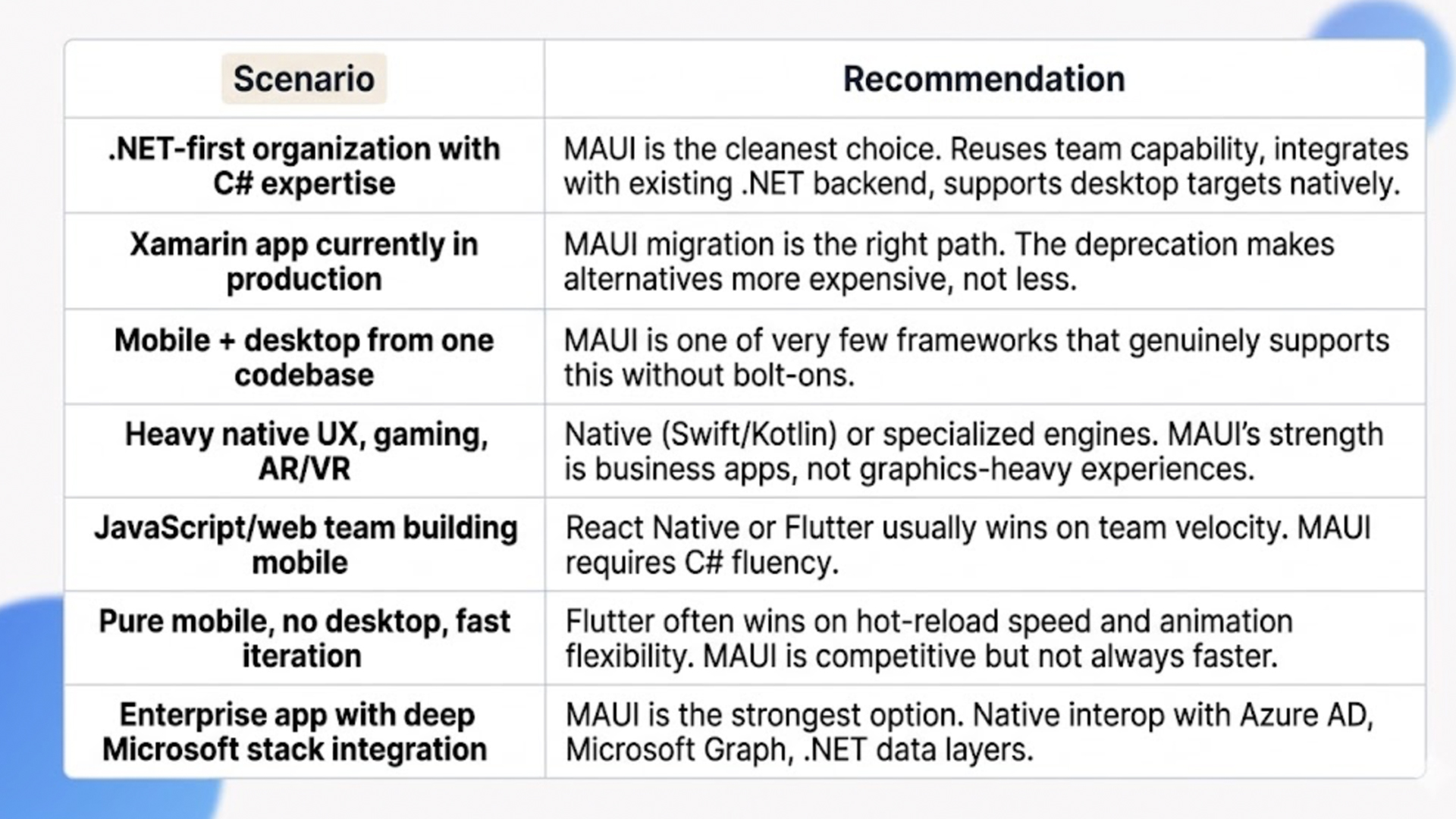
The deciding factor isn’t usually framework benchmarks. It’s team capability and ecosystem fit. A team fluent in C# and .NET will ship faster on MAUI than on a framework where they have to relearn patterns. A team fluent in JavaScript will do the opposite. Picking against your team’s existing strength is the most expensive optimization most projects make.
Xamarin to MAUI Migration: What Works and What Stalls
Xamarin to MAUI migration is the dominant context for MAUI work today. Syncfusion’s analysis of migration patterns estimates that around 70% of these migrations hit avoidable pitfalls, and the patterns that stall are consistent across projects.
The custom renderer rewrite is the largest line item
Every Xamarin app of meaningful size has custom renderers, the bridge code that extended platform-specific UI behavior. MAUI’s handler architecture is conceptually cleaner but requires those renderers to be rewritten. Estimate this as a small task and you will discover, mid-migration, that it is the dominant cost line. Plan for it as a workstream, not a checklist item. Audit every custom renderer in the existing codebase, classify by complexity, and sequence the rewrites against the migration plan.
Library compatibility is a forced inventory exercise
Not all Xamarin.Forms libraries have ported cleanly to MAUI. Some have direct replacements, some have community ports, some haven’t moved at all. Audit your NuGet dependencies before migration starts. For libraries without MAUI versions, the options are: switch to an alternative, write a custom replacement, or temporarily isolate the feature. Discovering this mid-migration is how schedules slip by months.
CI/CD pipelines need rebuilding
Legacy Xamarin pipelines are often incompatible with .NET 9+ build agents. Modern MAUI builds belong on GitHub Actions, Azure DevOps pipelines, or equivalent infrastructure with proper iOS signing, Android keystore management, and multi-target output. This is engineering work, not a config change. Defer pipeline modernization to phase two and you will ship MAUI builds manually for months, which kills release velocity.
Sequence the migration, don’t big-bang it
Big-bang migrations consistently fail. The pattern that works is migrating in slices, in this order:
- 1. Shared business logic and view models. These port with minimal change and validate the build pipeline early.
- 2. UI layer with renderer rewrites. This is the largest workstream and the highest-risk slice, so it goes second, not first.
- 3. Platform-specific code. CoreBluetooth, background services, native interop. The most platform-coupled work runs last.
Test continuously at each stage. Maintain the existing Xamarin app in parallel until cutover.
Editorial assets often get forgotten
AndroidManifest.xml, Info.plist, image resources, app icons, and splash screens move to a different folder structure in MAUI’s single-project layout. Migration tools handle code, but assets often get lost in the shuffle. Build an asset inventory at the start. Move and validate assets explicitly, not as a side effect of code migration.
.NET MAUI Development Patterns That Hold Up in Production
Once the framework decision is made and any migration is scoped, the next layer is what separates a working MAUI app from a production-grade one. Five patterns separate prototypes from cross platform app development that scales.
AOT compilation and trimming, not just defaults
In .NET MAUI development, Ahead-of-Time compilation produces faster cold starts and smaller binaries. Default builds don’t enable it aggressively. Tuning AOT settings, configuring trimming for unused code, and validating that linker rules don’t break runtime reflection is what delivers the headline performance numbers. Teams that ship default builds see modest gains. Teams that tune the build pipeline see the full 40% improvement.
Handler customization over custom renderers
MAUI’s handler architecture is the right place to customize platform-specific UI behavior. The pattern: implement a handler customization for the control, register it in MauiProgram, keep platform-specific logic out of business code. Teams that try to recreate Xamarin’s renderer patterns inside MAUI fight the framework constantly. Teams that adopt the handler model build cleaner, faster, and more maintainable UI layers.
Single project structure with intentional platform folders
MAUI’s single project structure removes the historical pain of maintaining separate iOS, Android, and Windows projects. The trade-off: platform-specific code lives in Platforms/ folders rather than separate projects. Treat this as a feature, not a workaround. Three patterns keep this clean:
- Partial classes for splitting cross-platform and platform-specific behavior in the same logical class.
- Dependency injection for resolving platform-specific implementations of shared interfaces.
- IPlatformApplication for accessing the platform context where required.
Avoid #if compiler directives where possible. They make code hard to read and harder to maintain.
Hot Reload as a workflow, not a feature
XAML Hot Reload and C# Hot Reload are productivity multipliers when configured correctly. Teams that don’t invest in setup (proper IDE config, debug builds, watching the right paths) get inconsistent behavior and lose trust in the feature. Teams that invest upfront see development velocity gains that compound across the entire project. This is one of the highest-leverage configurations to get right early.
Testing strategy across all targets
A single codebase doesn’t mean a single test pass. iOS, Android, Windows, and macOS all have platform-specific behaviors that surface only on those targets. Production MAUI apps need automated UI tests on each platform, integration tests against platform-specific APIs, and continuous device-farm validation. Test coverage that’s adequate for one platform almost always misses regressions on another. Plan the testing strategy as part of the architecture, not as a phase-two task.
The Trade-offs Most MAUI Posts Skip
This is the section we wish more vendor blogs included. These are the costs that don’t appear in the original business case but determine whether the project lands.
Performance ceiling for graphics-heavy work
MAUI is excellent for business apps, dashboards, productivity tools, line-of-business workflows. It’s not the right choice for high-fidelity games, AR/VR, or graphics-heavy creative tools. The handler architecture is faster than Xamarin renderers, but it’s not native, and on workloads that push GPU and animation budgets, native Swift or Kotlin still wins. Be honest about which category your app falls into.
Third-party UI library dependency
Out of the box, MAUI’s control library is functional but minimal. Most enterprise apps lean on Telerik, DevExpress, or Syncfusion for charts, grids, scheduling, and advanced controls. These licenses are real cost lines (low five figures annually for enterprise tiers) and need to be factored into TCO. Teams that scope without third-party libraries discover during build that they need them, then add unbudgeted cost.
iOS deployment requires a Mac
MAUI development on Windows handles Android and Windows targets fine. iOS and macOS builds still require a Mac, either physical or cloud-based (MacStadium, MacInCloud, GitHub-hosted runners). This is a real cost line and a real workflow constraint. Teams that don’t plan for it discover it late and ship iOS builds slower than the rest of the targets.
Native interop is possible but not free
When a feature needs deep platform-specific code (CoreBluetooth on iOS, specific Android background services), MAUI supports native interop, but writing it requires platform expertise that pure C# developers may not have. Estimate this work realistically. Treat platform-specific feature requirements as scope risk during planning, not as small extensions during build.
Long-term maintenance is a real line item
MAUI follows .NET’s release cadence. New iOS and Android SDK versions land every year and require corresponding MAUI updates. Library compatibility shifts. Tooling evolves. Plan ongoing maintenance, dependency upgrades, and OS compatibility validation as a steady-state cost, not a one-time launch task.
When .NET MAUI Is the Wrong Call
Not every cross-platform project needs MAUI. Here is when we tell clients to evaluate alternatives.
Your team is JavaScript-native. If your engineering team’s existing strength is React, TypeScript, and JavaScript ecosystems, React Native or Flutter usually delivers faster than MAUI. The cost of bringing C# fluency is real and underestimated. Pick against your team’s strength only when the broader stack benefit clearly justifies it.
Your app is graphics-heavy or game-like. MAUI is designed for business and productivity apps. Game engines (Unity, Unreal, Godot) and native development are the right call for graphics-intensive workloads. Trying to push MAUI into that space ends in performance compromises and rebuilds.
You need extreme platform-specific UX consistency. If your iOS app must feel exactly like an iOS app and your Android app must feel exactly like an Android app, with platform-specific gestures, animations, and conventions baked in deeply, native development still wins. MAUI’s shared UI layer is good but not perfect. Some experiences justify the dual-codebase cost.
How Ariel Approaches .NET MAUI Projects

We don’t lead with framework recommendations. We start with team capability, product reality, and existing stack. The framework choice falls out of that analysis.
When .NET MAUI development is the right call, our delivery approach is built around the failure modes we’ve described:
- Custom renderer audits happen during scoping, not during the migration.
- Library compatibility is mapped before the project starts, with replacement strategies for anything that hasn’t been ported.
- CI/CD pipelines are modernized in parallel with the code work, not after.
- Testing strategy spans all targets from the first sprint.
- AOT and trimming are tuned during build setup, not deferred until performance complaints arrive.
Across industries (logistics, healthcare, financial services, real estate) we’ve delivered MAUI projects ranging from greenfield enterprise mobile apps to Xamarin migrations carrying years of business logic. The platform isn’t the differentiator. The decisions made during scoping, sequencing, and architecture are.
Planning a .NET MAUI build or Xamarin migration and want a delivery-grade scoping conversation, not a vendor pitch?
Our team has shipped MAUI projects across enterprise and mid-market clients, including Xamarin migrations carrying years of production code. We’ll review your stack, your team capability, and your roadmap, then give you an honest path forward.
Frequently Asked Questions
1. How long does a Xamarin to MAUI migration take?
Small Xamarin apps with limited custom renderers and standard libraries run 2 to 4 months. Mid-size enterprise apps with significant custom UI, third-party libraries, and CI/CD modernization run 4 to 9 months. Large estates with multiple apps and shared component libraries run 9 to 18 months as a phased program. The biggest variable is custom renderer count and library portability, not raw codebase size.
2. Is .NET MAUI development ready for production?
Yes. .NET MAUI development has been production-ready since late 2022, and the framework has stabilized significantly since then. The remaining caveats are around very specific platform features and graphics-heavy use cases. For business apps, productivity tools, enterprise mobile, and Microsoft-stack integrations, MAUI is fully production-grade and being shipped at scale across industries.
3. How does .NET MAUI compare to Flutter for cross-platform development?
Different strengths. MAUI wins for .NET teams, Microsoft-stack integration, and projects that need desktop alongside mobile. Flutter wins for pure mobile, faster animation iteration, and teams that prefer Dart over C#. Performance is comparable for most business apps. The deciding factor is usually team fluency and ecosystem fit, not framework benchmarks.
4. What’s the most underestimated cost in MAUI projects?
Custom renderer rewrites in migration projects, and platform-specific testing in greenfield projects. Both consistently take 2 to 3 times the original estimate when teams treat them as small line items rather than dedicated workstreams.
5. Can Ariel handle MAUI development end-to-end?
Yes. We cover discovery, architecture, Xamarin migration, greenfield builds, CI/CD modernization, testing strategy, and ongoing support. Our team works across .NET MAUI alongside React Native, Flutter, and native development, so the framework recommendation is driven by your project, not by our preference. Get in touch to scope your build.
The Decision Behind the Decision
The framework choice in .NET MAUI development matters less than the decisions around it. Team capability. Stack alignment. Migration sequencing. Custom renderer planning. CI/CD modernization. Testing strategy across targets. Performance tuning. Platform-specific code organization. The teams that ship MAUI projects cleanly are the ones that scoped these decisions upfront. The teams that didn’t are still debugging.
Pick the framework that fits your team and product reality. Sequence the migration, never big-bang it. Treat custom renderer rewrites as a workstream, not a checklist. Modernize the build pipeline in parallel. Test on every target from the first sprint. The architecture follows from those decisions, not the other way around.
Ready to scope a MAUI build or migration that holds up in production, not just at demo day?
Book a free consultation with Ariel’s mobile team. We’ll review your codebase, your team capability, and your roadmap, then design a sequenced delivery plan that respects what the work actually costs.